
BanHammer
Simple, customisable punishment utility mod for Fabric
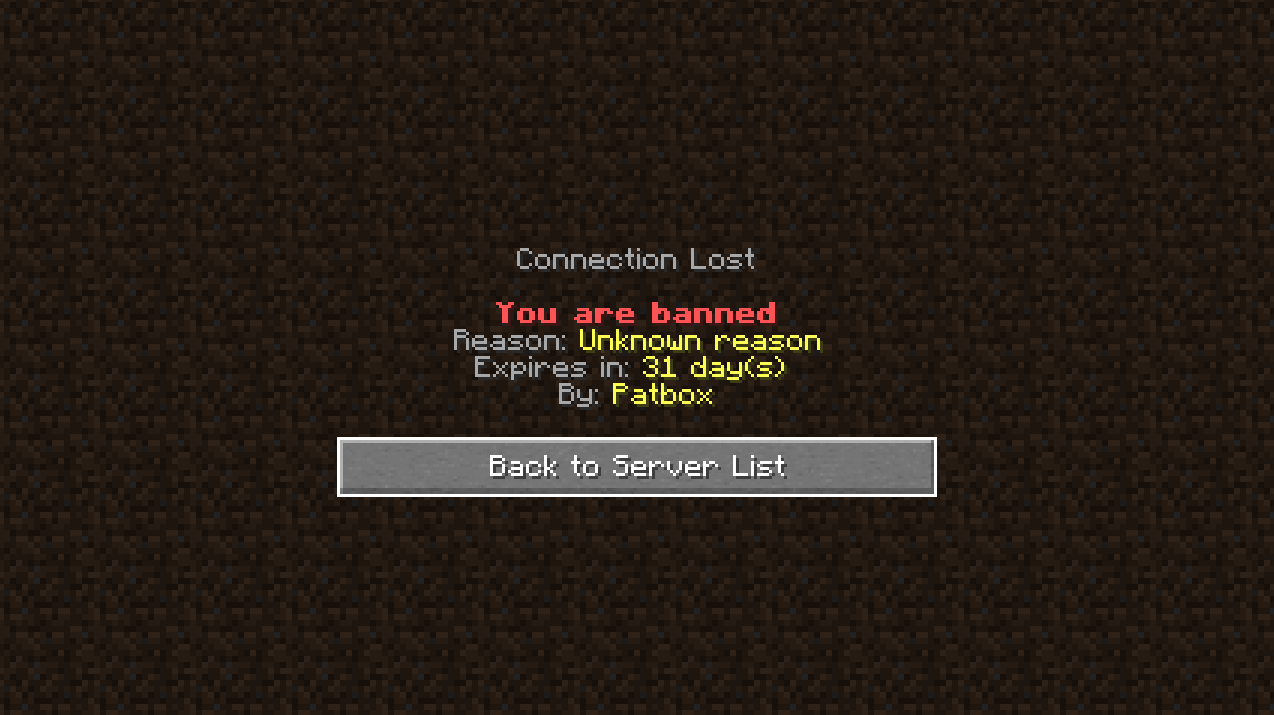
Screenshots
About this Mod

BanHammer
Simple, customisable punishment utility mod for Fabric. Allows moderators to permanently/temporary ban, mute or kick players.
Supports Fabric Permissions API used by LuckPerms and PlayerRoles.
Every user facing message is configurable with support of advanced formatting
It has build in support for SQLite and MySQL databases.
Commands and permissions
| Command | Permission | Description |
|---|---|---|
| /banhammer | banhammer.commands.main (default) | Sends information about banhammer |
| /banhammer reload | banhammer.commands.reload (op 4) | Reloads mods config |
| /banhammer import <source> [<remove>] | banhammer.commands.import (op 4) | Imports bans from other sources (and removes them from it, if remove is set to true) |
| /ban <player> [<reason>] | banhammer.punish.ban (op 3/config) | Bans player |
| /tempban <player> <duration> [<reason>] | banhammer.punish.tempban (op 3/config) | Bans player for provided time |
| /ban-ip <player> [<reason>] | banhammer.punish.banip (op 3/config) | Bans player (by ip) |
| /tempban-ip <player> <duration> [<reason>] | banhammer.punish.tempbanip (op 3/config) | Bans player (by ip) for provided time |
| /mute <player> [<reason>] | banhammer.punish.mute (op 3/config) | Mutes player |
| /tempmute <player> <duration> [<reason>] | banhammer.punish.tempmute (op 1) | Mutes player for provided time |
| /kick <player> [<reason>] | banhammer.punish.kick (op 3/config) | Kicks player from server |
| /unban <player> | banhammer.unpunish.unban (op 3/config) | Removes player's (temp)bans |
| /unban-ip <player> | banhammer.unpunish.unbanip (op 3/config) | Removes player's (temp)ip bans |
| /unmutes <player> | banhammer.unpunish.unmute (op 3/config) | Removes player's (temp)mute |
| /pardon <player> | banhammer.unpunish.pardon (op 3/config) | Removes all of player's punishments |
Additionally you can add -s Before reason, if you want to make that punishment silent.
Duration can be expressed in seconds (15/15s), minutes (3m), hours (24h), days (7d), years (1y)
or any combination of these (5y3d9h3m8s).
Configuration
{
  "CONFIG_VERSION_DONT_TOUCH_THIS": 1,
  "punishmentsAreSilent": false,             // Makes all punishments silent
  "storeAllPunishmentsInHistory": true,      // Stores all punishments in additional database table
  "muteBlockedCommands": [                   // List of commands blocked to muted players
    "msg",
    "me"
  ],
  "standardBanPlayersWithBannedIps": false,  // Gives users standard bans, when they are ip banned
  "autoBansFromIpBansAreSilent": true,       // Makes autobans from ip ban silent
  "defaultTempPunishmentDurationLimit": "-1",// Sets limit for duration of temporary punishments. -1 = no limit
  "permissionTempLimit": {                   // Allows to change duration limit of punishment with `banhammer.duration.<entry>` permission
    "example": "31d"
  },
  "databaseType": "sqlite",                  // Changes database type ("sqlite" or "mysql")
  "sqliteDatabaseLocation": "banhammer-sqlite.db",  // sqlite databases location (from server's directory)
  "mysqlDatabaseAddress": "",                // Address of mysql database
  "mysqlDatabaseName": "",                   // Name of mysql database
  "mysqlDatabaseUsername": "",               // Username of mysql user
  "mysqlDatabasePassword": ""                // Password of mysql user
}
Available Versions
How to Install BanHammer on Your Server
Order Server
Order a Minecraft Java server with at least 3 GB RAM (4 GB recommended).
Set fabric Loader
In the panel under "Egg", select the fabric loader and matching Minecraft version (26.2).
Install Mod
Open the mod browser in the dashboard and search for "BanHammer". Click "Install" – done! Alternatively, upload the .jar via SFTP to the /mods folder.
Compatibility
Mod Loaders
Minecraft Versions
26.2, 26.1.2, 26.1.1 (+42 more)
Server-side
✓ RequiredRecommended RAM
4 GB(min. 3 GB)Frequently Asked Questions
BanHammer server crashes on startup – what to do?
Most common cause: wrong fabric version or insufficient RAM. Check the server log (latest.log) for "OutOfMemoryError" or "Mixin" errors. With Mado Hosting: ensure at least 3 GB RAM is allocated and the loader matches the mod version (26.2). You can switch loaders with one click in the panel.
Is BanHammer compatible with fabric and quilt?
BanHammer officially supports fabric, quilt for Minecraft 26.2, 26.1.2, 26.1.1. The Mado dashboard automatically detects incompatible loader combinations.
Server lagging with BanHammer – how to optimize performance?
Recommended RAM: 4 GB (per 8 players). Use /spark profiler to check if BanHammer consumes the most tick time. Common fixes: reduce server view-distance to 8-10, install "performant" or "starlight" as supplementary mods on Forge. With Mado Hosting, your server runs on NVMe SSDs with dedicated CPU cores for minimal latency.
Similar Mods






Rent Modded Server
Install BanHammer with just one click on your server.