
Bapel Slimefun Mod
Automate Slimefun machines with smart recipe selection, auto-input/output, multiblock detection, and performance monitoring. Press R to start!
Screenshots


About this Mod
🎯 Bapel Slimefun Mod
Automate your Slimefun workflow with intelligent automation, recipe overlay, and performance monitoring!
✨ Features
🤖 Intelligent Automation
- Auto-Input/Output: Automatically insert ingredients and extract outputs
- Recipe Memory: Remember last used recipe per machine (Auto Mode)
- Smart Slot Management: Optimal slot filling for both electric and multiblock machines
- Auto-Clicker: Automatic multiblock activation after dispenser is filled
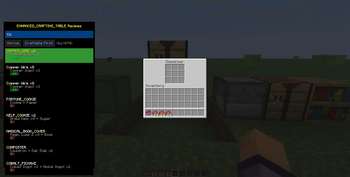
📋 Recipe Overlay
- Press R to open recipe selection overlay
- Visual Completion: See which recipes you can craft based on inventory
- Navigation: Use ↑↓ to browse, Enter to select
- Mouse Support: Click recipes directly or scroll with mouse wheel
- Smart Sorting: Craftable recipes appear first
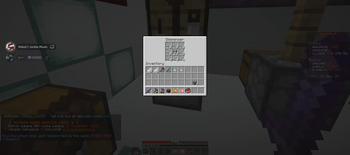
🏗️ Multiblock Support
- Auto-Detection: Automatically detects 13+ multiblock structures
- Position Caching: Remembers multiblock locations for quick access
- Machine Detector: Verify and manage cached multiblocks (Press M)
- Supported Types:
- Enhanced Crafting Table
- Grind Stone
- Armor Forge
- Ore Crusher
- Compressor
- Smeltery
- Pressure Chamber
- And more!
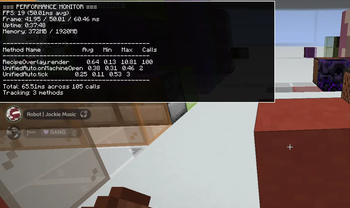
⚡ Performance Monitor
- Press F8 to toggle real-time performance overlay
- FPS & Frame Time: Monitor game performance
- Method Profiling: See which operations take the most time
- Memory Usage: Track RAM consumption
- Optimized: Only 10 FPS overhead
🎮 Operation Modes
Auto Mode (Default)
- Recipes are remembered per machine
- Automatically loads last recipe when returning
- Perfect for repetitive crafting
Manual Mode
- Select recipe each time
- Recipe overlay shows automatically
- Best for varied crafting sessions
🎹 Controls
| Key | Action |
|---|---|
| R | Toggle Recipe Overlay |
| K | Toggle Automation On/Off |
| M | Open Settings & Detector |
| F8 | Toggle Performance Monitor |
| ↑↓ | Navigate recipes |
| Enter | Select recipe |
| Esc | Close overlay |
🚀 Quick Start
Electric Machines
- Open machine GUI
- Press R to select recipe
- Mod automatically:
- Inserts ingredients from inventory
- Extracts outputs to inventory
- Monitors recipe completion
Multiblock Machines
- Right-click multiblock dispenser
- Press R to select recipe
- Mod automatically:
- Fills dispenser with ingredients
- Calculates possible crafts
- Auto-clicks signature block after filling
- Collect output from dispenser
🔧 Configuration
Press M in-game to access settings:
- Auto/Manual Mode: Toggle recipe memory
- Multiblock Cache: View/manage cached structures
- Machine Detector: Verify multiblock detection
- Recipe Memory: Clear saved recipes
Configuration saved to: config/bapel-slimefun-mod.json
📊 Technical Details
Performance
- Smart tick throttling (20 TPS automation)
- Cached inventory scanning (100ms cache)
- Batched rendering operations
- Pre-validated slot indices
- Lazy recipe loading
Detection System
- Pattern-based multiblock recognition
- Fuzzy material matching (handles variants)
- Structure validation (2-9 block patterns)
- Position caching system
Safety Features
- No localStorage usage
- Try-finally error handling
- Recipe validation (prevents machine mismatch)
- Graceful failure handling
📋 Requirements
- Minecraft: 1.21.8
- Fabric Loader: 0.17.2+
- Fabric API: 0.136.1+1.21.8
- Java: 21+
- Slimefun: Any version with standard machines
🐛 Known Issues
- Recipe overlay may not show for custom Slimefun addons (uses JSON database)
- Auto-detection works best with standard Slimefun multiblocks
- Performance monitor shows only client-side metrics
💡 Tips & Tricks
- Recipe Not Working?: Press M → Machine Detector → Verify Multiblock
- Automation Stuck?: Press K to toggle automation off/on
- Want Speed?: Reduce delay in config (min 50ms, default 200ms)
- Too Many Caches?: Press M → Multiblock Cache → Clear All
- Performance Issues?: Press F8 to see bottlenecks
📝 Changelog
v1.0.0
- ✅ Full electric machine automation
- ✅ Multiblock detection & automation
- ✅ Recipe overlay system
- ✅ Performance monitor
- ✅ Auto/Manual modes
- ✅ Position caching system
- ✅ 13+ multiblock support
🤝 Credits
Developer: Bapel
Framework: Fabric
Inspired by: Slimefun's automation needs
📞 Support
Found a bug? Have a suggestion?
- Report issues on GitHub
- Include logs from
logs/latest.log - Describe your Slimefun version
**⭐ If you find this mod helpful, please star it on Modrinth!**~~~~
Available Versions
How to Install Bapel Slimefun Mod on Your Server
Order Server
Order a Minecraft Java server with at least 3 GB RAM (4 GB recommended).
Set fabric Loader
In the panel under "Egg", select the fabric loader and matching Minecraft version (1.21.8).
Install Mod
Open the mod browser in the dashboard and search for "Bapel Slimefun Mod". Click "Install" – done! Alternatively, upload the .jar via SFTP to the /mods folder.
Compatibility
Mod Loaders
Minecraft Versions
1.21.8
Server-side
✗ UnsupportedRecommended RAM
4 GB(min. 3 GB)Frequently Asked Questions
Bapel Slimefun Mod server crashes on startup – what to do?
Most common cause: wrong fabric version or insufficient RAM. Check the server log (latest.log) for "OutOfMemoryError" or "Mixin" errors. With Mado Hosting: ensure at least 3 GB RAM is allocated and the loader matches the mod version (1.21.8). You can switch loaders with one click in the panel.
Is Bapel Slimefun Mod compatible with fabric?
Bapel Slimefun Mod officially supports fabric for Minecraft 1.21.8. The Mado dashboard automatically detects incompatible loader combinations.
Server lagging with Bapel Slimefun Mod – how to optimize performance?
Recommended RAM: 4 GB (per 8 players). Use /spark profiler to check if Bapel Slimefun Mod consumes the most tick time. Common fixes: reduce server view-distance to 8-10, install "performant" or "starlight" as supplementary mods on Forge. With Mado Hosting, your server runs on NVMe SSDs with dedicated CPU cores for minimal latency.
Similar Mods




![CobbleDollars [Cobblemon Addon]](https://cdn.modrinth.com/data/s7N7AsqL/684040a264fc1d7f9b856ec5d2da39767398c7ad.png)
Rent Modded Server
Install Bapel Slimefun Mod with just one click on your server.