
BasicallyParticleModels
a not very simple serverside fabric mod that can display 3d models as particles
Screenshots
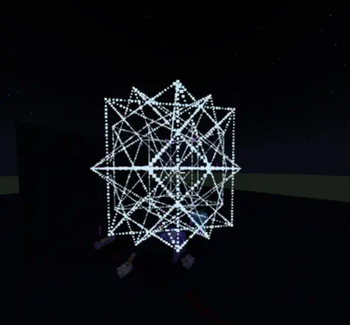


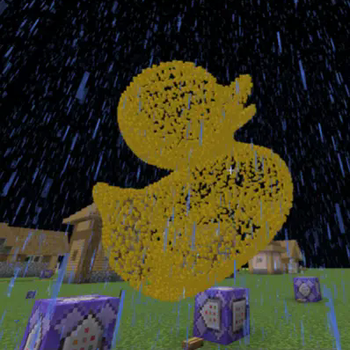
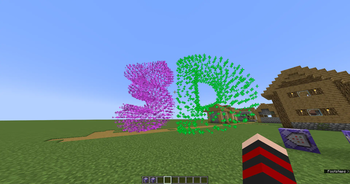
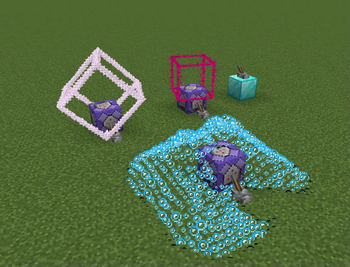
About this Mod
the mod creates a folder on your server, you can upload models into the folder you can list the models in-game with /particlemodels list
To actually display the models you use /particlemodels display <model file with file extension> <particle type> <model scale> <force/normal> <edge density> <players> the command basically works like the vanilla /particle command
the model will be displayed at the position the command is ran at, with 2 axis rotation support,
you can use /execute positioned and /execute rotated/facing to easily position and rotate the model, if the edge density is set to 0 only the model vertices will be displayed
example: /execute positioned 0 64 0 facing entity @p[distance=..15] run particlemodels display cube.obj minecraft:bubble 1 force 1 @a
this command will display a cube model at 0 64 0 that will face the closest player in a 15 block radius, the model will be made of bubble particles (good for moving models since the bubble particle has a very short lifetime), the particles are forced meaning even people with particles turned off will see them
Warning: the mod can lag your server and/or client
thats why theres a limit to how many vertices a model can have, by defauly set to 512 but can be configured, as well as the folder that the mod checks for models
the mod currently can only display vertices and edges as displaying full faces with particles would be too much, even small models would lag, so im not planning on adding face support
if you want to display models with faces, and even texture support check out [cymera's Text Display Models]
supported model types:
- .obj
- .stl (ASCII)
- .ply (ASCII)
Blender can be weird
if your model is consisted of only edges and vertices without any faces blender might just export a blank file sometimes, you can just select everything and press F to create some faces, that usually helps, but keep in mind that .stl automatically triangulates faces meaning those faces will each add 1 edge, so if you do that id recommend using OBJ or PLY models, when exporting you can uncheck pretty much everything, but you need to check "ASCII" when exporting .stl or .ply, otherwise the mod cant read the files
if you dont use blender you can use any CAD software to create models, they all can export .stl files
Available Versions
How to Install BasicallyParticleModels on Your Server
Order Server
Order a Minecraft Java server with at least 3 GB RAM (4 GB recommended).
Set bukkit Loader
In the panel under "Egg", select the bukkit loader and matching Minecraft version (1.21.11).
Install Mod
Open the mod browser in the dashboard and search for "BasicallyParticleModels". Click "Install" – done! Alternatively, upload the .jar via SFTP to the /mods folder.
Compatibility
Mod Loaders
Minecraft Versions
1.21.11, 1.21.10, 1.21.9 (+21 more)
Server-side
✓ RequiredRecommended RAM
4 GB(min. 3 GB)Frequently Asked Questions
BasicallyParticleModels server crashes on startup – what to do?
Most common cause: wrong bukkit version or insufficient RAM. Check the server log (latest.log) for "OutOfMemoryError" or "Mixin" errors. With Mado Hosting: ensure at least 3 GB RAM is allocated and the loader matches the mod version (1.21.11). You can switch loaders with one click in the panel.
Is BasicallyParticleModels compatible with bukkit and bungeecord and fabric and paper and purpur and quilt and spigot?
BasicallyParticleModels officially supports bukkit, bungeecord, fabric, paper, purpur, quilt, spigot for Minecraft 1.21.11, 1.21.10, 1.21.9. The Mado dashboard automatically detects incompatible loader combinations.
Server lagging with BasicallyParticleModels – how to optimize performance?
Recommended RAM: 4 GB (per 8 players). Use /spark profiler to check if BasicallyParticleModels consumes the most tick time. Common fixes: reduce server view-distance to 8-10, install "performant" or "starlight" as supplementary mods on Forge. With Mado Hosting, your server runs on NVMe SSDs with dedicated CPU cores for minimal latency.
Similar Mods





Rent Modded Server
Install BasicallyParticleModels with just one click on your server.