
BatleRoyalBorder
A mod that introduces the mechanics of reducing the boundaries of the world, similar to games of the battle royale genre. Ideal for UHC PVP events
Screenshots
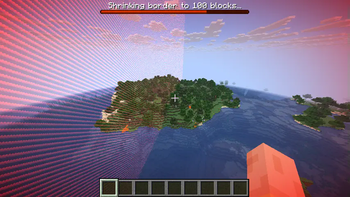
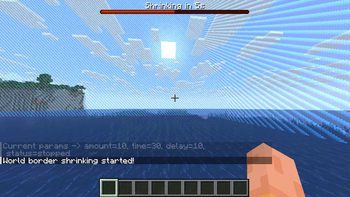
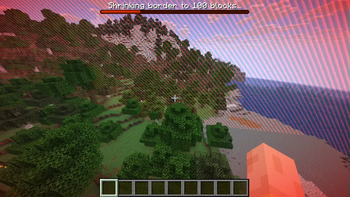
About this Mod
BatleRoyalBorder

Description:
BatleRoyalBorder is a Minecraft mod designed for players who enjoy a more dynamic and challenging gameplay experience. This mod introduces commands that allow you to shrink the world border incrementally, creating an intense and competitive environment. Perfect for UHC (Ultra Hardcore) games or any scenario where you want to force player encounters and add a thrilling twist to your survival gameplay.
Features:
- World Border Shrinking: Use commands to gradually shrink the world border
- Customizable Parameters: Define the amount by which the border shrinks, the time it takes to shrink, and the delay between each shrinkage
- Boss Bar Progress: Visual countdown timer and shrinking progress displayed in boss bar
- Automatic Control: The shrinking process continues automatically according to the parameters set, freeing you to focus on the game
- Flexible Input: Support for time formats (s/m/h) and number shortcuts (k/m/b/t/p)
Commands:
All commands support the alias /sr for quick access.
# Configure border shrinking parameters
/simpleroyal set <shrink_amount> <shrink_time> <delay_time>
# Begin/stop the border shrinking process
/simpleroyal start
/simpleroyal stop
# Display current settings and status
/simpleroyal get
# Reset parameters to default config values
/simpleroyal reset
Parameters:
shrink_amount: The amount by which the border will shrink each time (supports shortcuts like 1k, 500)shrink_time: The time it takes for the border to shrink (supports formats like 30s, 1m, .5m)delay_time: The delay between each shrink (supports same time formats)
How to Use:
- Install the mod and start your Minecraft server
- Use
/sr setwith desired parameters to configure the border shrinking - Use
/sr startto initiate the border shrinking process - Watch as the world border gradually shrinks with boss bar countdown, increasing tension and pushing players closer together
- Players receive boss bar updates and chat notifications throughout the process
Example Usage:
/sr set 50 30s 10s
This command will configure the border to shrink by 50 blocks within 30 seconds, with a 10-second delay between each shrink.
/sr set 1k 1m .5m
This will shrink by 1000 blocks over 1 minute, with 30-second delays between shrinks.
Available Versions
How to Install BatleRoyalBorder on Your Server
Order Server
Order a Minecraft Java server with at least 3 GB RAM (4 GB recommended).
Set fabric Loader
In the panel under "Egg", select the fabric loader and matching Minecraft version (1.21.8).
Install Mod
Open the mod browser in the dashboard and search for "BatleRoyalBorder". Click "Install" – done! Alternatively, upload the .jar via SFTP to the /mods folder.
Compatibility
Mod Loaders
Minecraft Versions
1.21.8
Server-side
✓ RequiredRecommended RAM
4 GB(min. 3 GB)Frequently Asked Questions
BatleRoyalBorder server crashes on startup – what to do?
Most common cause: wrong fabric version or insufficient RAM. Check the server log (latest.log) for "OutOfMemoryError" or "Mixin" errors. With Mado Hosting: ensure at least 3 GB RAM is allocated and the loader matches the mod version (1.21.8). You can switch loaders with one click in the panel.
Is BatleRoyalBorder compatible with fabric?
BatleRoyalBorder officially supports fabric for Minecraft 1.21.8. The Mado dashboard automatically detects incompatible loader combinations.
Server lagging with BatleRoyalBorder – how to optimize performance?
Recommended RAM: 4 GB (per 8 players). Use /spark profiler to check if BatleRoyalBorder consumes the most tick time. Common fixes: reduce server view-distance to 8-10, install "performant" or "starlight" as supplementary mods on Forge. With Mado Hosting, your server runs on NVMe SSDs with dedicated CPU cores for minimal latency.
Similar Mods





Rent Modded Server
Install BatleRoyalBorder with just one click on your server.