
BedAlarm
Sleep at any time of day and wake up exactly when you want.
Screenshots
About this Mod
BedAlarm
Tired of waiting until nightfall just to skip to morning? BedAlarm lets you sleep at any time of day and wake up exactly when you want.
How it works
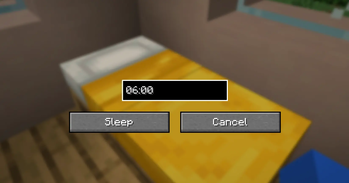
Shift + right-click any bed to open the alarm screen. Enter your desired wake-up time in HH:MM format (e.g. 06:00), click Sleep, and your character will doze off — even in broad daylight. When everyone in the world has gone to sleep, time skips directly to your chosen hour instead of the default sunrise.
Right-clicking a bed normally still works as in vanilla, so you only get the alarm behavior when you want it.
Features
- Custom wake-up time in 24-hour format (HH:MM)
- Sleep during the day, at dusk, at midnight — any time
- Time skips to your specified hour, not just the next morning
- Remembers your last-entered time within the session for quick re-use
- Non-intrusive: vanilla bed behavior is preserved for normal right-clicks
- Lightweight and works in both single-player and multiplayer
Compatibility
BedAlarm only modifies sleep timing behavior and adds a single GUI screen, so it should be compatible with most other mods. Other sleep-related mods that override CanPlayerSleepEvent, CanContinueSleepingEvent, or SleepFinishedTimeEvent may conflict.
Feedback
Found a bug or have a feature request? Please report it on the project page so it can be fixed in the next update.
All my mods are completely free to use.
If you'd like to support development, consider buying me a coffee!
☕ https://ko-fi.com/nekozame_garo
Available Versions
How to Install BedAlarm on Your Server
Order Server
Order a Minecraft Java server with at least 3 GB RAM (4 GB recommended).
Set forge Loader
In the panel under "Egg", select the forge loader and matching Minecraft version (1.21.8).
Install Mod
Open the mod browser in the dashboard and search for "BedAlarm". Click "Install" – done! Alternatively, upload the .jar via SFTP to the /mods folder.
Compatibility
Mod Loaders
Minecraft Versions
1.21.8, 1.21.4, 1.21.1 (+3 more)
Server-side
✓ RequiredRecommended RAM
4 GB(min. 3 GB)Frequently Asked Questions
BedAlarm server crashes on startup – what to do?
Most common cause: wrong forge version or insufficient RAM. Check the server log (latest.log) for "OutOfMemoryError" or "Mixin" errors. With Mado Hosting: ensure at least 3 GB RAM is allocated and the loader matches the mod version (1.21.8). You can switch loaders with one click in the panel.
Is BedAlarm compatible with forge and neoforge?
BedAlarm officially supports forge, neoforge for Minecraft 1.21.8, 1.21.4, 1.21.1. The Mado dashboard automatically detects incompatible loader combinations.
Server lagging with BedAlarm – how to optimize performance?
Recommended RAM: 4 GB (per 8 players). Use /spark profiler to check if BedAlarm consumes the most tick time. Common fixes: reduce server view-distance to 8-10, install "performant" or "starlight" as supplementary mods on Forge. With Mado Hosting, your server runs on NVMe SSDs with dedicated CPU cores for minimal latency.
Rent Modded Server
Install BedAlarm with just one click on your server.