
Bedrock Pattern Finder
A fast, client-side Fabric utility mod that calculates absolute world coordinates by matching bedrock floor patterns using modern 1.18+ generation math.
Screenshots

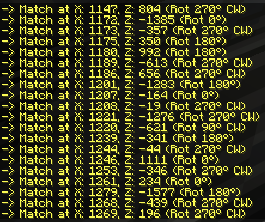
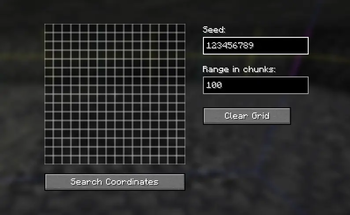
About this Mod
Bedrock Pattern Finder
Bedrock Pattern Finder is a powerful client-side Fabric utility mod for Minecraft 1.21+ that allows you to calculate absolute world coordinates by matching the bedrock floor pattern.
Perfect for finding specific locations, verifying seeds, or recovering coordinates when you only have access to the bedrock floor layout!
🌟 Features
- Modern Generation Support: Fully supports the modern Minecraft (1.18+) bedrock generation algorithm. It accurately computes bedrock at
Y=-60using the game's nativeRandomSplittermath. - Intuitive GUI: A clean, easy-to-use 16x16 interactive grid. Simply click the squares to draw the bedrock blocks you see in front of you.
- Lightning Fast & Multithreaded: Uses advanced multithreading to scan thousands of chunks in the background. Your game could lag while a search is running if the Chunk Range is high for example 1000 Chunks!
- Smart & Persistent UI: Your typed seed and search radius are automatically saved when you close the menu. No need to type them again!
- Client-Side Only: This mod runs entirely on your client. It works perfectly on multiplayer servers as long as you know the world seed.
🛠️ How to Use
- Open the GUI: Type
/bedrockfindor/bedrockfind guiin the game chat. - Enter the Seed: Type the world seed in the "Seed" field.
- Set the Range: Define how many chunks around your current position the mod should scan (e.g.,
100chunks). - Draw the Pattern: Look down at the bedrock floor (
Y=-60) and click the cells in the grid to match the bedrock blocks you see.- ⬛ Black (Empty): Ignored block (Wildcard - can be anything).
- ⬜ Gray: Bedrock block.
- Search: Click "Search Coordinates". The mod will scan the area in the background and output all matching coordinates and rotations directly into your chat!
📦 Installation
This is a Fabric mod. You will need:
- Fabric Loader installed for Minecraft 1.21.11.
- Fabric API (Recommended)
Simply drop the downloaded .jar file into your mods folder and launch the game.
💬 Support & Community
If you need help, found a bug, or just want to talk about the mod, feel free to join our community Discord server!
⚖️ Legal Disclaimer
Usage of this modification is entirely at your own risk.
This mod is provided "as is", without warranty of any kind, express or implied. The developers and contributors of "Bedrock Pattern Finder" are not responsible for any consequences resulting from the use of this software, including but not limited to: being banned from multiplayer servers, loss of data, or account suspensions.
This tool is intended for technical players and environments where such modifications are explicitly allowed (e.g., Anarchy servers). It is the user's sole responsibility to ensure that the use of this mod complies with the terms of service, rules, and guidelines of any server or platform they choose to play on. By downloading and using this mod, you agree to take full responsibility for your actions.
Available Versions
How to Install Bedrock Pattern Finder on Your Server
Order Server
Order a Minecraft Java server with at least 4 GB RAM (6 GB recommended).
Set fabric Loader
In the panel under "Egg", select the fabric loader and matching Minecraft version (1.21.11).
Install Mod
Open the mod browser in the dashboard and search for "Bedrock Pattern Finder". Click "Install" – done! Alternatively, upload the .jar via SFTP to the /mods folder.
Compatibility
Mod Loaders
Minecraft Versions
1.21.11, 1.21.10, 1.21.9 (+9 more)
Server-side
✗ UnsupportedRecommended RAM
6 GB(min. 4 GB)Frequently Asked Questions
Bedrock Pattern Finder server crashes on startup – what to do?
Most common cause: wrong fabric version or insufficient RAM. Check the server log (latest.log) for "OutOfMemoryError" or "Mixin" errors. With Mado Hosting: ensure at least 4 GB RAM is allocated and the loader matches the mod version (1.21.11). You can switch loaders with one click in the panel.
Is Bedrock Pattern Finder compatible with fabric?
Bedrock Pattern Finder officially supports fabric for Minecraft 1.21.11, 1.21.10, 1.21.9. The Mado dashboard automatically detects incompatible loader combinations.
Server lagging with Bedrock Pattern Finder – how to optimize performance?
Recommended RAM: 6 GB (per 5 players). Use /spark profiler to check if Bedrock Pattern Finder consumes the most tick time. Common fixes: reduce server view-distance to 8-10, install "performant" or "starlight" as supplementary mods on Forge. With Mado Hosting, your server runs on NVMe SSDs with dedicated CPU cores for minimal latency.
Similar Mods





Rent Modded Server
Install Bedrock Pattern Finder with just one click on your server.