
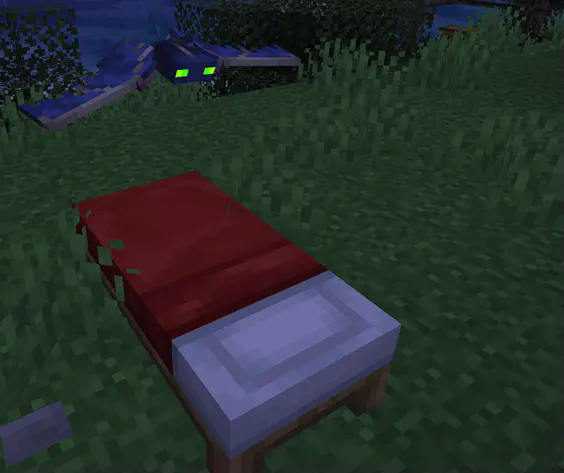
Beds Spawn Phantoms
Encourages building a proper shelter around your bed instead of just placing it in the open
About this Mod
Beds are overpowered, but also vital for many players.
The difficulty spike that is nighttime arguably plays a major part in keeping Minecraft interesting, especially the first few days, and being able to skip it feels upfair.
On the other hand, that "difficult" moment usually ends up being sitting on a pillar doing nothing for 10 minutes. That's not difficult, just annoying.
This datapack/mod fixes this by making phantoms spawn when you sleep, so if your bed isn't protected, you will get attacked.
By enouraging players to make a proper shelter, you can sleep when at home and safe (so night wouldn't pose a threat anyway) but not sleep when you're out in the open (where mobs can get you). Now, if night is likely to be a fun challenge, you're better off not sleeping, but if it will probably be boring, you should sleep instead.
Also useful for modpack authors or players who want to balance beds more so that you can't just plop a bed down in the middle of nowhere and skip the night.
TIP: If you want to turn off phantom spawning for when you DON'T sleep in a bed for 3 nights, turn off the doInsomnia gamerule either when creating a new world or with the command (requires cheats) /gamerule doInsomnia false.
FAQ:
How do I use it?
When creating a new world, you can add datapacks through the menu.
Can I install it as a mod?
Sure, check the Versions page for downloads. This will make it install for every world instead of just whatever you put it in.
Safe to uninstall?
Yup!
As a datapack, take the .zip out of your datapack folder.
As a mod, remove the .jar from the mods folder.
Can I use this in Modpacks?
Sure! Just please leave credit :)
Available Versions
How to Install Beds Spawn Phantoms on Your Server
Order Server
Order a Minecraft Java server with at least 3 GB RAM (4 GB recommended).
Set datapack Loader
In the panel under "Egg", select the datapack loader and matching Minecraft version (26.1).
Install Mod
Open the mod browser in the dashboard and search for "Beds Spawn Phantoms". Click "Install" – done! Alternatively, upload the .jar via SFTP to the /mods folder.
Compatibility
Mod Loaders
Minecraft Versions
26.1, 26.1-rc-3, 26.1-rc-2 (+51 more)
Server-side
✓ RequiredRecommended RAM
4 GB(min. 3 GB)Frequently Asked Questions
Beds Spawn Phantoms server crashes on startup – what to do?
Most common cause: wrong datapack version or insufficient RAM. Check the server log (latest.log) for "OutOfMemoryError" or "Mixin" errors. With Mado Hosting: ensure at least 3 GB RAM is allocated and the loader matches the mod version (26.1). You can switch loaders with one click in the panel.
Is Beds Spawn Phantoms compatible with datapack and fabric and forge and neoforge and quilt?
Beds Spawn Phantoms officially supports datapack, fabric, forge, neoforge, quilt for Minecraft 26.1, 26.1-rc-3, 26.1-rc-2. Note: Forge and Fabric mods are NOT cross-compatible – pick one loader and stick with it. The Mado dashboard automatically detects incompatible loader combinations.
Server lagging with Beds Spawn Phantoms – how to optimize performance?
Recommended RAM: 4 GB (per 8 players). Use /spark profiler to check if Beds Spawn Phantoms consumes the most tick time. Common fixes: reduce server view-distance to 8-10, install "performant" or "starlight" as supplementary mods on Forge. With Mado Hosting, your server runs on NVMe SSDs with dedicated CPU cores for minimal latency.
Similar Mods




Rent Modded Server
Install Beds Spawn Phantoms with just one click on your server.