
Better Auto-Jump
Improves the vanilla auto-jump and adds optional edge jumping for parkouring.
Screenshots
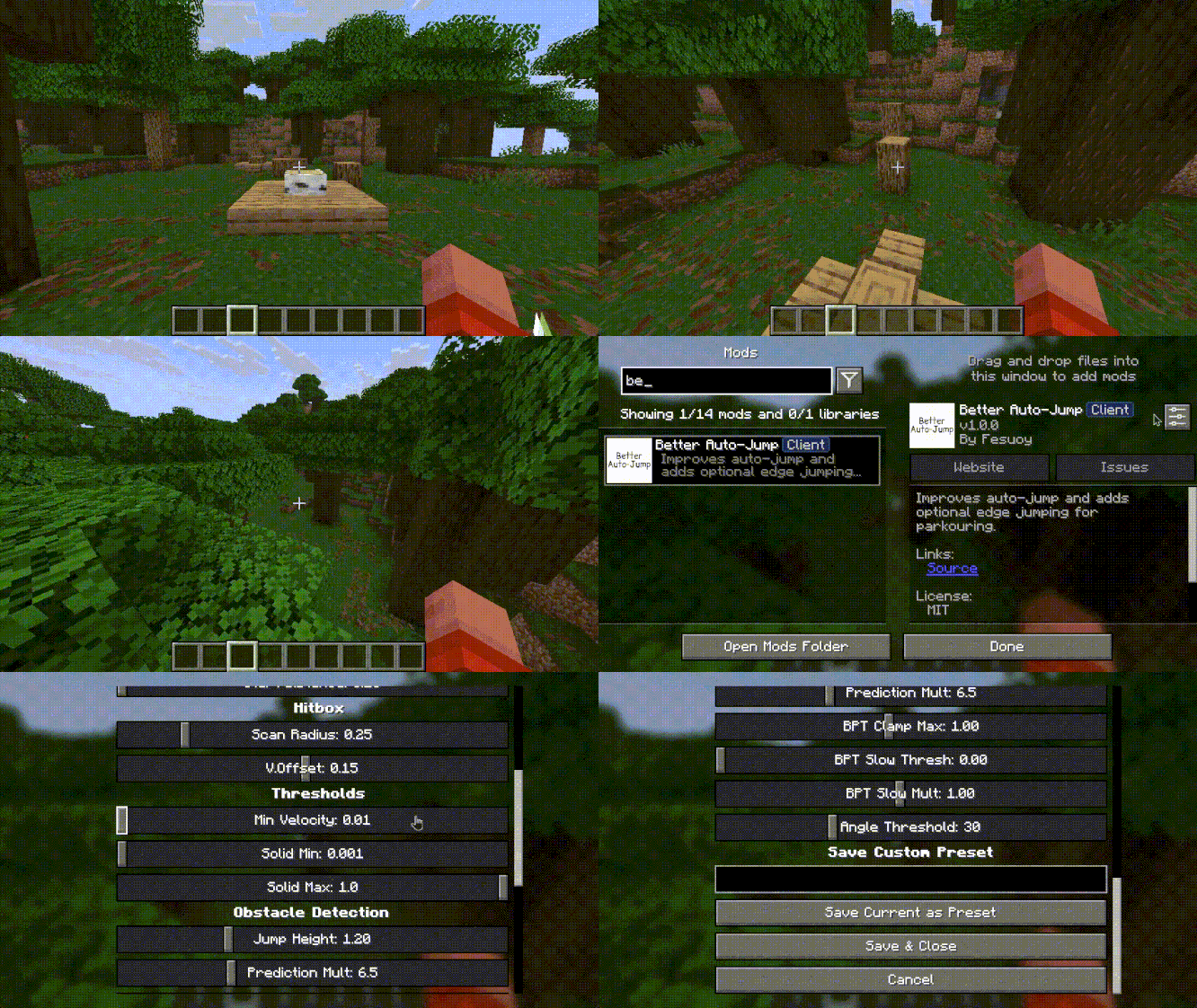
About this Mod
Better Auto-Jump
A Minecraft Fabric mod that replaces and vastly improves the vanilla auto-jump system. Client-side only.
Features
- Improved Auto-Jump -- Predicts collisions in the direction of movement and automatically jumps over blocks up to a configurable height. Accounts for the Jump Boost potion effect and respects an angle threshold so you only jump over blocks in your general path.
- Edge Jumping (Parkour Helper) -- Detects when you're approaching the edge of a block while moving forward and triggers a jump just before the edge. (Disabled by default, enable in mod's settings)
Configuration
Edit <game_dir>/config/better-auto-jump.json manually, or use the Mod Menu GUI (recommended). The GUI offers:
- Master Toggle -- Enable/disable the entire mod.
- Obstacle Jump / Edge Jump -- Individual feature toggles.
- Preset Selector -- Switch between built-in and saved custom presets.
- Variance / Cooldown -- Random tick delay (0–5) and minimum ticks (1–10+) between edge jumps.
- Advanced Settings -- Fine-tune all detection parameters and save custom presets.
Edge Detection Parameters
| Parameter | Default | Description |
|---|---|---|
| Sprint Distance | 2.0 | Max scan distance when sprinting |
| Walk Distance | 1.5 | Max scan distance when walking |
| Step Distance | 0.35 | Distance between scan samples |
| Start Distance | 0.3 | Distance from player to start scanning |
| Scan Radius | 0.3 | Horizontal radius of the scan area |
| Vertical Offset | 0.05 | Vertical offset for the scan area |
| Min Velocity | 0.1 | Minimum player speed to trigger |
| Solid Min | 0.001 | Min ground height at feet (edge if below) |
| Solid Max | 0.6 | Max ground height at feet |
Obstacle Detection Parameters
| Parameter | Default | Description |
|---|---|---|
| Jump Height | 1.2 | Max block height to auto-jump |
| Prediction Mult | 6.0 | How far ahead to check for collisions |
| BPT Clamp Max | 0.8 | Max blocks-per-tick clamp |
| BPT Slow Threshold | 0.2 | Slow movement threshold |
| BPT Slow Multiplier | 0.7 | Multiplier applied during slow movement |
| Angle Threshold | 30.0 | Max angle between movement and obstacle |
Available Versions
How to Install Better Auto-Jump on Your Server
Order Server
Order a Minecraft Java server with at least 3 GB RAM (4 GB recommended).
Set fabric Loader
In the panel under "Egg", select the fabric loader and matching Minecraft version (26.2).
Install Mod
Open the mod browser in the dashboard and search for "Better Auto-Jump". Click "Install" – done! Alternatively, upload the .jar via SFTP to the /mods folder.
Compatibility
Mod Loaders
Minecraft Versions
26.2
Server-side
✗ UnsupportedRecommended RAM
4 GB(min. 3 GB)Frequently Asked Questions
Better Auto-Jump server crashes on startup – what to do?
Most common cause: wrong fabric version or insufficient RAM. Check the server log (latest.log) for "OutOfMemoryError" or "Mixin" errors. With Mado Hosting: ensure at least 3 GB RAM is allocated and the loader matches the mod version (26.2). You can switch loaders with one click in the panel.
Is Better Auto-Jump compatible with fabric?
Better Auto-Jump officially supports fabric for Minecraft 26.2. The Mado dashboard automatically detects incompatible loader combinations.
Server lagging with Better Auto-Jump – how to optimize performance?
Recommended RAM: 4 GB (per 8 players). Use /spark profiler to check if Better Auto-Jump consumes the most tick time. Common fixes: reduce server view-distance to 8-10, install "performant" or "starlight" as supplementary mods on Forge. With Mado Hosting, your server runs on NVMe SSDs with dedicated CPU cores for minimal latency.
Rent Modded Server
Install Better Auto-Jump with just one click on your server.