
Better CPS Counter
A lightweight mod that allows you to add highly customizable CPS counters in your screen.
Screenshots
About this Mod
📊 Introduction
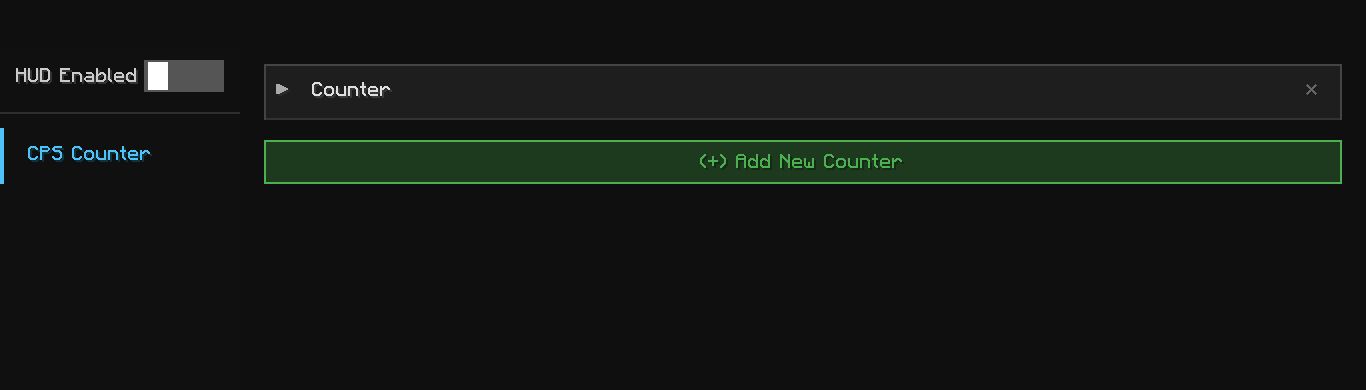
Better CPS Counter is a lightweight, heavily customizable mod that allows you to add custom HUD elements to your screen to display your current CPS (Clicks Per Second).
Whether you need to monitor your CPS for 1.8 PvP, practice advanced bridging techniques, or simply want a clean aesthetic upgrade for your game interface, this mod has you covered.
Everything is fully hot-swappable and configurable in-game. You do not need to restart your client to apply changes or disable the mod—simply toggle the button in the configuration menu.

✨ Features
- Extremely Lightweight: Designed to run with zero performance impact.
- Modern UI: Clean, intuitive interface for stress-free customization.
- Built-in Presets: Quick configurations to get you started immediately.
- Multiple HUDs: Create and manage independent counters simultaneously.
- Draggable HUDs: Drag and drop the HUDs anywhere you like.
- Zero Dependencies: Completely self-sustained—just drop it into your mods folder and play.
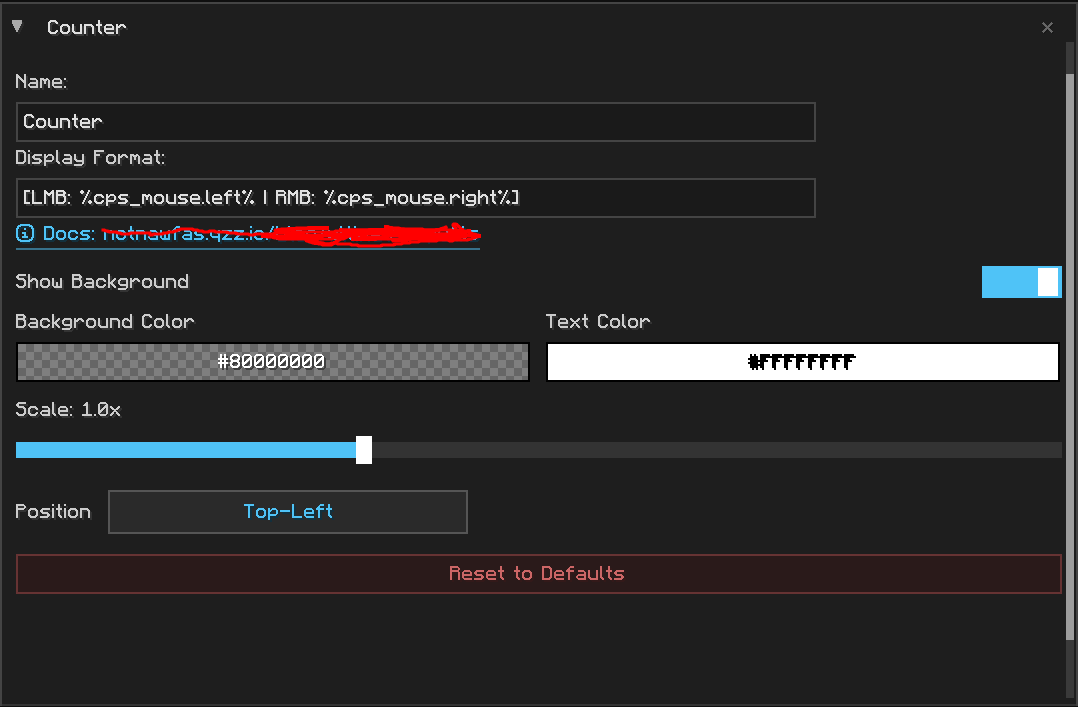
- Heavily Customizable: Tailor fonts, colors, formats, layouts, and positions exactly how you want them.
- Both Mouse+Keyboard: Track both keyboard or mouse's input.
⚙️ Variables
You can use the placeholders below inside your mod's Display Format text field to dynamically fetch specific click inputs.
🖱️ Mouse Inputs
| Variable | Description |
|---|---|
%cps_mouse.left% |
Left Click (LMB) |
%cps_mouse.right% |
Right Click (RMB) |
%cps_mouse.middle% |
Middle Click (MMB) |
⌨️ Keyboard Inputs
Alphabet (A-Z)
| Variable | Key | Variable | Key |
|---|---|---|---|
%cps_keyboard.a% |
A | %cps_keyboard.n% |
N |
%cps_keyboard.b% |
B | %cps_keyboard.o% |
O |
%cps_keyboard.c% |
C | %cps_keyboard.p% |
P |
%cps_keyboard.d% |
D | %cps_keyboard.q% |
Q |
%cps_keyboard.e% |
E | %cps_keyboard.r% |
R |
%cps_keyboard.f% |
F | %cps_keyboard.s% |
S |
%cps_keyboard.g% |
G | %cps_keyboard.t% |
T |
%cps_keyboard.h% |
H | %cps_keyboard.u% |
U |
%cps_keyboard.i% |
I | %cps_keyboard.v% |
V |
%cps_keyboard.j% |
J | %cps_keyboard.w% |
W |
%cps_keyboard.k% |
K | %cps_keyboard.x% |
X |
%cps_keyboard.l% |
L | %cps_keyboard.y% |
Y |
%cps_keyboard.m% |
M | %cps_keyboard.z% |
Z |
Numbers (0-9)
| Variable | Key | Variable | Key |
|---|---|---|---|
%cps_keyboard.0% |
0 | %cps_keyboard.5% |
5 |
%cps_keyboard.1% |
1 | %cps_keyboard.6% |
6 |
%cps_keyboard.2% |
2 | %cps_keyboard.7% |
7 |
%cps_keyboard.3% |
3 | %cps_keyboard.8% |
8 |
%cps_keyboard.4% |
4 | %cps_keyboard.9% |
9 |
Function Keys (F1 - F25)
Note: Standard hardware layouts generally access keys F13–F25 when pressing SHIFT alongside the regular F1–F12 row keys.
| Variable | Key | Variable | Key |
|---|---|---|---|
%cps_keyboard.f1% |
F1 | %cps_keyboard.f14% |
F14 |
%cps_keyboard.f2% |
F2 | %cps_keyboard.f15% |
F15 |
%cps_keyboard.f3% |
F3 | %cps_keyboard.f16% |
F16 |
%cps_keyboard.f4% |
F4 | %cps_keyboard.f17% |
F17 |
%cps_keyboard.f5% |
F5 | %cps_keyboard.f18% |
F18 |
%cps_keyboard.f6% |
F6 | %cps_keyboard.f19% |
F19 |
%cps_keyboard.f7% |
F7 | %cps_keyboard.f20% |
F20 |
%cps_keyboard.f8% |
F8 | %cps_keyboard.f21% |
F21 |
%cps_keyboard.f9% |
F9 | %cps_keyboard.f22% |
F22 |
%cps_keyboard.f10% |
F10 | %cps_keyboard.f23% |
F23 |
%cps_keyboard.f11% |
F11 | %cps_keyboard.f24% |
F24 |
%cps_keyboard.f12% |
F12 | %cps_keyboard.f25% |
F25 |
%cps_keyboard.f13% |
F13 |
Numpad Layout
| Variable | Key | Variable | Key |
|---|---|---|---|
%cps_keyboard.numpad0% |
Numpad 0 | %cps_keyboard.numpad9% |
Numpad 9 |
%cps_keyboard.numpad1% |
Numpad 1 | %cps_keyboard.numpad_add% |
Numpad Plus (+) |
%cps_keyboard.numpad2% |
Numpad 2 | %cps_keyboard.numpad_subtract% |
Numpad Minus (-) |
%cps_keyboard.numpad3% |
Numpad 3 | %cps_keyboard.numpad_multiply% |
Numpad Multiply (*) |
%cps_keyboard.numpad4% |
Numpad 4 | %cps_keyboard.numpad_divide% |
Numpad Divide (/) |
%cps_keyboard.numpad5% |
Numpad 5 | %cps_keyboard.numpad_decimal% |
Numpad Decimal (.) |
%cps_keyboard.numpad6% |
Numpad 6 | %cps_keyboard.numpad_enter% |
Numpad Enter |
%cps_keyboard.numpad7% |
Numpad 7 | %cps_keyboard.numpad_equal% |
Numpad Equal (=) |
%cps_keyboard.numpad8% |
Numpad 8 |
System & Navigation Keys
| Variable | Key |
|---|---|
%cps_keyboard.up% |
Up Arrow |
%cps_keyboard.down% |
Down Arrow |
%cps_keyboard.left% |
Left Arrow |
%cps_keyboard.right% |
Right Arrow |
%cps_keyboard.insert% |
Insert |
%cps_keyboard.delete% |
Delete |
%cps_keyboard.home% |
Home |
%cps_keyboard.end% |
End |
%cps_keyboard.page_up% |
Page Up |
%cps_keyboard.page_down% |
Page Down |
%cps_keyboard.print_screen% |
Print Screen |
%cps_lock% |
Scroll Lock |
%cps_keyboard.pause% |
Pause |
Modifiers & Control Keys
| Variable | Key |
|---|---|
%cps_keyboard.shift% |
Universal Shift |
%cps_keyboard.left_shift% |
Left Shift |
%cps_keyboard.right_shift% |
Right Shift |
%cps_keyboard.ctrl% |
Universal Ctrl |
%cps_keyboard.left_ctrl% |
Left Ctrl |
%cps_keyboard.right_ctrl% |
Right Ctrl |
%cps_keyboard.alt% |
Universal Alt |
%cps_keyboard.left_alt% |
Left Alt |
%cps_keyboard.right_alt% |
Right Alt |
%cps_keyboard.super% |
Super Key (Windows / OS Command Key) |
%cps_keyboard.left_super% |
Left Super Key |
%cps_keyboard.right_super% |
Right Super Key |
%cps_keyboard.caps_lock% |
Caps Lock |
%cps_keyboard.num_lock% |
Num Lock |
%cps_keyboard.space% |
Spacebar |
%cps_keyboard.enter% |
Enter |
%cps_keyboard.escape% |
Escape |
%cps_keyboard.tab% |
Tab |
%cps_keyboard.backspace% |
Backspace |
Symbols & Miscellaneous
| Variable | Key |
|---|---|
%cps_keyboard.grave% |
Grave Accent (`) |
%cps_keyboard.tilde% |
Tilde (~) |
%cps_keyboard.minus% |
Minus (-) |
%cps_keyboard.equal% |
Equal (=) |
%cps_keyboard.left_bracket% |
Left Bracket ([) |
%cps_keyboard.right_bracket% |
Right Bracket (]) |
%cps_keyboard.backslash% |
Backslash (\) |
%cps_keyboard.semicolon% |
Semicolon (;) |
%cps_keyboard.apostrophe% |
Apostrophe (') |
%cps_keyboard.comma% |
Comma (,) |
%cps_keyboard.period% |
Period (.) |
%cps_keyboard.slash% |
Forward Slash (/) |
%cps_keyboard.world1% |
World 1 |
%cps_keyboard.world2% |
World 2 |
%cps_keyboard.menu% |
Menu Key |
Author
made by NotNawfas
- Portfolio: https://notnawfas.qzz.io
- Discord: https://discord.notnawfas.qzz.io
- GitHub Repo: https://github.com/notnawfas/bettercpscounter
Thank you for reading all the way down to here! That's pretty much it.
Available Versions
How to Install Better CPS Counter on Your Server
Order Server
Order a Minecraft Java server with at least 3 GB RAM (4 GB recommended).
Set fabric Loader
In the panel under "Egg", select the fabric loader and matching Minecraft version (1.21.11).
Install Mod
Open the mod browser in the dashboard and search for "Better CPS Counter". Click "Install" – done! Alternatively, upload the .jar via SFTP to the /mods folder.
Compatibility
Mod Loaders
Minecraft Versions
1.21.11, 1.21.10
Server-side
✗ UnsupportedRecommended RAM
4 GB(min. 3 GB)Frequently Asked Questions
Better CPS Counter server crashes on startup – what to do?
Most common cause: wrong fabric version or insufficient RAM. Check the server log (latest.log) for "OutOfMemoryError" or "Mixin" errors. With Mado Hosting: ensure at least 3 GB RAM is allocated and the loader matches the mod version (1.21.11). You can switch loaders with one click in the panel.
Is Better CPS Counter compatible with fabric?
Better CPS Counter officially supports fabric for Minecraft 1.21.11, 1.21.10. The Mado dashboard automatically detects incompatible loader combinations.
Server lagging with Better CPS Counter – how to optimize performance?
Recommended RAM: 4 GB (per 8 players). Use /spark profiler to check if Better CPS Counter consumes the most tick time. Common fixes: reduce server view-distance to 8-10, install "performant" or "starlight" as supplementary mods on Forge. With Mado Hosting, your server runs on NVMe SSDs with dedicated CPU cores for minimal latency.
Similar Mods



![[TaCZ] Timeless and Classics Zero](https://cdn.modrinth.com/data/SzzJttH8/fd27766d2bb8390d284696b1dbd358f87e081439_96.webp)


Rent Modded Server
Install Better CPS Counter with just one click on your server.