
Better Enchant Command
Improves the /enchant command by removing limits
Screenshots
About this Mod
Better Enchant Command
A professional and lightweight Fabric mod for Minecraft 26.1 that unlocks the full potential of enchantments. Remove hardcoded limits, customize your experience, and enchant items with any level you desire.
Features
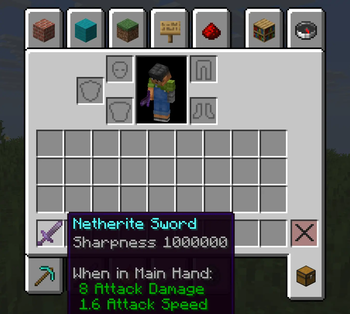
- Unlock Enchantment Levels: Bypass the vanilla
/enchantcommand restrictions. Apply Sharpness 1000, Efficiency 255, or any other level without limitations. - Custom Numerals: Choose between classic Roman numerals (I, V, X...) or modern Arabic numerals (1, 5, 10...) for enchantment levels in item tooltips.
- Anvil Enhancements:
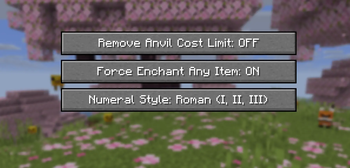
- Remove Cost Limits: Merge high-level items without the "Too Expensive!" message (Configurable).
- Force Enchanting: Allow any enchantment to be applied to any item, even if they are normally incompatible (Configurable).
- ModMenu Integration: Effortlessly toggle features via an in-game configuration screen.
Usage
Simply use the standard vanilla command with any level:
/enchant @s minecraft:sharpness 1000000
The mod handles the rest, ensuring the enchantment is applied correctly regardless of the usual level caps.
Configuration
The mod can be configured via the config/betterenchantcommand.json file or through the ModMenu interface:
| Option | Description | Default |
|---|---|---|
removeAnvilCostLimit |
Removes the "Too Expensive!" limit in Anvils. | false |
forceEnchantAnyItem |
Allows applying any enchantment to any item type. | true |
useArabicNumerals |
Displays levels as numbers (123) instead of Roman numerals (CXXIII). | false |
License
This project is licensed under the GNU GENERAL PUBLIC LICENSE
License.
Credits
Developed by ravistarr.
WARNING: SOME ENCHANTS MAY CRASH YOUR GAME SO BE CAREFUL
Available Versions
How to Install Better Enchant Command on Your Server
Order Server
Order a Minecraft Java server with at least 3 GB RAM (4 GB recommended).
Set fabric Loader
In the panel under "Egg", select the fabric loader and matching Minecraft version (26.1.1).
Install Mod
Open the mod browser in the dashboard and search for "Better Enchant Command". Click "Install" – done! Alternatively, upload the .jar via SFTP to the /mods folder.
Compatibility
Mod Loaders
Minecraft Versions
26.1.1, 26.1
Server-side
✓ RequiredRecommended RAM
4 GB(min. 3 GB)Frequently Asked Questions
Better Enchant Command server crashes on startup – what to do?
Most common cause: wrong fabric version or insufficient RAM. Check the server log (latest.log) for "OutOfMemoryError" or "Mixin" errors. With Mado Hosting: ensure at least 3 GB RAM is allocated and the loader matches the mod version (26.1.1). You can switch loaders with one click in the panel.
Is Better Enchant Command compatible with fabric?
Better Enchant Command officially supports fabric for Minecraft 26.1.1, 26.1. The Mado dashboard automatically detects incompatible loader combinations.
Server lagging with Better Enchant Command – how to optimize performance?
Recommended RAM: 4 GB (per 8 players). Use /spark profiler to check if Better Enchant Command consumes the most tick time. Common fixes: reduce server view-distance to 8-10, install "performant" or "starlight" as supplementary mods on Forge. With Mado Hosting, your server runs on NVMe SSDs with dedicated CPU cores for minimal latency.
Rent Modded Server
Install Better Enchant Command with just one click on your server.