
Better Enchantment Tooltips
Adds enhanced tool tips to enchanted books and items.
About this Mod
Description
This add on enhances the tooltips for enchanted books. It adds icons representing what items the enchantment can be applied to under the enchantment. Enchantments can be sorted alphabetically optionally with curses at the end. The enchantment max level can also be displayed. Lastly, if desired a brief description of the enchantment effect can also be shown if the shift key is held down. This is all configurable.
Can be run on the client side only. Requires Fabric API and Cloth Config API. ModMenu is optional.
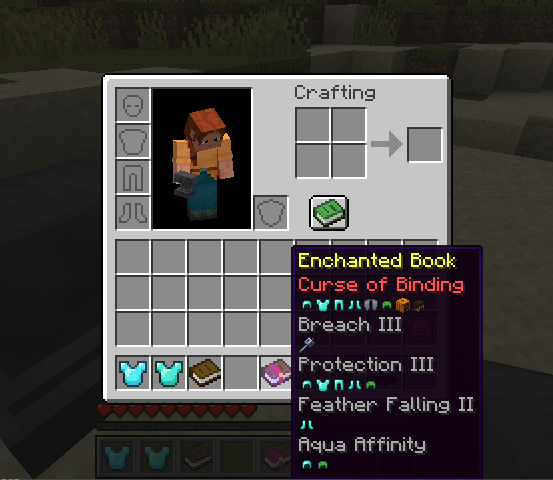
Combine it with the Clear Enchanted Books mod to get enhanced book textures.
Compatibility
If this mod is incompatible with your mod or a mod you like to use, please comment and I'll try to resolve the problem.
If you have a mod that has a custom enchantment and you'd like the enchantment description to appear in the tooltip, add the key "enchantment.betterbooks.
If you have a custom item that accepts enchantments and you'd like it to appear in the list of icons that an enchantment can be applied to, let me know and I'll setup a registry to make this work.
Version History
Version 1.0.3 adds a short description of the enchantment effect to the tooltip. This is configurable to the shift key.
Version 1.0.2 fixes a problem with the AppleSkin mod.
New version 1.0.1 now provides:
sorting alphabetically and placing curses at the bottom
showing the max enchantment level
removing the glint
ModMenu integration so it can be configured in game - requires ModMenu and Cloth API.
Developed and tested in MC 1.21.7 -> MC 1.21.4
Available Versions
How to Install Better Enchantment Tooltips on Your Server
Order Server
Order a Minecraft Java server with at least 3 GB RAM (4 GB recommended).
Set fabric Loader
In the panel under "Egg", select the fabric loader and matching Minecraft version (1.21.8).
Install Mod
Open the mod browser in the dashboard and search for "Better Enchantment Tooltips". Click "Install" – done! Alternatively, upload the .jar via SFTP to the /mods folder.
Compatibility
Mod Loaders
Minecraft Versions
1.21.8, 1.21.7, 1.21.6 (+2 more)
Server-side
~ OptionalRecommended RAM
4 GB(min. 3 GB)Frequently Asked Questions
Better Enchantment Tooltips server crashes on startup – what to do?
Most common cause: wrong fabric version or insufficient RAM. Check the server log (latest.log) for "OutOfMemoryError" or "Mixin" errors. With Mado Hosting: ensure at least 3 GB RAM is allocated and the loader matches the mod version (1.21.8). You can switch loaders with one click in the panel.
Is Better Enchantment Tooltips compatible with fabric?
Better Enchantment Tooltips officially supports fabric for Minecraft 1.21.8, 1.21.7, 1.21.6. The Mado dashboard automatically detects incompatible loader combinations.
Server lagging with Better Enchantment Tooltips – how to optimize performance?
Recommended RAM: 4 GB (per 8 players). Use /spark profiler to check if Better Enchantment Tooltips consumes the most tick time. Common fixes: reduce server view-distance to 8-10, install "performant" or "starlight" as supplementary mods on Forge. With Mado Hosting, your server runs on NVMe SSDs with dedicated CPU cores for minimal latency.
Similar Mods




![[TaCZ] Timeless and Classics Zero](https://cdn.modrinth.com/data/SzzJttH8/fd27766d2bb8390d284696b1dbd358f87e081439_96.webp)

Rent Modded Server
Install Better Enchantment Tooltips with just one click on your server.