
Better Forge Chat (LuckPerms) Fork
A Forge based serverside chat mod to allow prefixes, suffixes and integration with LuckPerms and FTB-Essentials nicknames.
Screenshots
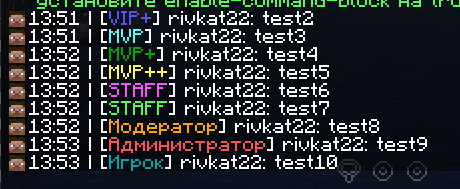
About this Mod
This mod is a fork of BetterForgeChat, the creator of this mod has not released updates for 2 years, so it was decided to create a fork for version 1.20.1
All rights to the mod belong to abc123mewot.
BetterForgeChat
A Forge based serverside chat mod to allow prefixes, suffixes and integration with LuckPerms and FTB-Essentials nicknames.
Why does this exist?
If you are building a forge modded server on MC1.20.1 there unfortunately are no decent mods available due to SpongeForge not supporting MC1.20.1 - this mod only supports MC1.20.1 forge servers for this very reason.
To date this is the most feature-rich chat mod for Forge 1.20.1 blowing all others out of the water
Features
LuckPerms integration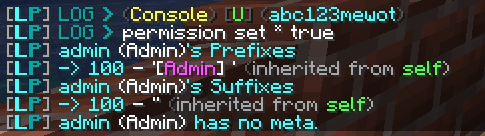
Tab list integration
Nickname integration
Colors command
Markdown support
Permissions plugin integration
Works with any Forge Permissions plugin to provide easy permission management, see the permissions on the WIKI
Highly configurable
Customizable timestamp formats
Customizable tab-list playername formats
All features can be turned on/off easily
Customizable permission nodes
Out-Of-Box integration with LuckPerms and FTBEssentials
Installation
Get the latest version off CurseForge
Add JAR file to serverside mods/ folder
Available Versions
How to Install Better Forge Chat (LuckPerms) Fork on Your Server
Order Server
Order a Minecraft Java server with at least 3 GB RAM (4 GB recommended).
Set forge Loader
In the panel under "Egg", select the forge loader and matching Minecraft version (1.20.1).
Install Mod
Open the mod browser in the dashboard and search for "Better Forge Chat (LuckPerms) Fork". Click "Install" – done! Alternatively, upload the .jar via SFTP to the /mods folder.
Compatibility
Mod Loaders
Minecraft Versions
1.20.1
Server-side
✓ RequiredRecommended RAM
4 GB(min. 3 GB)Frequently Asked Questions
Better Forge Chat (LuckPerms) Fork server crashes on startup – what to do?
Most common cause: wrong forge version or insufficient RAM. Check the server log (latest.log) for "OutOfMemoryError" or "Mixin" errors. With Mado Hosting: ensure at least 3 GB RAM is allocated and the loader matches the mod version (1.20.1). You can switch loaders with one click in the panel.
Is Better Forge Chat (LuckPerms) Fork compatible with forge?
Better Forge Chat (LuckPerms) Fork officially supports forge for Minecraft 1.20.1. The Mado dashboard automatically detects incompatible loader combinations.
Server lagging with Better Forge Chat (LuckPerms) Fork – how to optimize performance?
Recommended RAM: 4 GB (per 8 players). Use /spark profiler to check if Better Forge Chat (LuckPerms) Fork consumes the most tick time. Common fixes: reduce server view-distance to 8-10, install "performant" or "starlight" as supplementary mods on Forge. With Mado Hosting, your server runs on NVMe SSDs with dedicated CPU cores for minimal latency.
Similar Mods






Rent Modded Server
Install Better Forge Chat (LuckPerms) Fork with just one click on your server.