
Better information display
Add prominent information display for third parties为第三人称添加醒目的信息显示
Screenshots
About this Mod
Better Information Display
Overview
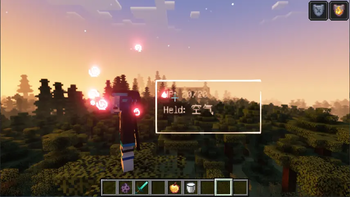
Better Information Display is a Minecraft Forge mod that adds a highly customizable, head-tracking information box to your game. It displays critical player data—such as health and held items—prominently yet unobtrusively in your field of view, perfect for gameplay recording, tutorials, or enhancing your situational awareness in third-person view.
Features
- Dynamic Third-Person Display: A configurable info box that follows the player's perspective, showing vital statistics right where you're looking.
- Core Information:
- Health Bar: Clearly shows current and maximum health (
showHp). - Held Item Display: Shows the name, durability, and enchantments of the item in hand (
showHeldItem). - Status Effects: Toggles display of active potion effects (
showEffects).
- Health Bar: Clearly shows current and maximum health (
- Fully Customizable:
- Size & Position: Precisely adjust the box's
boxWidth,boxHeight, and its 3D offset (offsetX,offsetY,offsetZ) relative to the player's head. - Visual Style: Customize colors for text (
textColorARGB), border (borderColorARGB), and background (backgroundColorARGB). Toggle background, shadow, and see-through effects. - Rendering Control: Fine-tune the overall
scaleand depthzBiasfor perfect integration into your game's visuals.
- Size & Position: Precisely adjust the box's
- Lightweight & Efficient: Built with performance in mind, ensuring minimal impact on your game's frame rate.
- Easy Configuration: All features are controlled via a well-documented config file, allowing for personalized setups without needing to modify code.
Why Download?
- Enhanced Gameplay Clarity: Keep track of your health and tools without cluttering the screen or opening inventories, especially useful in combat or exploration.
- Perfect for Content Creators: Makes vital stats always visible to your audience in third-person shots or tutorials.
- Tailor to Your Taste: With an extensive range of config options, you can make the display look and behave exactly how you want.
- Simple Integration: Just install and tweak the config file—no complex setup required.
Compatibility & Installation
- Minecraft Version: 1.20.1 ONLY
- Mod Loader: Forge ONLY
- Installation:
- Ensure you have Minecraft 1.20.1 and the correct version of Forge installed.
- Download the
.jarfile from the "Files" section of this page. - Place the file into your
.minecraft/modsfolder. - Launch the game! The mod will generate a configuration file on first run.
Configuration
After first launch, you can find the config file at config/bid.toml. All settings listed in the features section can be modified there. The file contains detailed comments explaining each option.
Support & Source Code
- Source Code & Issue Tracking: The full project is open-source and available on GitHub. Please report any bugs or suggest features there.
- License: This mod is licensed under the MIT License.
Credits
Developer: Daonyako
Concept: Created to provide a cleaner, more customizable way to view essential player information in third-person gameplay.
Available Versions
How to Install Better information display on Your Server
Order Server
Order a Minecraft Java server with at least 3 GB RAM (4 GB recommended).
Set forge Loader
In the panel under "Egg", select the forge loader and matching Minecraft version (1.20.1).
Install Mod
Open the mod browser in the dashboard and search for "Better information display". Click "Install" – done! Alternatively, upload the .jar via SFTP to the /mods folder.
Compatibility
Mod Loaders
Minecraft Versions
1.20.1
Server-side
✗ UnsupportedRecommended RAM
4 GB(min. 3 GB)Frequently Asked Questions
Better information display server crashes on startup – what to do?
Most common cause: wrong forge version or insufficient RAM. Check the server log (latest.log) for "OutOfMemoryError" or "Mixin" errors. With Mado Hosting: ensure at least 3 GB RAM is allocated and the loader matches the mod version (1.20.1). You can switch loaders with one click in the panel.
Is Better information display compatible with forge?
Better information display officially supports forge for Minecraft 1.20.1. The Mado dashboard automatically detects incompatible loader combinations.
Server lagging with Better information display – how to optimize performance?
Recommended RAM: 4 GB (per 8 players). Use /spark profiler to check if Better information display consumes the most tick time. Common fixes: reduce server view-distance to 8-10, install "performant" or "starlight" as supplementary mods on Forge. With Mado Hosting, your server runs on NVMe SSDs with dedicated CPU cores for minimal latency.
Rent Modded Server
Install Better information display with just one click on your server.