
Better Peaceful
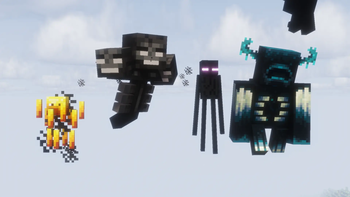
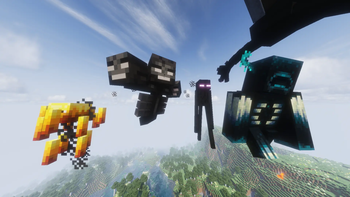
Removes hostile mobs, except for mobs, which you need to beat the ender dragon.
Screenshots

About this Mod
Better Peaceful


Overview
This datapack brings the feeling of Peaceful Mode without removing the possibility of completing the game.
Most hostile mobs are prevented from spawning, creating a calmer survival experience while still allowing players to progress through all major milestones, including defeating the Ender Dragon.
Better Peaceful is perfect for players who enjoy building, exploring, and surviving without constantly fighting hostile creatures.
Features
- Removes most hostile mobs from the game.
- Keeps important progression mobs alive.
- Allows players to access Blaze Rods and Ender Pearls.
- Supports defeating the Ender Dragon.
- Fully configurable mob blacklist.
- Multiplayer-friendly.
- Lightweight and easy to install.
Whitelisted Hostile Mobs
The following hostile mobs are not removed:
minecraft:blaze
minecraft:enderman
minecraft:ender_dragon
minecraft:wither
minecraft:warden
Customizing the Mob Blacklist
To remove or add mobs to the blacklist, open:
Better-Peaceful-1-0-0.zip\data\betterpeaceful\tags\entity_type\banned.json
You can then:
- Add mob IDs to blacklist them.
- Remove mob IDs to allow them to spawn.
⚠️ Important
This datapack is not designed for worlds with the difficulty set to Peaceful.
Instead, it should be used on Easy, Normal, or Hard difficulty. The datapack only removes hostile mobs that are not necessary for completing the game.
Installation
- Download the datapack.
- Move the
.zipfile into your world'sdatapacksfolder. - Run
/reloador restart the world/server. - Enjoy a more relaxed Minecraft experience.
Compatibility
- Singleplayer ✔
- Multiplayer ✔
- Vanilla ✔
- Most datapacks ✔
Have Fun!
Thank you for downloading Better Peaceful. I hope you enjoy a calmer Minecraft adventure while still being able to experience the ender fight.

Available Versions
How to Install Better Peaceful on Your Server
Order Server
Order a Minecraft Java server with at least 3 GB RAM (4 GB recommended).
Set datapack Loader
In the panel under "Egg", select the datapack loader and matching Minecraft version (26.1.2).
Install Mod
Open the mod browser in the dashboard and search for "Better Peaceful". Click "Install" – done! Alternatively, upload the .jar via SFTP to the /mods folder.
Compatibility
Mod Loaders
Minecraft Versions
26.1.2, 26.1.1, 26.1 (+12 more)
Server-side
✓ RequiredRecommended RAM
4 GB(min. 3 GB)Frequently Asked Questions
Better Peaceful server crashes on startup – what to do?
Most common cause: wrong datapack version or insufficient RAM. Check the server log (latest.log) for "OutOfMemoryError" or "Mixin" errors. With Mado Hosting: ensure at least 3 GB RAM is allocated and the loader matches the mod version (26.1.2). You can switch loaders with one click in the panel.
Is Better Peaceful compatible with datapack and fabric and forge and neoforge and quilt?
Better Peaceful officially supports datapack, fabric, forge, neoforge, quilt for Minecraft 26.1.2, 26.1.1, 26.1. Note: Forge and Fabric mods are NOT cross-compatible – pick one loader and stick with it. The Mado dashboard automatically detects incompatible loader combinations.
Server lagging with Better Peaceful – how to optimize performance?
Recommended RAM: 4 GB (per 8 players). Use /spark profiler to check if Better Peaceful consumes the most tick time. Common fixes: reduce server view-distance to 8-10, install "performant" or "starlight" as supplementary mods on Forge. With Mado Hosting, your server runs on NVMe SSDs with dedicated CPU cores for minimal latency.
Similar Mods




Rent Modded Server
Install Better Peaceful with just one click on your server.