
Better Revive
A death & revive system with graves, revive potions, grave compass, revive scroll, Hardcore Support and more!
Screenshots


About this Mod
🪦 Better Revive
A Complete Death & Revive System for Minecraft
Better Revive transforms death in Minecraft into a meaningful, recoverable event.
When you fall, your items don't scatter into the void — they're stored safely inside a grave.
Your friends can bring you back with magical revive potions, and a mystical compass will always guide you home.
⚖️ Built for SMP servers — carefully balanced for PvP, teamwork, and fair recovery.
⚔️ Core Features
🪦 The Grave System
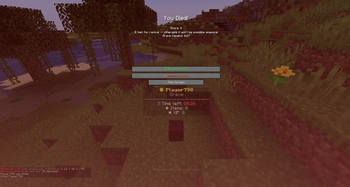
When you die, an invisible grave manifests at your death location — marked by your floating player head and a live countdown timer.
- 🔒 Persistent First Grave — your first grave is permanent until collected or destroyed.
- ⏳ Temporary Backup Grave — if you die again mid-recovery, a second grave appears only during your death screen, allowing teammates to still revive you.
- 🎒 Full Inventory Storage — armor, hotbar, offhand, everything.
- 🖱️ Right-click to recover all items instantly.
- ⚠️ If the timer runs out → items drop publicly for anyone to grab.
💀 Hardcore Mode Support
Play Hardcore with your friends and get one last chance. Enter the Downed State when you die — if a teammate revives you in time, you survive.
📜 Resurrection Scroll
A rare, magical scroll that teleports you directly to your active grave.
Perfect for escaping dangerous dimensions, deep caves, or lava-filled catastrophes.
💊 Revive Potions — 3 Tiers
Brew special potions and revive fallen teammates straight from their death screen — no respawn required.
| Tier | Healing | Debuffs | Debuff Duration |
|---|---|---|---|
| Revive Potion I | ❤ 1 Heart | Slowness, Hunger, Weakness | 30s |
| Revive Potion II | ❤❤❤ 3 Hearts | Slowness, Hunger, Weakness | 15s |
| Revive Potion III | ❤❤❤❤❤ 5 Hearts | None! | — |
How It Works
- 💀 A player dies → their grave appears.
- 🧪 A teammate throws a Revive Potion at the grave.
- 🖥️ The dead player sees Accept / Decline buttons on their death screen.
- ✅ Accept → teleported back with full inventory + tier-based debuffs.
- ❌ Decline → normal respawn, grave stays intact for manual pickup.
🧭 The Grave Compass
After a normal respawn, you automatically receive a Grave Compass — enchanted with Lodestone tracking.
- ➡️ Always points toward your grave.
- 📏 Shows direction + distance in the action bar:
☠ Grave: ⬆ 145m (Y: 64) - 🖱️ Right-click to open the Grave Contents Screen — preview every item inside.
- 💥 Dissolve your grave remotely — drop all items publicly for looters.
- 🌌 Works across dimensions — displays "Other Dimension" if your grave is in the Nether or End.
- 🔗 The compass cannot be dropped and is removed automatically when the grave is collected, dissolved, or expires.
🔥 Instant Death Mechanics
Some deaths are simply unrecoverable — no grave, no revive, no second chances.
- 🌋 Lava Death → instant permanent death, no grave spawns.
- 💀 Void Death → items are lost, no grave can be placed.
⚠️ This keeps high-risk zones actually risky — no cheesing lava lakes or the void with infinite revives.
⏱️ Revive Cooldown (Anti-Spam)
After being revived, a Revive Lock (default 60s, configurable) prevents instant re-revives.
- 🔵 Lock timer shown in the action bar and on the grave itself.
- 🚫 Potions thrown during the lock notify both players with remaining time.
🧪 Recipes
🍶 Brewing
| Potion | Base | Ingredient |
|---|---|---|
| Revive Potion I | Splash Potion | Golden Apple |
| Revive Potion II | Revive Potion I | Honeycomb |
| Revive Potion III | Revive Potion II | Blaze Rod |
🛠️ Crafting
- Resurrection Scroll —
1x Paper(center) surrounded by8x Revive Potion IIIin a Crafting Table.
🔧 Admin Commands
All commands require OP level 2.
| Command | Description |
|---|---|
/betterrevive cooldown |
Show current revive lock duration |
/betterrevive cooldown <seconds> |
Set revive lock duration (0–600s) |
/betterrevive graveduration |
Show current grave duration |
/betterrevive graveduration <seconds> |
Set grave duration (30–3600s) |
/betterrevive xp |
Show XP retention percentage |
/betterrevive xp <percentage> |
Set XP retention (0–100%) |
/betterrevive info |
Show all settings + color legend |
/betterrevive cleanup |
Remove orphaned grave display entities |
⚙️ Config File
Better Revive creates a server config at:
config/better_revive.json
The config persists across restarts and lets server owners tune revive timing, grave behavior, XP recovery, and debugging.
{
  "cooldownSeconds": 60,
  "graveDurationSeconds": 180,
  "xpPercentage": 100,
  "forceLoadGraveChunks": false,
  "graveTextUpdateIntervalTicks": 20,
  "debugLogging": false
}
| Setting | Description |
|---|---|
cooldownSeconds |
Revive Lock duration after a player has been revived. |
graveDurationSeconds |
How long a grave stays protected before it expires and drops its contents publicly. |
xpPercentage |
How much XP is stored inside the grave and restored. |
forceLoadGraveChunks |
If enabled, the chunk containing a grave stays force-loaded so the grave timer and display can continue updating even when no player is nearby. Disabled by default for better server performance. |
graveTextUpdateIntervalTicks |
How often the floating grave text updates. Minimum: 20 ticks / 1 second. |
debugLogging |
Enables extra server log output for debugging. |
⚠️ For most servers,
forceLoadGraveChunksshould stay disabled unless you specifically want graves to keep ticking while nobody is nearby.
🎮 Gameplay Scenarios
🟢 Scenario 1 — Normal Death
- You die → grave appears → death message with coordinates.
- You respawn → receive a Grave Compass.
- Follow the compass → right-click the grave → items restored to original slots.
- Compass vanishes automatically.
🔵 Scenario 2 — Revived by a Teammate
- You die → grave appears.
- Teammate throws a Revive Potion.
- You see Accept / Decline on your death screen.
- Accept → teleport back with items + debuffs.
- 60s Revive Lock begins.
🔴 Scenario 3 — The Grave Expires
- You die → grave appears with countdown.
- Timer expires → items drop publicly.
- Compass is removed → notification sent.
- Anyone can loot the drops.
🌍 Multi-Dimension Support
- ✅ Works in Overworld, Nether, and End.
- 🧪 Revive Potions must be thrown in the same dimension as the grave.
- 🧭 Compass shows "Other Dimension" across worlds.
- 🌀 Revive teleportation works across dimensions.
📋 Technical Details
| Property | Value |
|---|---|
| Mod Loader | Fabric / NeoForge |
| Server-side | ✅ Yes |
| Client-side | ✅ Required (death screen UI + compass HUD) |
| keepInventory | ✅ Respected — graves won't spawn if enabled |
🔌 Mod Compatibility
Better Revive plays nicely with popular inventory-extending mods:
- ✅ Accessories Mod — accessory slots are safely stored in the grave NBT and fully restored.
- ✅ Trinkets & Curios Mod — trinket slots handled separately and restored on revive or grave collection.
- 🧭 The Grave Compass is protected from vanilla inventory drops — it will never be lost on re-death.
🗣️ Language Support
- 🇬🇧 English (default)
- 🇩🇪 German
- 🌐 All strings fully translatable — contributions welcome!
💡 PvP Balance Philosophy
Better Revive was engineered for competitive servers:
- 🛡️ Revive Lock prevents revive-spam in extended fights.
- ⚔️ Tier-based debuffs make cheap revives a real risk (1 HP + Slowness + Weakness).
- 🎯 Revives only work during the death screen — no post-respawn cheese.
- 🤝 Accept/Decline prevents unwanted revives.
- 🔒 Dead players cannot collect items before deciding — no exploit vectors.
- ⏳ Graves have a time limit — no permanent storage abuse.
- 🌋 Lava & void deaths are final — no grave, no recovery. High-risk zones stay high-risk.
🚀 Roadmap
| Version | Feature |
|---|---|
| 1.1.0 | ⚡ Performance Optimization (server-side grave handling) |
| 1.1.5 | 📜 New Revive Scroll Item |
| 1.1.6 | 🎨 New Revive Potion Texture |
| 1.1.7 | 🔧 NeoForge Port |
| 1.1.7 | 🎨 New Revive Texture |
| 1.2.5 | 🐛 Major Bug Fixes |
| 2.0.0 | 💀 Hardcore Support |
❤️ Credits & Links
Made with ❤️ by Mrstilu2k6
🔗 Modrinth · 🔗 CurseForge · ☕ PayPal
💬 Found a bug? Have a suggestion? Drop it in the comments or open an issue — every piece of feedback helps shape the 2.0 update!
☕ Enjoying the mod? If you'd like to support my work, a small tip is greatly appreciated. Every bit of support helps me dedicate more time to updates and new features!
Available Versions
How to Install Better Revive on Your Server
Order Server
Order a Minecraft Java server with at least 3 GB RAM (4 GB recommended).
Set fabric Loader
In the panel under "Egg", select the fabric loader and matching Minecraft version (26.1.2).
Install Mod
Open the mod browser in the dashboard and search for "Better Revive". Click "Install" – done! Alternatively, upload the .jar via SFTP to the /mods folder.
Compatibility
Mod Loaders
Minecraft Versions
26.1.2, 26.1.1, 26.1 (+3 more)
Server-side
✓ RequiredRecommended RAM
4 GB(min. 3 GB)Frequently Asked Questions
Better Revive server crashes on startup – what to do?
Most common cause: wrong fabric version or insufficient RAM. Check the server log (latest.log) for "OutOfMemoryError" or "Mixin" errors. With Mado Hosting: ensure at least 3 GB RAM is allocated and the loader matches the mod version (26.1.2). You can switch loaders with one click in the panel.
Is Better Revive compatible with fabric and neoforge?
Better Revive officially supports fabric, neoforge for Minecraft 26.1.2, 26.1.1, 26.1. The Mado dashboard automatically detects incompatible loader combinations.
Server lagging with Better Revive – how to optimize performance?
Recommended RAM: 4 GB (per 8 players). Use /spark profiler to check if Better Revive consumes the most tick time. Common fixes: reduce server view-distance to 8-10, install "performant" or "starlight" as supplementary mods on Forge. With Mado Hosting, your server runs on NVMe SSDs with dedicated CPU cores for minimal latency.
Similar Mods




Rent Modded Server
Install Better Revive with just one click on your server.