
betterbackups
a little mod to view your backups in minecraft
Screenshots
About this Mod
BetterBackups
Never lose your worlds again.
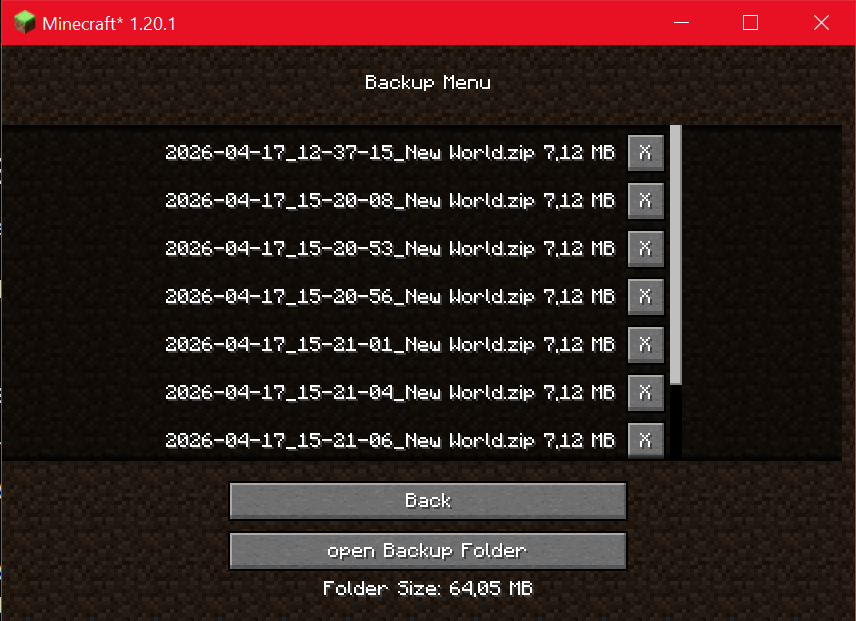
BetterBackups adds a simple and user-friendly backup manager directly into Minecraft. Browse, manage, and organize your world backups without leaving the game.
Features
✅ In-game backup browser
✅ Displays all backups from the Minecraft backups folder
✅ Shows the size of every backup
✅ Displays the total size of the backup folder
✅ Open the backup folder with a single click
✅ Clean and lightweight interface
✅ Fully integrated into Minecraft's GUI
Why BetterBackups?
Managing backups through your file explorer can be inconvenient, especially when you have dozens of backup files. BetterBackups provides a dedicated screen where you can quickly view and organize your backups directly from inside Minecraft.
Whether you're a casual player or a modpack creator, BetterBackups helps you keep track of your saved worlds and storage usage.
Current Functionality
- View all available backups
- Display backup file sizes
- Display total backup folder size
- Open the backup folder from within the game
Planned Features
- Restore backups directly in-game
- Delete backups from the backup screen
- Search and sort backups
- Backup creation with one click
- Additional information such as creation date and world name
Compatibility
- Client-side mod
- Works with existing Minecraft backups
- No server installation required
Feedback & Suggestions
Found a bug or have an idea for a new feature? Feel free to leave feedback and help improve BetterBackups.
Keep your worlds safe. Manage your backups with ease. 📦💾
Available Versions
How to Install betterbackups on Your Server
Order Server
Order a Minecraft Java server with at least 3 GB RAM (4 GB recommended).
Set fabric Loader
In the panel under "Egg", select the fabric loader and matching Minecraft version (1.20.6).
Install Mod
Open the mod browser in the dashboard and search for "betterbackups". Click "Install" – done! Alternatively, upload the .jar via SFTP to the /mods folder.
Compatibility
Mod Loaders
Minecraft Versions
1.20.6, 1.20.5, 1.20.4 (+3 more)
Server-side
✗ UnsupportedRecommended RAM
4 GB(min. 3 GB)Frequently Asked Questions
betterbackups server crashes on startup – what to do?
Most common cause: wrong fabric version or insufficient RAM. Check the server log (latest.log) for "OutOfMemoryError" or "Mixin" errors. With Mado Hosting: ensure at least 3 GB RAM is allocated and the loader matches the mod version (1.20.6). You can switch loaders with one click in the panel.
Is betterbackups compatible with fabric?
betterbackups officially supports fabric for Minecraft 1.20.6, 1.20.5, 1.20.4. The Mado dashboard automatically detects incompatible loader combinations.
Server lagging with betterbackups – how to optimize performance?
Recommended RAM: 4 GB (per 8 players). Use /spark profiler to check if betterbackups consumes the most tick time. Common fixes: reduce server view-distance to 8-10, install "performant" or "starlight" as supplementary mods on Forge. With Mado Hosting, your server runs on NVMe SSDs with dedicated CPU cores for minimal latency.
Similar Mods



Rent Modded Server
Install betterbackups with just one click on your server.