
Better Healthbar
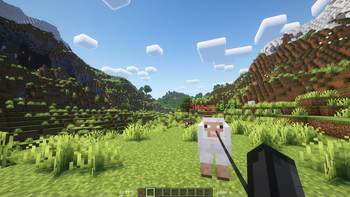
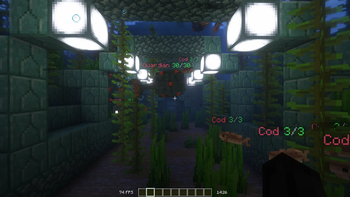
A Minecraft datapack and mod that displays health bars and damage indicators for almost all mobs. Everything can be configured in the in-game chat menu.
Screenshots
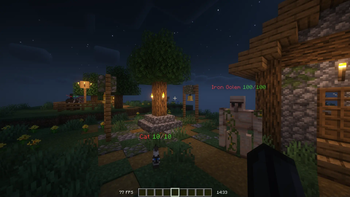
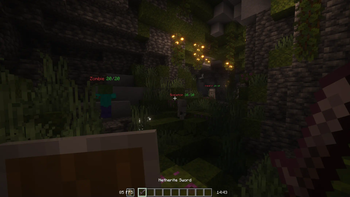
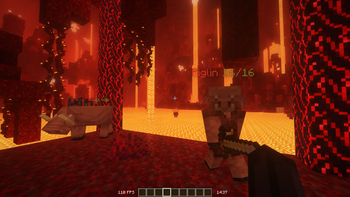
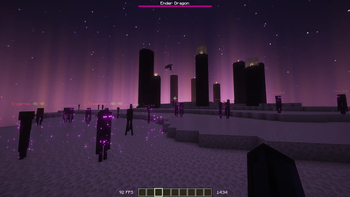
About this Mod





📖 Description
A fully customizable datapack for Minecraft 1.20.6+ that displays a health bar for nearly all mobs. This datapack also includes a damage display showing how much damage you did. The health bar and damage display can both be customized to suit your preferences and colorful imagination while maintaining the Minecraft aesthetic. It works seamlessly in both single-player and multiplayer modes.
⭐ Features
• Functional Healthbars that update instantly.
• Works with custom names from nametags.
• Exclude specific mobs from the healthbar.
• 100% Multiplayer supported.
• It's simple to adjust settings using the chat menu.
🎗️ Compatibility

⚙️ Installation
For version v3 and above, you only need to enter the world after installing it and it should automatically install everything for you.
Use /trigger HB.Settings to open the chat menu.
Uninstalling
Use /function healthbar:handler/settings/uninstall to uninstall everything and only then you can remove the datapack/mod. This makes sure that there is nothing left of the healthbars.
⚡️IMPORTANT REMINDER
You need permissions to use commands to install and configure the settings!
This means that commands are turned on in singleplayer and OP in multiplayer.
Available Versions
How to Install Better Healthbar on Your Server
Order Server
Order a Minecraft Java server with at least 3 GB RAM (4 GB recommended).
Set datapack Loader
In the panel under "Egg", select the datapack loader and matching Minecraft version (26.1.2).
Install Mod
Open the mod browser in the dashboard and search for "Better Healthbar". Click "Install" – done! Alternatively, upload the .jar via SFTP to the /mods folder.
Compatibility
Mod Loaders
Minecraft Versions
26.1.2, 26.1.1, 26.1 (+16 more)
Server-side
✓ RequiredRecommended RAM
4 GB(min. 3 GB)Frequently Asked Questions
Better Healthbar server crashes on startup – what to do?
Most common cause: wrong datapack version or insufficient RAM. Check the server log (latest.log) for "OutOfMemoryError" or "Mixin" errors. With Mado Hosting: ensure at least 3 GB RAM is allocated and the loader matches the mod version (26.1.2). You can switch loaders with one click in the panel.
Is Better Healthbar compatible with datapack and fabric and forge and neoforge and quilt?
Better Healthbar officially supports datapack, fabric, forge, neoforge, quilt for Minecraft 26.1.2, 26.1.1, 26.1. Note: Forge and Fabric mods are NOT cross-compatible – pick one loader and stick with it. The Mado dashboard automatically detects incompatible loader combinations.
Server lagging with Better Healthbar – how to optimize performance?
Recommended RAM: 4 GB (per 8 players). Use /spark profiler to check if Better Healthbar consumes the most tick time. Common fixes: reduce server view-distance to 8-10, install "performant" or "starlight" as supplementary mods on Forge. With Mado Hosting, your server runs on NVMe SSDs with dedicated CPU cores for minimal latency.
Similar Mods




Rent Modded Server
Install Better Healthbar with just one click on your server.