
BetterHP
A better visual system for your vanilla HUD ! Fully customizable
Screenshots

About this Mod

Overview
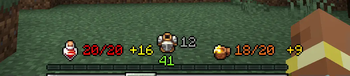
Better HP is a Minecraft client-only mod designed to enhance your gameplay experience by offering a more intuitive and informative way to view and manage your health, armor, and hunger stats in-game. By replacing traditional heart and armor icons with a sleek, customizable numerical system, Better HP allows you to track your health status at a glance.
NO NEED FOR OVERFLOW MODS! Better HP will display over 20 HP and over 20 armor, syncing seamlessly with the player!
Join Our Community! Check out Pixel Dream Studios - an official partner!
Join my Personal Discord here -> Bandit Discord
Features
Numerical Health Display: Experience precision with your health shown as numbers instead of vague hearts. Know exactly how much damage you've taken and how much health you have left!
Armor Value Display: Better HP shows your armor value right on the HUD, eliminating the need to guess your protection level and providing clear insight into your defenses.
Absorption Hearts: Quickly assess the extra protection provided by absorption effects like Golden Apples with a clear display next to your health.
Numerical Hunger Display: Track your hunger with precise numbers, making it easy to manage your food needs efficiently.
Effect-Driven Colors: Visualize the impact of status effects with dynamically changing colors:
Wither Effect: Health text turns a sinister dark purple.
Freezing Effect: Experience an icy aqua color. -
Poison Effect: Watch as your health turns a sickly green.
Customizable Positioning: Optimize the placement of health, armor, and hunger numbers so they're perfectly aligned with other HUD elements, keeping your interface clean and informative.
Configuration File: Easily enable, disable, or customize features to suit your personal preferences.
How It Works
Better HP integrates seamlessly into the Minecraft GUI, replacing default health, armor, and hunger bars. By intercepting the rendering process, the mod provides a numerical display of health, armor, and hunger values. It also adapts to different status effects by changing text color to match the effect currently applied to your character.
Compatibility
Minecraft Version: 1.20.1
Forge Version: 47.0.0 and above
Fabric Version: Compatible with Fabric Loader 0.14.21 and above
Client Only: Designed to run on the client side only, ensuring it doesn't affect server performance and is safe to use on any server that allows client mods.
Installation
Download: Get the latest version of Better HP from the CurseForge page.
Install Forge/Fabric: Ensure you have Forge or Fabric installed and running on your Minecraft client.
Add to Mods Folder: Place the downloaded mod file into your Minecraft mods folder.
Launch Minecraft: Start Minecraft with the Forge or Fabric profile and enjoy the enhanced health, armor, and hunger display!
Frequently Asked Questions (FAQ)
Q: Will Better HP work with other mods?
A: Yes, Better HP is compatible with most other mods. It only changes the client-side HUD, so it doesn't interfere with gameplay mechanics.
Q: Can I change the positioning of the health, armor, Oxygen, and hunger numbers?
A: Yes, you can! The config file allows you to enable or disable armor, health, hunger displays, and customize their locations.
Q: Does this mod affect server performance?
A: No, Better HP is a client-only mod and doesn't interact with server operations. You can use it on any server that permits client-side mods.
Planned Features
Customizable Colors: Set your preferred colors for health, armor, and hunger displays.
Advanced Configuration: Fine-tune the positioning of health, armor, and hunger displays to suit your personal preferences.
HUD Integration: Additional HUD elements for other stats like stamina (future updates).
Summary
This updated description emphasizes the key features of Better HP, including the newly added numerical hunger display, compatibility with Fabric, and client-side-only functionality. The improved configuration options and planned features highlight the mod's flexibility and future growth potential.
If you have any more specific requirements or additional features you'd like to highlight, feel free to let me know!
Available Versions
How to Install BetterHP on Your Server
Order Server
Order a Minecraft Java server with at least 3 GB RAM (4 GB recommended).
Set fabric Loader
In the panel under "Egg", select the fabric loader and matching Minecraft version (26.1.2).
Install Mod
Open the mod browser in the dashboard and search for "BetterHP". Click "Install" – done! Alternatively, upload the .jar via SFTP to the /mods folder.
Compatibility
Mod Loaders
Minecraft Versions
26.1.2, 26.1.1, 26.1 (+12 more)
Server-side
✗ UnsupportedRecommended RAM
4 GB(min. 3 GB)Frequently Asked Questions
BetterHP server crashes on startup – what to do?
Most common cause: wrong fabric version or insufficient RAM. Check the server log (latest.log) for "OutOfMemoryError" or "Mixin" errors. With Mado Hosting: ensure at least 3 GB RAM is allocated and the loader matches the mod version (26.1.2). You can switch loaders with one click in the panel.
Is BetterHP compatible with fabric and forge and neoforge?
BetterHP officially supports fabric, forge, neoforge for Minecraft 26.1.2, 26.1.1, 26.1. Note: Forge and Fabric mods are NOT cross-compatible – pick one loader and stick with it. The Mado dashboard automatically detects incompatible loader combinations.
Server lagging with BetterHP – how to optimize performance?
Recommended RAM: 4 GB (per 8 players). Use /spark profiler to check if BetterHP consumes the most tick time. Common fixes: reduce server view-distance to 8-10, install "performant" or "starlight" as supplementary mods on Forge. With Mado Hosting, your server runs on NVMe SSDs with dedicated CPU cores for minimal latency.
Similar Mods




Rent Modded Server
Install BetterHP with just one click on your server.