
BetterRewards
Create and manage promotional codes to reward players with items. Perfect for events, giveaways, and starter bonuses. Includes anti-abuse protection and real-time statistics.
Screenshots

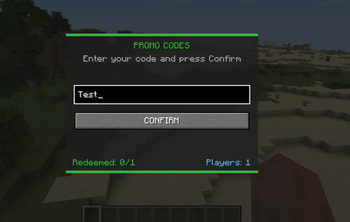
About this Mod
BetterRewards Mod — Minecraft Forge 1.16.5
A complete promotional code system for Minecraft servers. Server administrators can create codes that reward players with items, with full control over quantities, limits, and expiration dates.
Overview
PromoCode Mod adds an intuitive in-game interface for redeeming promotional codes. Perfect for:
- 🎁 Starter rewards for new players
- 🎉 Event bonuses (seasonal, special occasions)
- 🏆 Achievement rewards (giveaways, contests)
- 👥 Community perks (Discord members, supporters)
Key Features
✅ Simple GUI — Players press /promo and enter a code
✅ Flexible rewards — Multiple items per code, customisable quantities
✅ Admin controls — Create/delete codes in-game using commands
✅ Usage limits — Set maximum redemptions or expiration dates
✅ Anti-abuse — Each player can claim each code only once
✅ Statistics — Track total items distributed and unique players
✅ Offline-friendly — Works perfectly on offline-mode servers
✅ Auto-saves — All data persisted to promocodes_data.json
Installation
For Server Administrators
Download the
.jarfile from ModRinth or CurseForgePlace it in your Forge 1.16.5
mods/folderStart the server — configuration files generate automatically
Restart the server
For Players
The mod is server-side, so you only need it if your server uses it. It'll be on the server's mod list.
Quick Start — Creating Your First Code
Via In-Game Command (Easiest)
/promo create WELCOME minecraft:diamond 5
Now players can type /promo, enter WELCOME, and get 5 diamonds!
Advanced: Multiple Items
/promo create STARTER minecraft:diamond 3 minecraft:iron_sword 1 minecraft:bread 10 0 0
Players get: 3 diamonds, 1 iron sword, 10 bread. Unlimited uses, never expires.
Advanced: Limited Time Event
/promo createraw HALLOWEEN:minecraft:pumpkin,20;minecraft:orange_dye,10|50|0
Only 50 total redemptions, never expires, includes 20 pumpkins and 10 orange dye.
Delete Old Codes
/promo delete WELCOME
Complete Command Reference
Player Commands
| Command | Purpose |
|---|---|
/promo |
Open the redemption GUI |
/promocode |
Same as /promo |
/promo help |
Display all available commands |
Administrator Commands (Op Level 2+)
Create Code:
/promo create <CODE> <item> <count> [maxUses] [expiryEpoch]
/promo create <CODE> <item1> <count1> <item2> <count2> [item3] [count3] [maxUses] [expiryEpoch]
/promo createraw <CODE:item1,count1;item2,count2|maxUses|expiryEpoch>
Delete Code:
/promo delete <CODE>
Show Help:
/promo help
Parameters Explained
| Parameter | Value | Notes |
|---|---|---|
CODE |
Letters, numbers, underscores, hyphens | WELCOME, SUMMER2024, EVENT_01 |
item |
Minecraft item ID | Format: namespace:name (e.g., minecraft:diamond) |
count |
1–64 | Quantity per item in the reward |
maxUses |
0–999 | 0 = unlimited redemptions |
expiryEpoch |
Unix timestamp (seconds) | 0 = never expires; see below for examples |
Expiry Date Examples
Convert to Unix epoch using unixtimestamp.com:
| Date | Epoch |
|---|---|
| 1 January 2025 | 1735689600 |
| 1 July 2025 | 1751500800 |
| 31 December 2025 | 1767225600 |
Set to 0 for no expiration.
Common Item IDs
minecraft:diamond              minecraft:emerald
minecraft:golden_apple         minecraft:enchanted_golden_apple
minecraft:netherite_sword      minecraft:diamond_pickaxe
minecraft:diamond_axe          minecraft:iron_sword
minecraft:respawn_anchor       minecraft:bread
minecraft:coal                 minecraft:iron_ingot
minecraft:oak_log              minecraft:obsidian
minecraft:amethyst_block       minecraft:copper_ore
Tip: Hover over items in Minecraft's creative inventory to see their exact ID.
Configuration File
[[promocodes]]
codes = [
    "EARLY_EASTER:minecraft:diamond,5;minecraft:golden_apple,3|100|0",
    "FREESTART:minecraft:iron_sword,1;minecraft:bread,10|200|0",
    "DIAMONDS4ALL:minecraft:diamond,64|10|0"
]
Format: CODE:item1,count1;item2,count2|maxUses|expiryEpoch
Changes take effect on server restart.
How It Works
- Player opens the GUI:
/promo - Types the code name:
WELCOME - Clicks "CONFIRM" (or presses Enter key)
- If valid: items appear in inventory
- Overflow drops at feet if inventory full
- If invalid: error message displayed
- Already used, expired, max uses reached, invalid code
Statistics shown in the GUI:
- Redeemed:
25/100(25 of 100 available items claimed) - Players:
10(10 unique players have redeemed something)
Anti-Abuse Protection
Each player can redeem each code exactly once. This protection persists across:
- Name changes
- Multiple accounts on the same computer
- Server restarts
- Reinstalling the game
⚠️ Note: On offline-mode servers, users could theoretically use modified clients to bypass this. Server administrators should monitor usage and delete problematic codes if needed.
Data Storage
Redemption data is automatically saved to:
world_folder/promocodes_data.json
Contents:
- Which codes each player has redeemed
- Total redemptions per code
- Custom codes created via commands
Do not edit manually unless backing up. The mod manages this file automatically.
Real-World Examples
Example 1: Welcome Bonus
/promo create WELCOME minecraft:diamond,5 minecraft:iron_sword,1 minecraft:bread,20 0 0
- Unlimited uses
- Never expires
- Rewards: 5 diamonds, iron sword, 20 bread
Example 2: Anniversary Event (100 uses, expires 1 January 2026)
/promo create ANNIVERSARY minecraft:golden_apple,3 100 1735689600
Example 3: Complex Reward (3 items, 50 uses, never expires)
/promo createraw STARTER:minecraft:diamond,10;minecraft:emerald,5;minecraft:enchanted_golden_apple,2|50|0
Example 4: Seasonal Giveaway (expires 31 December 2025)
/promo create XMAS minecraft:red_concrete,20 minecraft:green_concrete,20 minecraft:gold_block,5 0 1767225600
Troubleshooting
Issue: "Invalid item" error when creating a code
- Solution: Check the item ID spelling (e.g.
minecraft:acacia_lognotacacia log)
Issue: "Code already exists" when creating
- Solution: Delete the old code first:
/promo delete OLDCODE
Issue: Player can't redeem, but code looks valid
- Solution: Check if:
- Player already redeemed it (1 per player)
- Code has expired (check expiryEpoch)
- Max uses reached (check redemption count in /promo GUI stats)
Issue: Items aren't appearing in inventory
- Solution: Check inventory space. Overflow items drop at feet.
Issue: Server crashed after changing config
Compatibility
- Minecraft Version: 1.16.5
- Modloader: Forge
- Client/Server: Can be server and client (recommended)
- Offline Mode:
- Online Mode:
Known Limitations
- Maximum 3 items per code via simple command (use
createrawfor more) - Item count limited to 1–64 per item
- No GUI for admins to create codes (use commands or config file)
- Codes are case-insensitive but stored in uppercase
Licence
Redistribution without credit is not permitted.
Available Versions
How to Install BetterRewards on Your Server
Order Server
Order a Minecraft Java server with at least 3 GB RAM (4 GB recommended).
Set forge Loader
In the panel under "Egg", select the forge loader and matching Minecraft version (1.16.5).
Install Mod
Open the mod browser in the dashboard and search for "BetterRewards". Click "Install" – done! Alternatively, upload the .jar via SFTP to the /mods folder.
Compatibility
Mod Loaders
Minecraft Versions
1.16.5
Server-side
✓ RequiredRecommended RAM
4 GB(min. 3 GB)Frequently Asked Questions
BetterRewards server crashes on startup – what to do?
Most common cause: wrong forge version or insufficient RAM. Check the server log (latest.log) for "OutOfMemoryError" or "Mixin" errors. With Mado Hosting: ensure at least 3 GB RAM is allocated and the loader matches the mod version (1.16.5). You can switch loaders with one click in the panel.
Is BetterRewards compatible with forge?
BetterRewards officially supports forge for Minecraft 1.16.5. The Mado dashboard automatically detects incompatible loader combinations.
Server lagging with BetterRewards – how to optimize performance?
Recommended RAM: 4 GB (per 8 players). Use /spark profiler to check if BetterRewards consumes the most tick time. Common fixes: reduce server view-distance to 8-10, install "performant" or "starlight" as supplementary mods on Forge. With Mado Hosting, your server runs on NVMe SSDs with dedicated CPU cores for minimal latency.
Similar Mods




![CobbleDollars [Cobblemon Addon]](https://cdn.modrinth.com/data/s7N7AsqL/684040a264fc1d7f9b856ec5d2da39767398c7ad.png)
Rent Modded Server
Install BetterRewards with just one click on your server.