
BetterTeams
A Teams mod with a built-in custom tab bar. Lots of features and a lot of fun.
Screenshots
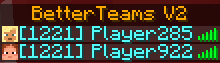


About this Mod
BetterTeams
Overview
BetterTeams is a Fabric mod that provides a comprehensive and user-friendly team system for multiplayer servers. With colored teams and simple commands, players can collaborate, communicate, and stay organized.
Features
Colored Teams: Create teams with individual Minecraft colors
Comprehensive Invitation System: Invite players, accept or decline invitations
Team Chat: Communicate privately with your team members
Team Management: Create teams, rename, kick members and more
Simple Commands: Intuitive command system with tab completion
Ownership Rights: Teams have owners with special privileges
Admin Commands: Server administrators can remove teams
Configurable Formatting: Toggle chat and tab-list team formatting on/off
Custom Tab-List: Beautiful server tab-list with TPS, ping, and rotating messages
Language Available in English and German (/bteam language en/de)
Commands
Player Commands
- /bteam create
- Create a new team with color - /bteam colors - Show all available team colors
- /bteam invite
- Invite a player to your team - /bteam accept
- Accept a team invitation - /bteam decline
- Decline a team invitation - /bteam leave - Leave your current team
- /bteam kick
- Remove a player from your team - /bteam info - Show information about your team
- /bteam msg
- Send a message to all team members - /bteam transfer
- Transfer team ownership - /bteam rename
- Rename your team - /bteam changecolor
- Change your team's color - /bteam support - Get help and show credits
- /bteam help - Show all available commands
Admin Commands (OP required)
- /bteam list - Show all teams on the server
- /bteam remove
- Remove any team from the server - /bteam config status - Show current formatting configuration
- /bteam config tablist <true/false> - Toggle tab-list team formatting
- /bteam config chat <true/false> - Toggle chat team formatting
Why BetterTeams v2?
BetterTeams v2 was designed to enhance the multiplayer experience through simple organization. Whether for minigames, survival servers, or roleplaying - BetterTeams v2 provides an intuitive way to group players and promote collaboration.
Installation
Install
Download BetterTeams and place the .jar file in your mods folder on your Server and in your Client Modpack
Restart your server and start creating teams!
TabList & Chat Configuration
Customize your server's appearance and control team formatting!
Toggle Team Formatting (Admin only)
/bteam config tablist false    # Disable [TeamName] in tab-list
/bteam config chat false       # Disable [TeamName] in chat
/bteam config status          # Check current settings
Config File
Edit config/betterteamsv2/tablist.json to customize:
{
  "enableTabListFormatting": true,    // Show teams in tab-list
  "enableChatFormatting": true,       // Show teams in chat
  "serverName": "Your Server Name",
  "rotatingMessages": ["Message 1", "Message 2"]
}
Available colors: DARK_RED, RED, GOLD, YELLOW, DARK_GREEN, GREEN, AQUA, DARK_AQUA, DARK_BLUE, BLUE, LIGHT_PURPLE, DARK_PURPLE, WHITE, GRAY, DARK_GRAY, BLACK
Formatting Examples
With team formatting enabled:
- Tab-list:
[TeamName] PlayerName - Chat:
[TeamName] PlayerName: Hello!
With team formatting disabled:
- Tab-list:
PlayerName - Chat:
PlayerName: Hello!
Compatibility
Fabric API required
Compatible with most other Fabric mods
Text Placeholder API implemented
Future Plans
- Additional team customization
- Extended permissions
- Updating to more Versions
For Help add @.t4bzzz on Discord
Available Versions
How to Install BetterTeams on Your Server
Order Server
Order a Minecraft Java server with at least 3 GB RAM (4 GB recommended).
Set fabric Loader
In the panel under "Egg", select the fabric loader and matching Minecraft version (1.21.1).
Install Mod
Open the mod browser in the dashboard and search for "BetterTeams". Click "Install" – done! Alternatively, upload the .jar via SFTP to the /mods folder.
Compatibility
Mod Loaders
Minecraft Versions
1.21.1
Server-side
✓ RequiredRecommended RAM
4 GB(min. 3 GB)Frequently Asked Questions
BetterTeams server crashes on startup – what to do?
Most common cause: wrong fabric version or insufficient RAM. Check the server log (latest.log) for "OutOfMemoryError" or "Mixin" errors. With Mado Hosting: ensure at least 3 GB RAM is allocated and the loader matches the mod version (1.21.1). You can switch loaders with one click in the panel.
Is BetterTeams compatible with fabric?
BetterTeams officially supports fabric for Minecraft 1.21.1. The Mado dashboard automatically detects incompatible loader combinations.
Server lagging with BetterTeams – how to optimize performance?
Recommended RAM: 4 GB (per 8 players). Use /spark profiler to check if BetterTeams consumes the most tick time. Common fixes: reduce server view-distance to 8-10, install "performant" or "starlight" as supplementary mods on Forge. With Mado Hosting, your server runs on NVMe SSDs with dedicated CPU cores for minimal latency.
Similar Mods




![CobbleDollars [Cobblemon Addon]](https://cdn.modrinth.com/data/s7N7AsqL/684040a264fc1d7f9b856ec5d2da39767398c7ad.png)
Rent Modded Server
Install BetterTeams with just one click on your server.