
BetterTimer
A timer fo minecraft challanges.
Screenshots
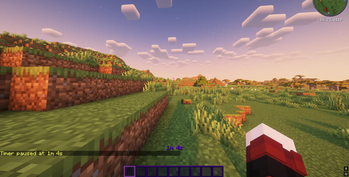
About this Mod
MC Timer Mod
A simple yet powerful timer mod for Minecraft that lets you track your gameplay sessions, speedruns, or any timed activities with an elegant HUD display.
Features
Timer Commands
/timer start- Start the timer or resume from pause/timer pause- Pause the running timer/timer reset- Reset the timer to zero
HUD Display
- Clean, minimalist timer display above your hotbar
- Smart formatting:
1d 1h 1m 1s(only shows non-zero values) - Always visible without cluttering your screen
- Color-coded status: white when running, yellow when paused
Customization
Configure every aspect of the timer through the Mod Menu integration:
Colors
- Customize normal and paused state colors
- Use hex codes for precise color control
- Quick presets: White, Yellow, Red, Green, Blue, Magenta, Cyan, Orange
Animations
- None - Classic static display
- Rainbow - Smooth color cycling effect
- Pulse - Gentle breathing animation
Timer Persistence
Your timer state is automatically saved and restored when you restart the game, so you never lose track of your progress.
Requirements
- Minecraft: 1.21.4
- Fabric Loader: 0.16.9 or higher
- Fabric API: 0.110.0+1.21.4 or higher
- Mod Menu: Recommended for easy configuration access
Use Cases
- Speedrunning: Track your run times with precision
- Survival Challenges: Monitor how long you've survived
- Building Projects: Time your mega-builds
- Hardcore Worlds: Track your hardcore survival time
- General Gameplay: Keep track of your session length
Configuration
Access the configuration screen through Mod Menu or by editing the config file at .minecraft/config/mctimer.json
Made with ❤️ for the Minecraft community
Available Versions
How to Install BetterTimer on Your Server
Order Server
Order a Minecraft Java server with at least 3 GB RAM (4 GB recommended).
Set fabric Loader
In the panel under "Egg", select the fabric loader and matching Minecraft version (1.21.10).
Install Mod
Open the mod browser in the dashboard and search for "BetterTimer". Click "Install" – done! Alternatively, upload the .jar via SFTP to the /mods folder.
Compatibility
Mod Loaders
Minecraft Versions
1.21.10, 1.21.9, 1.21.8 (+4 more)
Server-side
✗ UnsupportedRecommended RAM
4 GB(min. 3 GB)Frequently Asked Questions
BetterTimer server crashes on startup – what to do?
Most common cause: wrong fabric version or insufficient RAM. Check the server log (latest.log) for "OutOfMemoryError" or "Mixin" errors. With Mado Hosting: ensure at least 3 GB RAM is allocated and the loader matches the mod version (1.21.10). You can switch loaders with one click in the panel.
Is BetterTimer compatible with fabric?
BetterTimer officially supports fabric for Minecraft 1.21.10, 1.21.9, 1.21.8. The Mado dashboard automatically detects incompatible loader combinations.
Server lagging with BetterTimer – how to optimize performance?
Recommended RAM: 4 GB (per 8 players). Use /spark profiler to check if BetterTimer consumes the most tick time. Common fixes: reduce server view-distance to 8-10, install "performant" or "starlight" as supplementary mods on Forge. With Mado Hosting, your server runs on NVMe SSDs with dedicated CPU cores for minimal latency.
Similar Mods




Rent Modded Server
Install BetterTimer with just one click on your server.