
Beyond The Clouds
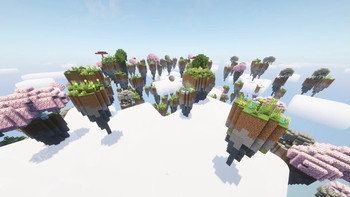
Discover clusters of floating islands mirroring familiar biomes and bridge the gaps as you gather resources above the clouds.
Screenshots
About this Mod
☁️ Beyond the Clouds ☁️
Venture into the skies to discover clusters of small and medium floating islands—ranging from serene lake and cherry groves to misty swamps—bridge the gaps, gather vanilla resources, and enjoy breathtaking aerial vistas.
✨ Features
🏝️ Small Islands
- Lake Island: A compact island centered around a crystal-clear pond.
- Plains Island: Open grassy terrain dotted with wildflowers and gentle hills.
- Cherry Island: A pink-blossomed cherry grove suspended in the sky.
- Swamp Island: Murky waters with overhanging vines, lily pads, and hidden nooks.
- Mossy Island: Verdant moss-covered stones and lush undergrowth.
🏞️ Medium Islands
- Plains Island: A larger version of the grassy plains, with rolling hills and abundant resources.
- Swamp Island: An expansive swamp ecosystem featuring deeper pools, mangrove-like roots, and foggy patches.
🚀 Future Plans
- More types of small islands: Expand the variety with desert, forest, mushroom, and other vanilla biomes.
- More types of medium islands: Introduce ice plains, jungle, and mountain-themed medium islands.
- Adding large islands: Create massive floating landmasses with unique landmarks and challenges.
- Updraft columns: Implement rising air currents to give players a new way to glide and traverse between islands.
- Floatberries: Small bushes of berries that apply a magical floating effect when eaten.
- Labyrinth: A long forgotten labyrinth with dormant magic.
- Categorized island groups: Categorize island groups by biome type.
- More custom minibiomes: Floating island types not based on vanilla biomes, completely designed from scratch.
Available Versions
How to Install Beyond The Clouds on Your Server
Order Server
Order a Minecraft Java server with at least 4 GB RAM (6 GB recommended).
Set fabric Loader
In the panel under "Egg", select the fabric loader and matching Minecraft version (1.21.7).
Install Mod
Open the mod browser in the dashboard and search for "Beyond The Clouds". Click "Install" – done! Alternatively, upload the .jar via SFTP to the /mods folder.
Compatibility
Mod Loaders
Minecraft Versions
1.21.7
Server-side
✓ RequiredRecommended RAM
6 GB(min. 4 GB)Frequently Asked Questions
Beyond The Clouds server crashes on startup – what to do?
Most common cause: wrong fabric version or insufficient RAM. Check the server log (latest.log) for "OutOfMemoryError" or "Mixin" errors. With Mado Hosting: ensure at least 4 GB RAM is allocated and the loader matches the mod version (1.21.7). You can switch loaders with one click in the panel.
Is Beyond The Clouds compatible with fabric and neoforge?
Beyond The Clouds officially supports fabric, neoforge for Minecraft 1.21.7. The Mado dashboard automatically detects incompatible loader combinations.
Server lagging with Beyond The Clouds – how to optimize performance?
Recommended RAM: 6 GB (per 5 players). Use /spark profiler to check if Beyond The Clouds consumes the most tick time. Common fixes: reduce server view-distance to 8-10, install "performant" or "starlight" as supplementary mods on Forge. With Mado Hosting, your server runs on NVMe SSDs with dedicated CPU cores for minimal latency.
Similar Mods




Rent Modded Server
Install Beyond The Clouds with just one click on your server.