
beyond:Cmd-Extension
The mod extends the limited command set of Beyond Dimensions, adding comprehensive network management capabilities and additional utility features.
Screenshots
About this Mod
Mod Overview
An auxiliary mod that extends the /bdtools command in the Beyond Dimensions mod with more features and adds some other small utilities. Primarily designed to help server administrators/owners manage the dimension network more easily.
Due to a significant discrepancy between the current mod's functionality and its name, this mod has been archived and renamed to Beyond_Integration, aiming to provide greater integration support for Beyond Dimension.
Core Features
Network Management
For OP players (permission level >= 2):
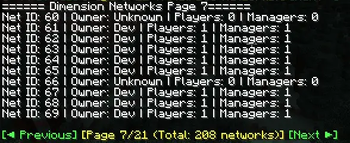
/bdtools network list – List all networks
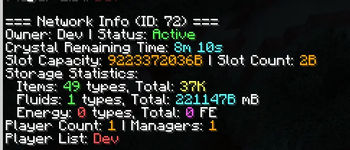
/bdtools network info – View network information
/bdtools network insert – Insert items into a network
/bdtools network giveTerminal – Give a terminal to a player
/bdtools network batchCreate – Batch create networks
/bdtools network openAny – Open the network GUI of any network
For regular players:
/bdtools open – Open the network GUI
/bdtools addMembers – Add members to a network
/bdtools addManagers – Add managers to a network
/bdtools removePlayers – Remove players from a network
/bdtools myNetworks – View your own networks
Enchantment Book Separation
Automatic separation – When a multi-enchantment book is inserted into the dimension network, it is automatically separated into single-enchantment books (configurable on/off)
Experience cost – The cost of separation is calculated based on enchantment type and level
Configurable formula – Supports custom cost calculation formulas
Tier list system – Different enchantments have different cost multipliers
Language
Default output language: English (en_us)
The language can be changed by modifying the configuration file at:
saves/
Built-in language options: zh_cn (Simplified Chinese) and en_us (English)
Available Versions
How to Install beyond:Cmd-Extension on Your Server
Order Server
Order a Minecraft Java server with at least 3 GB RAM (4 GB recommended).
Set forge Loader
In the panel under "Egg", select the forge loader and matching Minecraft version (1.20.1).
Install Mod
Open the mod browser in the dashboard and search for "beyond:Cmd-Extension". Click "Install" – done! Alternatively, upload the .jar via SFTP to the /mods folder.
Compatibility
Mod Loaders
Minecraft Versions
1.20.1
Server-side
✓ RequiredRecommended RAM
4 GB(min. 3 GB)Frequently Asked Questions
beyond:Cmd-Extension server crashes on startup – what to do?
Most common cause: wrong forge version or insufficient RAM. Check the server log (latest.log) for "OutOfMemoryError" or "Mixin" errors. With Mado Hosting: ensure at least 3 GB RAM is allocated and the loader matches the mod version (1.20.1). You can switch loaders with one click in the panel.
Is beyond:Cmd-Extension compatible with forge?
beyond:Cmd-Extension officially supports forge for Minecraft 1.20.1. The Mado dashboard automatically detects incompatible loader combinations.
Server lagging with beyond:Cmd-Extension – how to optimize performance?
Recommended RAM: 4 GB (per 8 players). Use /spark profiler to check if beyond:Cmd-Extension consumes the most tick time. Common fixes: reduce server view-distance to 8-10, install "performant" or "starlight" as supplementary mods on Forge. With Mado Hosting, your server runs on NVMe SSDs with dedicated CPU cores for minimal latency.
Similar Mods






Rent Modded Server
Install beyond:Cmd-Extension with just one click on your server.