
Big Items API
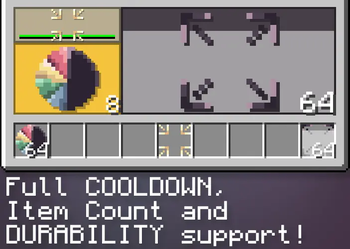
A really simple library that allows developers to make items take up more inventory slots.
Screenshots
About this Mod
A simple to use library mod that allows mod developers to make their items take up more inventory space... for whatever reason you want to make people's lives harder
For players
Does nothing if installed not as a dependency or by itself!
For mod developers
Getting started:
- Import the .jar into your project root folder (or any folder branching from root)
- In your
dependencies block in build.gradle add this line:
modImplementation(files("path/big-items-a1.0.jar"))
Usage:
- In an item class, implement silly.homak.bigitems.interfaces.IBigItem

IBigItem:
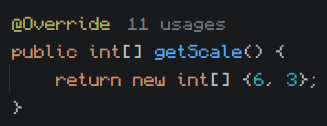
To set the item's scale override the getScale() array, has to return an array of 2 integers, this is the item's scale in slots on the X and Y axis.
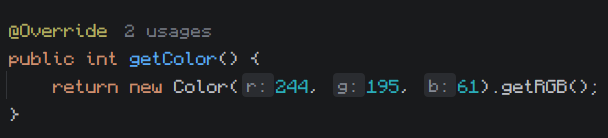
Big items have a rendered background that displays their actual scale, it's color is based on the average color of the item's texture (disregarding empty pixels). To set the background color explicitly override getColor(), has to return an integer color value.
The interface contains a boolean isScaled() that returns if the item is big or not, returns false in scenarios like being in the hotbar or a crafting block, has to be called on the client side.
Misc:
TextureUtils:
- Contains a bunch of helper methods for working with integer color values:
- darkenColor: Decreases an int color's brightness, accepts an integer color and a double factor, which has to be a decimal between 0 and 1, 1 being no effect and 0 being fully black.
- fadeColor: Decreases an int color's alpha, same arguments as the previous.
- darkenColor: Decreases an int color's saturation, same arguments as the previous.
- getAverageColor: Returns the mathematical average color of all pixels in an item's texture, disregards alpha.
Available Versions
How to Install Big Items API on Your Server
Order Server
Order a Minecraft Java server with at least 3 GB RAM (4 GB recommended).
Set fabric Loader
In the panel under "Egg", select the fabric loader and matching Minecraft version (1.21.1).
Install Mod
Open the mod browser in the dashboard and search for "Big Items API". Click "Install" – done! Alternatively, upload the .jar via SFTP to the /mods folder.
Compatibility
Mod Loaders
Minecraft Versions
1.21.1
Server-side
✓ RequiredRecommended RAM
4 GB(min. 3 GB)Frequently Asked Questions
Big Items API server crashes on startup – what to do?
Most common cause: wrong fabric version or insufficient RAM. Check the server log (latest.log) for "OutOfMemoryError" or "Mixin" errors. With Mado Hosting: ensure at least 3 GB RAM is allocated and the loader matches the mod version (1.21.1). You can switch loaders with one click in the panel.
Is Big Items API compatible with fabric and quilt?
Big Items API officially supports fabric, quilt for Minecraft 1.21.1. The Mado dashboard automatically detects incompatible loader combinations.
Server lagging with Big Items API – how to optimize performance?
Recommended RAM: 4 GB (per 8 players). Use /spark profiler to check if Big Items API consumes the most tick time. Common fixes: reduce server view-distance to 8-10, install "performant" or "starlight" as supplementary mods on Forge. With Mado Hosting, your server runs on NVMe SSDs with dedicated CPU cores for minimal latency.
Similar Mods





Rent Modded Server
Install Big Items API with just one click on your server.