
Bigger Items PvP
BiggerItems lets you resize dropped items in Minecraft from 0.01× to 10×. Press H to open the GUI, search items, and save custom sizes for every item.
Screenshots
About this Mod
BiggerItems is a Minecraft Forge mod for version 1.20.1 that gives players full control over the visual size of dropped item entities (items lying on the ground). Why? In vanilla Minecraft, every dropped item is the same size, making it hard to visually distinguish valuable loot from common junk. BiggerItems fixes this by letting you scale items independently. How it works:
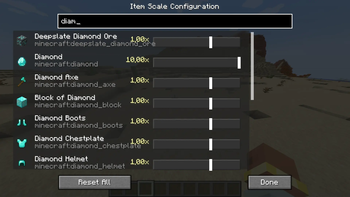
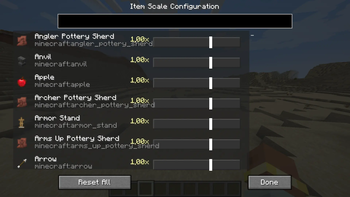
Press the H key (configurable) to open the Item Scale Configuration GUI.
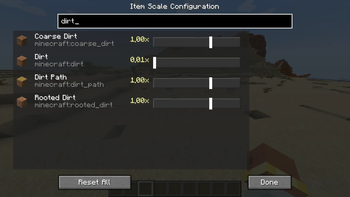
The GUI lists every registered item in the game with a search bar to quickly find what you need.
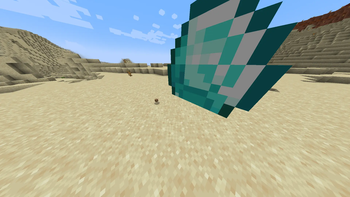
Adjust any item's ground scale from 0.01× (barely visible) to 10.0× (huge) using a logarithmic slider for precise control.
Changes are saved immediately to config/biggeritems_scales.json and persist across restarts.
A "Reset All" button restores every item back to its default 1.0× scale. Technical details:
Uses a Mixin ( ItemRendererMixin.java ) to inject scale transformations into the item rendering pipeline — only affects ItemDisplayContext.GROUND , so inventory icons, item frames, and name tags are unaffected.
The scale is applied via PoseStack.scale() wrapped in pushPose()/popPose() calls to isolate the transform.
Built with Minecraft Forge (v47.4.20) for Minecraft 1.20.1 using the official Mojang mappings.
Written in Java 17 using the ForgeGradle build system. Use cases:
Make rare items like Netherite ingots or diamonds appear larger to stand out.
Shrink common junk items to reduce visual clutter.
Create dramatic visual effects for adventure maps or modpacks.
Improve clarity when many items are dropped in the same spot.
Available Versions
How to Install Bigger Items PvP on Your Server
Order Server
Order a Minecraft Java server with at least 3 GB RAM (4 GB recommended).
Set forge Loader
In the panel under "Egg", select the forge loader and matching Minecraft version (1.20.6).
Install Mod
Open the mod browser in the dashboard and search for "Bigger Items PvP". Click "Install" – done! Alternatively, upload the .jar via SFTP to the /mods folder.
Compatibility
Mod Loaders
Minecraft Versions
1.20.6, 1.20.5, 1.20.4 (+3 more)
Server-side
✗ UnsupportedRecommended RAM
4 GB(min. 3 GB)Frequently Asked Questions
Bigger Items PvP server crashes on startup – what to do?
Most common cause: wrong forge version or insufficient RAM. Check the server log (latest.log) for "OutOfMemoryError" or "Mixin" errors. With Mado Hosting: ensure at least 3 GB RAM is allocated and the loader matches the mod version (1.20.6). You can switch loaders with one click in the panel.
Is Bigger Items PvP compatible with forge?
Bigger Items PvP officially supports forge for Minecraft 1.20.6, 1.20.5, 1.20.4. The Mado dashboard automatically detects incompatible loader combinations.
Server lagging with Bigger Items PvP – how to optimize performance?
Recommended RAM: 4 GB (per 8 players). Use /spark profiler to check if Bigger Items PvP consumes the most tick time. Common fixes: reduce server view-distance to 8-10, install "performant" or "starlight" as supplementary mods on Forge. With Mado Hosting, your server runs on NVMe SSDs with dedicated CPU cores for minimal latency.
Rent Modded Server
Install Bigger Items PvP with just one click on your server.