
BinSlot
This mod adds a trash can slot to your inventory, allowing you to quickly and safely dispose of unwanted items. Type "/trash" in chat to open the new inventory with the new bin can slot.
Screenshots
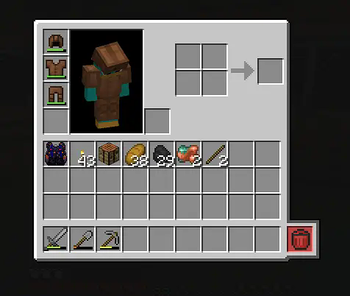
About this Mod
🗑️ BinSlot – Crafting Table With Automatic Trash Slot
BinSlot is a Minecraft mod that adds a custom crafting table featuring a special "bin slot". This slot automatically handles leftover items produced during crafting, helping reduce inventory clutter.
🔍 How It Works
When crafting recipes that generate extra items (like empty buckets or bottles), BinSlot will attempt to return them to your inventory. If there's no available space, those items will be discarded automatically using the bin slot.
This behavior mimics the crafting logic of vanilla Minecraft, but improves usability for players who craft large amounts of items or play with recipe-heavy modpacks.
🧰 Features
- A custom crafting table with a standard 3x3 grid
- An extra output slot for handling recipe results
- Automatic cleanup of leftover items (e.g. buckets, bottles)
- Supports all vanilla Minecraft recipes
- Helps avoid manual inventory management during crafting
🛠 Requirements
- Minecraft Java 1.21.3
- Forge 53.1
📌 Notes
- The mod uses Minecraft's standard recipe system.
- It does not require any other mods to function.
- BinSlot is a lightweight quality-of-life addition, especially useful in survival and modded environments.
🔧 Future Plans
Planned features may include:
- Customization options for trash behavior
- Compatibility with other mods
- Integration with recipe automation tools
If you find a bug or have suggestions, feel free to share them in the project’s issue tracker or discussion page.
Available Versions
How to Install BinSlot on Your Server
Order Server
Order a Minecraft Java server with at least 3 GB RAM (4 GB recommended).
Set forge Loader
In the panel under "Egg", select the forge loader and matching Minecraft version (1.21.5).
Install Mod
Open the mod browser in the dashboard and search for "BinSlot". Click "Install" – done! Alternatively, upload the .jar via SFTP to the /mods folder.
Compatibility
Mod Loaders
Minecraft Versions
1.21.5, 1.21.4, 1.21.3
Server-side
✓ RequiredRecommended RAM
4 GB(min. 3 GB)Frequently Asked Questions
BinSlot server crashes on startup – what to do?
Most common cause: wrong forge version or insufficient RAM. Check the server log (latest.log) for "OutOfMemoryError" or "Mixin" errors. With Mado Hosting: ensure at least 3 GB RAM is allocated and the loader matches the mod version (1.21.5). You can switch loaders with one click in the panel.
Is BinSlot compatible with forge?
BinSlot officially supports forge for Minecraft 1.21.5, 1.21.4, 1.21.3. The Mado dashboard automatically detects incompatible loader combinations.
Server lagging with BinSlot – how to optimize performance?
Recommended RAM: 4 GB (per 8 players). Use /spark profiler to check if BinSlot consumes the most tick time. Common fixes: reduce server view-distance to 8-10, install "performant" or "starlight" as supplementary mods on Forge. With Mado Hosting, your server runs on NVMe SSDs with dedicated CPU cores for minimal latency.
Similar Mods




![[TaCZ] Timeless and Classics Zero](https://cdn.modrinth.com/data/SzzJttH8/fd27766d2bb8390d284696b1dbd358f87e081439_96.webp)

Rent Modded Server
Install BinSlot with just one click on your server.