
bio add
add some fun with biomancy,tetra,iron's spellbooks and SlashBladeResharped
Screenshots
About this Mod
▶ What This Mod Adds
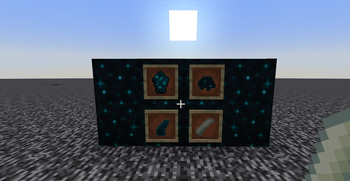
Core Sculk Items
- Adds 4 new sculk-themed materials:
deep_dark_bone,sculk_clump,echo_sensor,echo_cluster. - Obtain by: Mining sculk blocks or killing Wardens.
- Crafting: Recycle these items into vanilla sculk blocks (e.g., Sculk Catalyst, Sculk Vein).
- Adds 4 new sculk-themed materials:
Deep Cross-Mod Integration
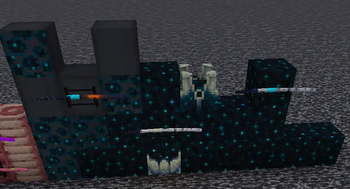
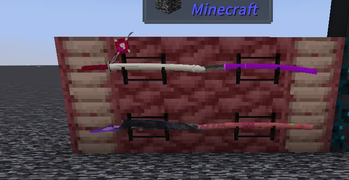
SlashBlade: Resharped
- Requires Iron's Spells 'n Spellbooks:
Silent Blade·Ephemera,Silent Blade 「Deep Dark Resonance」. - Requires Tetra + Iron's Spells 'n Spellbooks:
Reforged 「Shattered Stone」. - Requires Biomancy:
Desire-Hunting Bone Blade,Primordial 「Void Decay」,Primal 「Nameless」,Reforged 「Overflowing Vessel」. - Original Blades (no deps):
Blazing Blade 「Gulie Royal」,Blazing Blade 「Fragment」,Ember Ash「Blazing Flame」.
- Requires Iron's Spells 'n Spellbooks:
Tinkers' Construct 3
- New materials:
deep_dark_bone,frozen_bone(req. Iron's Spells 'n Spellbooks).
- New materials:
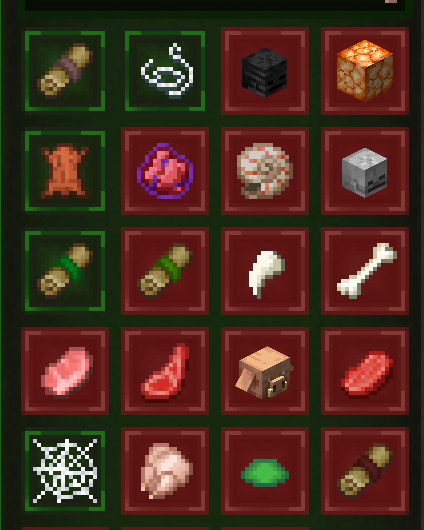
Tetra
- New materials:
nutrients,mineral_fragment,gem_fragments,malignant_flesh_veins,elastic_fibers,bloomberry(req. Biomancy),deep_dark_bone,echo_cluster. - Durability Upgrade System:
Craft unique schematics via Biomancy'sbio_forging, then sequentially apply:elastic_fibers→mineral_fragment→gem_fragmentsto boost Tetra gear durability.
- New materials:
▶ Why Download?
→ Enhances Deep Dark: Adds collectible/craftable sculk materials, rewarding exploration.
→ Seamless Mod Synergy: Bridges SlashBlade, Tetra, Tinkers', Biomancy, and Iron's Spells for unified progression.
→ Zero Waste: Recycle sculk drops into functional blocks.
▶ Key Notes
⚠️ REQUIRED Mod Dependencies:
- SlashBlade/Tetra/Biomancy/etc. content WON'T WORK without their parent mods installed.
⚠️ Sculk-Exclusive Loot: - Core items only drop from sculk blocks/Wardens (no crafting/trading).
⚠️ Clear Integration Labels: - All items explicitly state mod requirements (e.g., "Req. Biomancy").
Available Versions
How to Install bio add on Your Server
Order Server
Order a Minecraft Java server with at least 3 GB RAM (4 GB recommended).
Set forge Loader
In the panel under "Egg", select the forge loader and matching Minecraft version (1.20.1).
Install Mod
Open the mod browser in the dashboard and search for "bio add". Click "Install" – done! Alternatively, upload the .jar via SFTP to the /mods folder.
Compatibility
Mod Loaders
Minecraft Versions
1.20.1
Server-side
✓ RequiredRecommended RAM
4 GB(min. 3 GB)Frequently Asked Questions
bio add server crashes on startup – what to do?
Most common cause: wrong forge version or insufficient RAM. Check the server log (latest.log) for "OutOfMemoryError" or "Mixin" errors. With Mado Hosting: ensure at least 3 GB RAM is allocated and the loader matches the mod version (1.20.1). You can switch loaders with one click in the panel.
Is bio add compatible with forge?
bio add officially supports forge for Minecraft 1.20.1. The Mado dashboard automatically detects incompatible loader combinations.
Server lagging with bio add – how to optimize performance?
Recommended RAM: 4 GB (per 8 players). Use /spark profiler to check if bio add consumes the most tick time. Common fixes: reduce server view-distance to 8-10, install "performant" or "starlight" as supplementary mods on Forge. With Mado Hosting, your server runs on NVMe SSDs with dedicated CPU cores for minimal latency.
Similar Mods




Rent Modded Server
Install bio add with just one click on your server.