BL Custom Death Sounds
Choose ANY Minecraft sound effect to play on player death. Search sounds, preview them instantly, and customize volume & pitch.
Screenshots
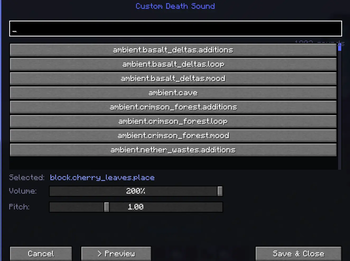
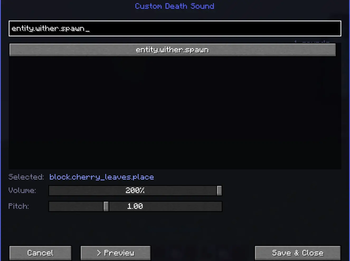
About this Mod
💀 Custom Death Sound
Turn every death message into absolute chaos.
Custom Death Sound lets you choose ANY Minecraft sound event to play whenever someone dies in chat. From Wither spawns to goat screams, explosions, anvils, music disc sounds, or even the most cursed vanilla audio imaginable — if Minecraft can play it, this mod can use it.
No resource packs. No commands. No editing config files manually.
Just open the menu, search for a sound, preview it instantly, and save it as your death sound.
✨ Features
- 🔎 Search through all Minecraft sound events
- 🎵 Use virtually any built-in Minecraft sound as a death sound
- 🔊 Adjustable volume slider
- 📈 Adjustable pitch slider
- ▶️ Instant sound preview button
- 💬 Detects tons of vanilla-style death messages
- ⚡ Lightweight client-side mod
- 🧩 Clean custom UI with scrolling sound browser
- 🎮 Works great for SMPs, trolling, chaos, content creation, and memes
🎧 Examples
Some funny sound ideas:
- Wither spawn
- Creeper explosion
- Goat scream
- Villager no
- Anvil land
- Ender dragon growl
- TNT prime
- Warden sonic boom
- XP pickup
- Cat meow
🖥️ How To Use
- Open ModMenu and search BL Custom Death Sounds
- Open the mod config screen
- Search for any sound
- Click a sound to select it
- Adjust volume & pitch
- Preview it
- Save and enjoy the chaos 💀
📦 Notes
- Client-side only
- Uses Minecraft's built-in sound registry
- Supports thousands of vanilla sound events
- Sound IDs can be searched instantly in-game
Available Versions
How to Install BL Custom Death Sounds on Your Server
Order Server
Order a Minecraft Java server with at least 3 GB RAM (4 GB recommended).
Set fabric Loader
In the panel under "Egg", select the fabric loader and matching Minecraft version (26.1.2).
Install Mod
Open the mod browser in the dashboard and search for "BL Custom Death Sounds". Click "Install" – done! Alternatively, upload the .jar via SFTP to the /mods folder.
Compatibility
Mod Loaders
Minecraft Versions
26.1.2, 26.1.1, 26.1
Server-side
✗ UnsupportedRecommended RAM
4 GB(min. 3 GB)Frequently Asked Questions
BL Custom Death Sounds server crashes on startup – what to do?
Most common cause: wrong fabric version or insufficient RAM. Check the server log (latest.log) for "OutOfMemoryError" or "Mixin" errors. With Mado Hosting: ensure at least 3 GB RAM is allocated and the loader matches the mod version (26.1.2). You can switch loaders with one click in the panel.
Is BL Custom Death Sounds compatible with fabric?
BL Custom Death Sounds officially supports fabric for Minecraft 26.1.2, 26.1.1, 26.1. The Mado dashboard automatically detects incompatible loader combinations.
Server lagging with BL Custom Death Sounds – how to optimize performance?
Recommended RAM: 4 GB (per 8 players). Use /spark profiler to check if BL Custom Death Sounds consumes the most tick time. Common fixes: reduce server view-distance to 8-10, install "performant" or "starlight" as supplementary mods on Forge. With Mado Hosting, your server runs on NVMe SSDs with dedicated CPU cores for minimal latency.
Similar Mods




Rent Modded Server
Install BL Custom Death Sounds with just one click on your server.