
BL Home Manager
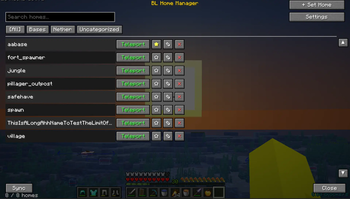
A client side GUI for managing server homes without typing commands. Configure your server's home commands once, then create, delete, and teleport to homes with a few clicks. Works with virtually any command based home system!
Screenshots

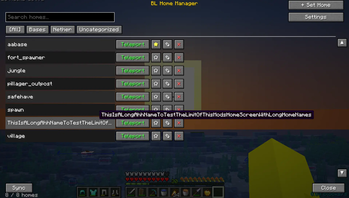
About this Mod
BL Home Manager
A clean, no-typing GUI for managing server homes — fully client-side, no server plugin required.
🏠 What Is This?
Tired of typing /sethome basement_storage_room_3 and praying you spelled it right? BL Home Manager wraps your server's existing home commands in a proper graphical interface. Set, teleport to, rename, and organize homes from a searchable, scrollable list — no command memorization, no typos, no scrolling through chat history to remember what you named that one home. The mod never touches your homes' actual locations; it's a smart client-side wrapper around whatever home plugin your server already runs.
✨ Features
- One-Click Teleport — Browse your homes and teleport with a single button press instead of typing commands
- Searchable Home List — Instantly filter homes by name as you type
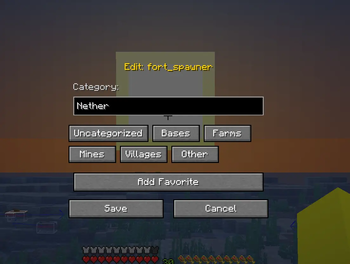
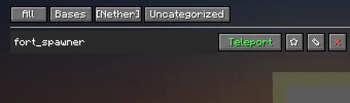
- Categories — Sort homes into Bases, Farms, Mines, Villages, or your own custom categories
- Favorites — Star your most-used homes to keep them easy to find
- Safe Delete Confirmation — A two-stage "are you sure?" prompt with a 5-second countdown and cancel option, so a misclick never costs you a home
- Server Sync — Automatically pulls your existing home list from the server's
/homes-style command and keeps your local list up to date - Configurable Commands — Works with any server's command syntax (
/sethome,/home,/delhome, etc.) — just set them once in setup - Keybind Access — Press a single key to open the Home Manager from anywhere (rebindable in Controls)
- Persistent Local Database — Home metadata (favorites, categories) is saved locally so it survives restarts and isn't wiped by server-side resyncs
🕹️ How To Use
- Join any multiplayer server with a home plugin (Essentials, CMI, or similar)
- Press your configured key (default unbound — set it in Controls) to open BL Home Manager
- On first launch, enter your server's home commands (e.g.
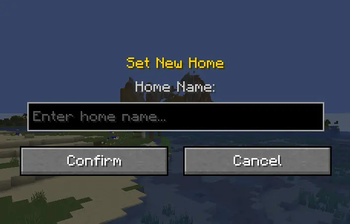
/sethome,/home,/delhome,/homes) - Click + Set Home, type a name, and confirm — the mod sends the command for you
- Click Teleport next to any home to warp there instantly
- Use the search bar or category tabs to find what you need in a long list
Note: The mod relies on parsing your server's chat output to detect home names during Sync. If your server uses an unusual home-list format, you may need to add homes manually instead.
⚙️ Technical Details
- 100% client-side — No server plugin, mod, or configuration needed on the server
- Works with any command-based home system — Essentials, CMI, or custom plugins, as long as commands are configurable
- Uses Fabric's
ClientReceiveMessageEventsAPI to read chat output during sync — no mixins into server internals - Home data stored as JSON under
.minecraft/config/bl-home-manager-homes.json - Sync parses multi-line chat responses and filters out non-home tokens automatically
Available Versions
How to Install BL Home Manager on Your Server
Order Server
Order a Minecraft Java server with at least 3 GB RAM (4 GB recommended).
Set fabric Loader
In the panel under "Egg", select the fabric loader and matching Minecraft version (1.21.11).
Install Mod
Open the mod browser in the dashboard and search for "BL Home Manager". Click "Install" – done! Alternatively, upload the .jar via SFTP to the /mods folder.
Compatibility
Mod Loaders
Minecraft Versions
1.21.11
Server-side
✗ UnsupportedRecommended RAM
4 GB(min. 3 GB)Frequently Asked Questions
BL Home Manager server crashes on startup – what to do?
Most common cause: wrong fabric version or insufficient RAM. Check the server log (latest.log) for "OutOfMemoryError" or "Mixin" errors. With Mado Hosting: ensure at least 3 GB RAM is allocated and the loader matches the mod version (1.21.11). You can switch loaders with one click in the panel.
Is BL Home Manager compatible with fabric?
BL Home Manager officially supports fabric for Minecraft 1.21.11. The Mado dashboard automatically detects incompatible loader combinations.
Server lagging with BL Home Manager – how to optimize performance?
Recommended RAM: 4 GB (per 8 players). Use /spark profiler to check if BL Home Manager consumes the most tick time. Common fixes: reduce server view-distance to 8-10, install "performant" or "starlight" as supplementary mods on Forge. With Mado Hosting, your server runs on NVMe SSDs with dedicated CPU cores for minimal latency.
Similar Mods






Rent Modded Server
Install BL Home Manager with just one click on your server.
Details
- License
- Creative Commons Attribution Non Commercial No Derivatives 4.0 International
- Server-side
- Unsupported