
BL Inventory Peek
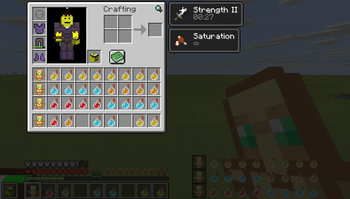
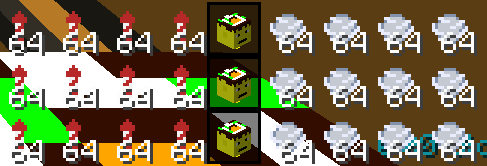
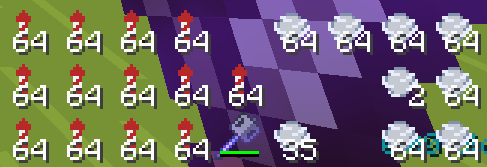
This mod adds a small preview of your inventory next to your hotbar, it even highlights the same item in your inventory that is in your hands
Screenshots



About this Mod
📦 InventoryPeek
A lightweight client-side HUD mod for Minecraft that lets you see your inventory at all times without opening the inventory screen.
InventoryPeek displays your full main inventory directly on the HUD in a compact bottom-right layout, allowing faster item management during gameplay while keeping your screen clean and unobtrusive.
Whether you're building, fighting, speedrunning, bridging, exploring, or looting, InventoryPeek helps reduce unnecessary inventory interruptions and keeps important items visible at a glance.
✨ Features
🧰 Full Main Inventory HUD
Displays all 27 main inventory slots directly on your screen in real time.
🎯 Smart Item Highlighting
Items matching your currently selected hotbar item are automatically highlighted for quick identification.
📍 Minimal Bottom-Right Design
Carefully positioned to stay out of the way while remaining easy to read during gameplay.
🔢 Stack Counts & Overlays
Supports vanilla-style item overlays including stack sizes and durability bars.
⚡ Lightweight & Client-Side
No server installation required. Designed to be lightweight with minimal impact on performance.
🎮 Vanilla-Friendly Feel
Blends naturally into Minecraft’s existing HUD style instead of feeling intrusive or overly flashy.
🕹️ Great For
⚔️ PvP
🏗️ Building
🚀 Elytra Travel
🧱 Bridging
📦 Resource Gathering
🏃 Speedrunning
🌍 Survival Multiplayer
🔥 Fast-paced gameplay
📸 What It Does
Instead of constantly opening your inventory to search for items, InventoryPeek keeps your inventory visible at all times so you can:
- Quickly locate building blocks
- Find extra tools instantly
- Track food and rockets
- Monitor resources during combat
- Reduce inventory interruptions
- Improve overall gameplay flow
🔧 Technical Info
✅ Client-side only
✅ Fabric mod
✅ Lightweight HUD rendering
✅ Real-time inventory updates
✅ Works seamlessly during gameplay
❤️ Made For Convenience
InventoryPeek was designed to solve a simple annoyance in Minecraft gameplay: repeatedly opening the inventory just to check where something is.
The goal is to keep gameplay smooth, uninterrupted, and efficient while maintaining a clean vanilla-like experience.
Available Versions
How to Install BL Inventory Peek on Your Server
Order Server
Order a Minecraft Java server with at least 3 GB RAM (4 GB recommended).
Set fabric Loader
In the panel under "Egg", select the fabric loader and matching Minecraft version (1.21.11).
Install Mod
Open the mod browser in the dashboard and search for "BL Inventory Peek". Click "Install" – done! Alternatively, upload the .jar via SFTP to the /mods folder.
Compatibility
Mod Loaders
Minecraft Versions
1.21.11
Server-side
✗ UnsupportedRecommended RAM
4 GB(min. 3 GB)Frequently Asked Questions
BL Inventory Peek server crashes on startup – what to do?
Most common cause: wrong fabric version or insufficient RAM. Check the server log (latest.log) for "OutOfMemoryError" or "Mixin" errors. With Mado Hosting: ensure at least 3 GB RAM is allocated and the loader matches the mod version (1.21.11). You can switch loaders with one click in the panel.
Is BL Inventory Peek compatible with fabric?
BL Inventory Peek officially supports fabric for Minecraft 1.21.11. The Mado dashboard automatically detects incompatible loader combinations.
Server lagging with BL Inventory Peek – how to optimize performance?
Recommended RAM: 4 GB (per 8 players). Use /spark profiler to check if BL Inventory Peek consumes the most tick time. Common fixes: reduce server view-distance to 8-10, install "performant" or "starlight" as supplementary mods on Forge. With Mado Hosting, your server runs on NVMe SSDs with dedicated CPU cores for minimal latency.
Similar Mods






Rent Modded Server
Install BL Inventory Peek with just one click on your server.