![BL Screenshot Gallery [BLSG]](https://cdn.modrinth.com/data/Cdo4b3z6/7e99a08a253af6045451f1e490fd797b34be0899_96.webp)
BL Screenshot Gallery [BLSG]
A modern in-game screenshot gallery for Minecraft that automatically saves where, when, and what biome every screenshot was taken in, with a clean visual browser directly inside Minecraft.
Screenshots
About this Mod
BL Screenshot Gallery (BLSG)
A modern in-game screenshot gallery for Minecraft that automatically saves where, when, and what biome every screenshot was taken in — with a clean visual browser directly inside Minecraft.
Perfect for builders, explorers, map makers, SMP players, content creators, and anyone who takes lots of screenshots and later forgets where they were taken.
✨ Features
🖼 In-Game Screenshot Gallery
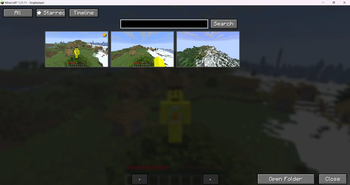
Press F12 to open a fully integrated screenshot browser without leaving Minecraft.
Features include:
Grid-based gallery view
Smooth thumbnail previews
Pagination system
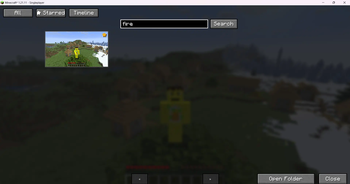
Search bar
Star/favorite screenshots
Timeline-style browsing
📍 Automatic Metadata Capture
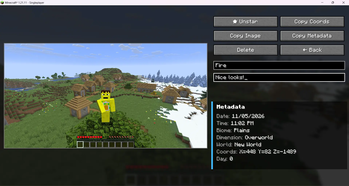
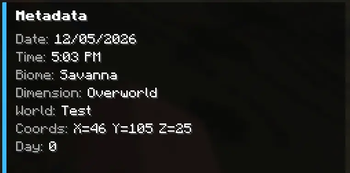
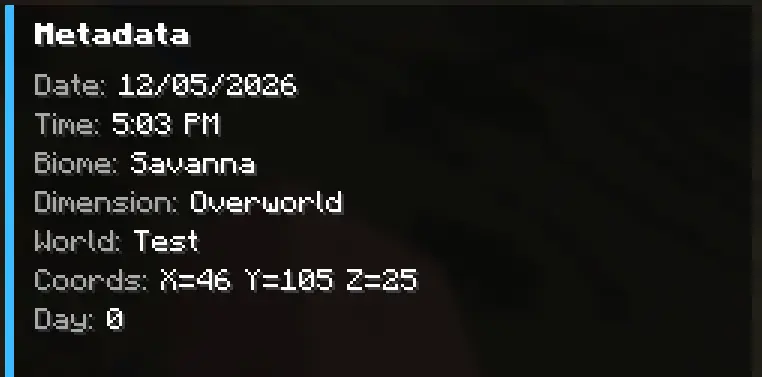
Every screenshot automatically stores:
World / server name
Coordinates (X/Y/Z)
Biome
Dimension
Real-world date & time
Minecraft in-game day
Multiplayer detection
Camera rotation (yaw/pitch)
All metadata is saved into lightweight .json sidecar files next to the screenshot.
🔎 Powerful Search
Search screenshots by:
Filename
World name
Server name
Biome
Dimension
Title
Notes
Example searches:
plains
nether
village
my base
survival server
📝 Titles & Notes
Add custom:
Screenshot titles
Personal notes
Build reminders
Lore/context
Titles appear directly on thumbnails for quick identification.
⭐ Favorites System
Star important screenshots and quickly filter them later.
Perfect for:
Favorite builds
Coordinates worth revisiting
Progress milestones
Rare discoveries
🗑 Delete Screenshots In-Game
Delete screenshots directly from the gallery.
BLSG properly removes:
The PNG image
Thumbnail
Metadata JSON
Gallery entry
without needing to restart Minecraft.
🎨 Clean Modern UI
Designed to feel like a native Minecraft feature.
Includes:
Hover effects
Dynamic thumbnails
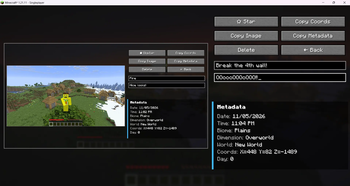
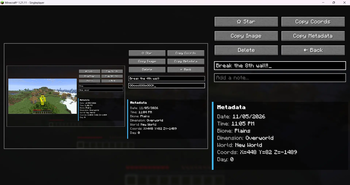
Responsive detail screen
Metadata panel
Large screenshot preview
Minimal visual clutter
⚡ Lightweight
No external dependencies
Minimal memory usage
Metadata stored locally
Fast thumbnail loading
Optimized caching
🧠 Why Use BLSG?
Vanilla Minecraft screenshots become chaotic over time.
BLSG turns them into a searchable visual archive.
Instead of:
"Where did I build that?"
you get:
"Oh yeah — Plains biome, Day 184, SMP world."
📦 Metadata Example
⌨ Default Keybind
Action Key
Open Gallery F12
(Keybind can be changed in Minecraft Controls settings.)
🔧 Supported Loader
Fabric
Available Versions
How to Install BL Screenshot Gallery [BLSG] on Your Server
Order Server
Order a Minecraft Java server with at least 3 GB RAM (4 GB recommended).
Set fabric Loader
In the panel under "Egg", select the fabric loader and matching Minecraft version (1.21.11).
Install Mod
Open the mod browser in the dashboard and search for "BL Screenshot Gallery [BLSG]". Click "Install" – done! Alternatively, upload the .jar via SFTP to the /mods folder.
Compatibility
Mod Loaders
Minecraft Versions
1.21.11, 1.21.10, 1.21.9
Server-side
✗ UnsupportedRecommended RAM
4 GB(min. 3 GB)Frequently Asked Questions
BL Screenshot Gallery [BLSG] server crashes on startup – what to do?
Most common cause: wrong fabric version or insufficient RAM. Check the server log (latest.log) for "OutOfMemoryError" or "Mixin" errors. With Mado Hosting: ensure at least 3 GB RAM is allocated and the loader matches the mod version (1.21.11). You can switch loaders with one click in the panel.
Is BL Screenshot Gallery [BLSG] compatible with fabric?
BL Screenshot Gallery [BLSG] officially supports fabric for Minecraft 1.21.11, 1.21.10, 1.21.9. The Mado dashboard automatically detects incompatible loader combinations.
Server lagging with BL Screenshot Gallery [BLSG] – how to optimize performance?
Recommended RAM: 4 GB (per 8 players). Use /spark profiler to check if BL Screenshot Gallery [BLSG] consumes the most tick time. Common fixes: reduce server view-distance to 8-10, install "performant" or "starlight" as supplementary mods on Forge. With Mado Hosting, your server runs on NVMe SSDs with dedicated CPU cores for minimal latency.
Similar Mods






Rent Modded Server
Install BL Screenshot Gallery [BLSG] with just one click on your server.