
Black Ether
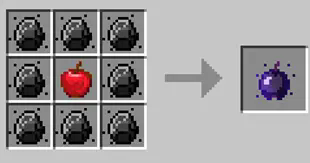
A simple mod that adds a new ore type, along with new weapons, armor and a few extra items. The new ore is called Onyx (like the gem) which can be created by smelting a diamond in the furnace. There is also a new fuel type called ether.
Screenshots
About this Mod
Black Ether Minecraft Mod

To install, go to https://modrinth.com/mod/black-ether
Current Items:
- Ether ore: Burnable, lasts a little longer than coal ore. Ether is found at level 8 or lower, most commonly between 0 and 8, in vein sizes of about 5.
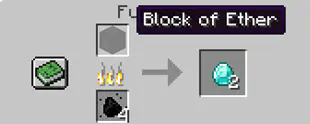
- Block of ether: Non-burnable, but can be placed into a blast furnace to create diamonds.
- Onyx ore: An ore slightly more valuable than diamond. Can be used to craft an Onyx Pickaxe. To create Onyx ore, simply place a diamond into either a blast furnace or a furnace and burn it to produce Onyx.
- Onyx Pickaxe
- Onyx Shovel
- Onyx Axe
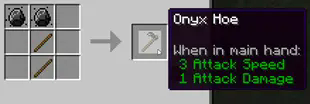
- Onyx Hoe
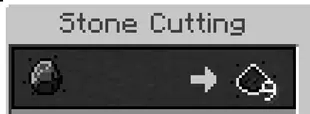
- Onyx Dust: Craftable using the stonesaw. (WIP, will add more to this later. Dust is currently useless.)
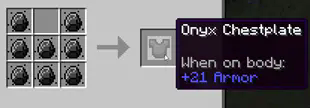
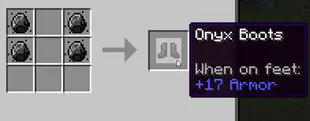
- Onyx Armor: Craftable using onyx ore.
- Onyx fort: Structures which spawn randomly 1 in every 1000 chunks, filled with loot and a few goodies.
- Onyx Snake Mob: An onyx snake which has a few animations and is hostile. Spawns in forests at night, as well as in the deep dark.
This mod changes how diamonds can be acquired. A new recipe was introduced to allow the player to smelt a block of ether or place a block of ether into the blast furnace to create a diamond. Cooking time in the blast furnace is 3x as fast.
Requires:
- Geckolib: 1.19.4:4.1.0
- Fabric Loader: 0.14.17
- Minecraft: 1.19.4
Available Versions
How to Install Black Ether on Your Server
Order Server
Order a Minecraft Java server with at least 3 GB RAM (4 GB recommended).
Set fabric Loader
In the panel under "Egg", select the fabric loader and matching Minecraft version (1.19.4).
Install Mod
Open the mod browser in the dashboard and search for "Black Ether". Click "Install" – done! Alternatively, upload the .jar via SFTP to the /mods folder.
Compatibility
Mod Loaders
Minecraft Versions
1.19.4, 1.19.3
Server-side
✓ RequiredRecommended RAM
4 GB(min. 3 GB)Frequently Asked Questions
Black Ether server crashes on startup – what to do?
Most common cause: wrong fabric version or insufficient RAM. Check the server log (latest.log) for "OutOfMemoryError" or "Mixin" errors. With Mado Hosting: ensure at least 3 GB RAM is allocated and the loader matches the mod version (1.19.4). You can switch loaders with one click in the panel.
Is Black Ether compatible with fabric?
Black Ether officially supports fabric for Minecraft 1.19.4, 1.19.3. The Mado dashboard automatically detects incompatible loader combinations.
Server lagging with Black Ether – how to optimize performance?
Recommended RAM: 4 GB (per 8 players). Use /spark profiler to check if Black Ether consumes the most tick time. Common fixes: reduce server view-distance to 8-10, install "performant" or "starlight" as supplementary mods on Forge. With Mado Hosting, your server runs on NVMe SSDs with dedicated CPU cores for minimal latency.
Similar Mods




Rent Modded Server
Install Black Ether with just one click on your server.