
Blackhole
A Server Side Blackhole Mod That Follows You
Screenshots
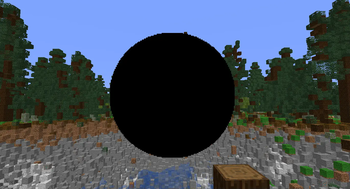

About this Mod
Black Hole Mod
A Minecraft mod that adds destructive, dynamic black holes to your world.
- Github: https://github.com/IDoTheHax/Blackhole
- Modrinth: https://modrinth.com/mod/blackhole
- Discord: https://discord.com/faPd8MQ3Ke
- Youtube:
Overview
The Black Hole mod introduces a new block that creates a simulated black hole in your Minecraft world. These black holes have realistic gravitational effects, pulling in nearby entities and blocks. They can grow over time, follow players, and cause destruction in their path.
PSA: DONT USE THIS IN YOUR WORLD WITHOUT MAKING A BACKUP!!
Features
- Realistic Physics: Black holes exert gravitational force on nearby entities and blocks based on configurable mass values
- Growing Black Holes: Black holes can expand over time, increasing their area of effect
- Player Tracking: Black holes can follow players within a configurable range
- Visual Effects: Features customizable particle effects for an immersive experience
- Fully Configurable: All aspects of black hole behavior can be adjusted via commands or configuration file
- Creative Mode Integration: Black hole item available in both custom creative tab and vanilla Redstone Blocks tab
Texture Pack
This mod uses Polymer for custom rendering and requires a texture pack for the black hole visuals. Use the /polymer generatepack command in-game to create a default texture pack, then drag the generated pack (named resource_pack in the polymer folder) into your resources folder or use a serverside resource pack. See the Polymer Documentation for more details.
Commands
All commands require operator permission level 2 or higher and begin with /blackhole:
Configuration Commands
| Command | Description |
|---|---|
getmaxscale / setmaxscale <value> |
Get/set maximum size a black hole can grow to |
getgravity / setgravity <value> |
Get/set gravitational constant |
getplayermass / setplayermass <value> |
Get/set mass value for players |
getblockmass / setblockmass <value> |
Get/set mass value for blocks |
getitementitymass / setitementitymass <value> |
Get/set mass value for item entities |
getanimalmass / setanimalmass <value> |
Get/set mass value for animal entities |
getchunkloadradius / setchunkloadradius <value> |
Get/set radius of chunks to force-load around a black hole |
getmaxblockspertick / setmaxblockspertick <value> |
Get/set maximum blocks processed per tick |
getmovementspeed / setmovementspeed <value> |
Get/set movement speed of following black holes |
getdefaultfollowrange / setdefaultfollowrange <value> |
Get/set default range for black holes to detect players |
getplayerdetectioninterval / setplayerdetectioninterval <value> |
Get/set ticks between player detection checks |
getgrowthrate / setgrowthrate <value> |
Get/set growth rate for black holes |
getparticles / toggleparticles |
Get/toggle particle effects on/off globally |
Black Hole Manipulation Commands
| Command | Description |
|---|---|
togglefollow |
Toggle whether the nearest black hole follows players |
togglegrowth |
Toggle whether the nearest black hole grows over time |
setfollowrange <range> |
Set the follow range for the nearest black hole |
kill |
Permanently remove the nearest black hole and its visuals (requires server-side 1.21.11+ features) |
Configuration
The mod creates a configuration file at config/black_hole.json with the following default values:
{
  "maxScale": 40.0,
  "gravity": 60.0,
  "playerMass": 700.0,
  "blockMass": 10.0,
  "itemEntityMass": 0.1,
  "animalMass": 50.0,
  "chunkLoadRadius": 2,
  "maxBlocksPerTick": 500,
  "movementSpeed": 1.0,
  "defaultFollowRange": 256.0,
  "playerDetectionInterval": 60,
  "growthRate": 0.04,
  "particlesEnabled": true
}
Configuration Properties
| Property | Description | Default |
|---|---|---|
maxScale |
Maximum size a black hole can grow to | 40.0 |
gravity |
Gravitational constant affecting pull strength | 60.0 |
playerMass |
Mass value for players (affects how strongly they're pulled) | 700.0 |
blockMass |
Mass value for blocks | 10.0 |
itemEntityMass |
Mass value for item entities | 0.1 |
animalMass |
Mass value for animal entities | 50.0 |
chunkLoadRadius |
Radius of chunks to force-load around a black hole | 2 |
maxBlocksPerTick |
Maximum blocks processed per tick (performance setting) | 500 |
movementSpeed |
Movement speed when following players | 1.0 |
defaultFollowRange |
Default range for black holes to detect players | 256.0 |
playerDetectionInterval |
Ticks between player detection checks | 60 |
growthRate |
How quickly black holes grow in size | 0.04 |
particlesEnabled |
Whether particle effects are enabled globally | true |
Behavior Notes
- Black holes will consume any entity that gets too close to its center
- Creative mode players are immune to black hole effects
- Black holes can break most blocks but cannot break blocks with infinite hardness (like bedrock)
- Black holes can be configured to not follow players or to stop growing
- Black holes will create falling block entities from some destroyed blocks for visual effect
- Each black hole maintains its own settings for following and growth
- Particle effects can be toggled off for better performance on servers or lower-end systems
- The black hole item can be found in the custom "BlackHole" creative tab or in the vanilla Redstone Blocks tab
Technical Information
- Built with Fabric and Polymer for vanilla client compatibility
- Uses chunk force-loading to ensure black holes function even when players are distant
- Implements custom block entity with tick-based behavior
- Supports server-side resource packs for texture distribution
Known Issues
- Black Hole Rendering Issue: The black hole often looks like the circle is moving when the player changes their view, this is due to the display mode of the item display being set to billboard, advanced maths that i dont understand is required to fix this.
- Render Distance Issue: The black hole disappears when moving too far away, even within typical render distances, due to entity rendering limitations.
Any fixes found can be submitted through a Pull request on the Github: https://github.com/IDoTheHax/Blackhole
Don't Hesitate to add your fixes!!
Compatibility
This mod is built for Fabric and requires:
- Fabric API
- Polymer
License
All Rights Reserved - IDoTheHax 2025
Credits
Created by IDoTheHax
Available Versions
How to Install Blackhole on Your Server
Order Server
Order a Minecraft Java server with at least 3 GB RAM (4 GB recommended).
Set fabric Loader
In the panel under "Egg", select the fabric loader and matching Minecraft version (1.21.11).
Install Mod
Open the mod browser in the dashboard and search for "Blackhole". Click "Install" – done! Alternatively, upload the .jar via SFTP to the /mods folder.
Compatibility
Mod Loaders
Minecraft Versions
1.21.11, 1.21.10, 1.21.9 (+6 more)
Server-side
✓ RequiredRecommended RAM
4 GB(min. 3 GB)Frequently Asked Questions
Blackhole server crashes on startup – what to do?
Most common cause: wrong fabric version or insufficient RAM. Check the server log (latest.log) for "OutOfMemoryError" or "Mixin" errors. With Mado Hosting: ensure at least 3 GB RAM is allocated and the loader matches the mod version (1.21.11). You can switch loaders with one click in the panel.
Is Blackhole compatible with fabric?
Blackhole officially supports fabric for Minecraft 1.21.11, 1.21.10, 1.21.9. The Mado dashboard automatically detects incompatible loader combinations.
Server lagging with Blackhole – how to optimize performance?
Recommended RAM: 4 GB (per 8 players). Use /spark profiler to check if Blackhole consumes the most tick time. Common fixes: reduce server view-distance to 8-10, install "performant" or "starlight" as supplementary mods on Forge. With Mado Hosting, your server runs on NVMe SSDs with dedicated CPU cores for minimal latency.
Similar Mods




Rent Modded Server
Install Blackhole with just one click on your server.