
BlackyWhiteTierTagger
Displays player tiers from BlackyWhite community rankings
About this Mod
BlackyWhite TierTagger
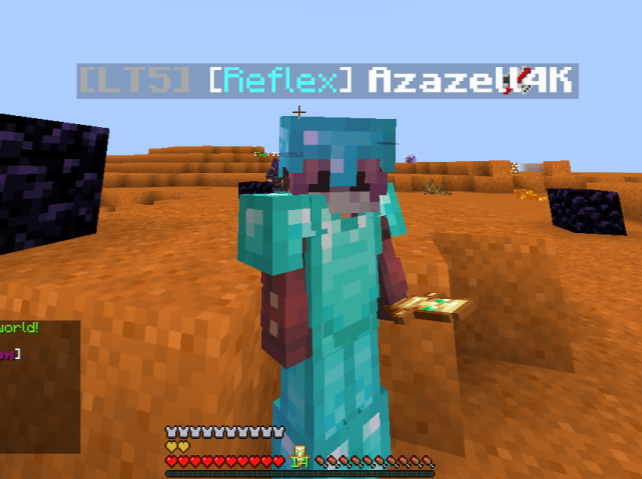
BlackyWhite TierTagger is a modern client-side PvP utility mod that allows players to view BlackyWhite community tiers directly in Minecraft. Player rankings are displayed seamlessly above nametags and inside the tab list, making it easier to recognize skill levels during fights, practice sessions, and competitive gameplay.
The mod is designed to be lightweight, fast, and visually clean, using a monochrome-inspired style that fits naturally into the Minecraft UI without feeling intrusive. All ranking data is automatically synced from the BlackyWhite ranking system Website and cached locally for smoother performance.
Features
- Displays BlackyWhite player tiers above nametags
- Integrated tier display inside the tab list
- Lightweight and optimized for PvP gameplay
- Automatic syncing with the BlackyWhite ranking database
- Local caching support for faster loading
- Clean black-and-white visual style
- Works on multiplayer servers without server-side installation
Compatibility
- Fabric 1.21 – 1.21.1
- Requires Fabric API
- Compatible with most modern Minecraft clients
Notes
This mod is completely client-side and safe to use on any server. Server owners do not need to install anything for the mod to function.
Community
BlackyWhite Discord:https://discord.gg/X9PunB6XYB
BlackyWhite Website:https://blackywhitetierlist.vercel.app/
Available Versions
How to Install BlackyWhiteTierTagger on Your Server
Order Server
Order a Minecraft Java server with at least 3 GB RAM (4 GB recommended).
Set fabric Loader
In the panel under "Egg", select the fabric loader and matching Minecraft version (1.21.11).
Install Mod
Open the mod browser in the dashboard and search for "BlackyWhiteTierTagger". Click "Install" – done! Alternatively, upload the .jar via SFTP to the /mods folder.
Compatibility
Mod Loaders
Minecraft Versions
1.21.11, 1.21.1, 1.21
Server-side
✗ UnsupportedRecommended RAM
4 GB(min. 3 GB)Frequently Asked Questions
BlackyWhiteTierTagger server crashes on startup – what to do?
Most common cause: wrong fabric version or insufficient RAM. Check the server log (latest.log) for "OutOfMemoryError" or "Mixin" errors. With Mado Hosting: ensure at least 3 GB RAM is allocated and the loader matches the mod version (1.21.11). You can switch loaders with one click in the panel.
Is BlackyWhiteTierTagger compatible with fabric?
BlackyWhiteTierTagger officially supports fabric for Minecraft 1.21.11, 1.21.1, 1.21. The Mado dashboard automatically detects incompatible loader combinations.
Server lagging with BlackyWhiteTierTagger – how to optimize performance?
Recommended RAM: 4 GB (per 8 players). Use /spark profiler to check if BlackyWhiteTierTagger consumes the most tick time. Common fixes: reduce server view-distance to 8-10, install "performant" or "starlight" as supplementary mods on Forge. With Mado Hosting, your server runs on NVMe SSDs with dedicated CPU cores for minimal latency.
Similar Mods






Rent Modded Server
Install BlackyWhiteTierTagger with just one click on your server.