
BlatBlock
New generation of OneBlock maps and modpacks
Screenshots
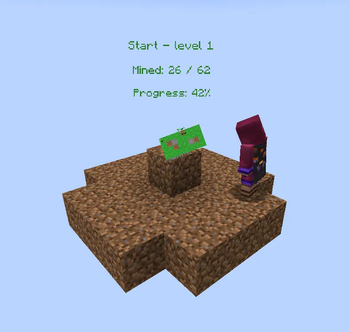


About this Mod


🌍 Overview
BlatBlock introduces a revolutionary skyblock-style gameplay experience to Minecraft! This mod adds a unique world type, powerful tools, and magical accessories to transform your gameplay.
⭐ Key Features
- 🏗️ BlatBlock World Type - Start in a void world with a magical generator
- 🏗️ Auto Generators
- ⚒️ Multitools - All-in-one tools combining pickaxe, axe, shovel, hoe, and sword functionality
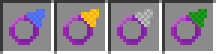
- 💍 Magical Rings - Special accessories that enhance generator functionality
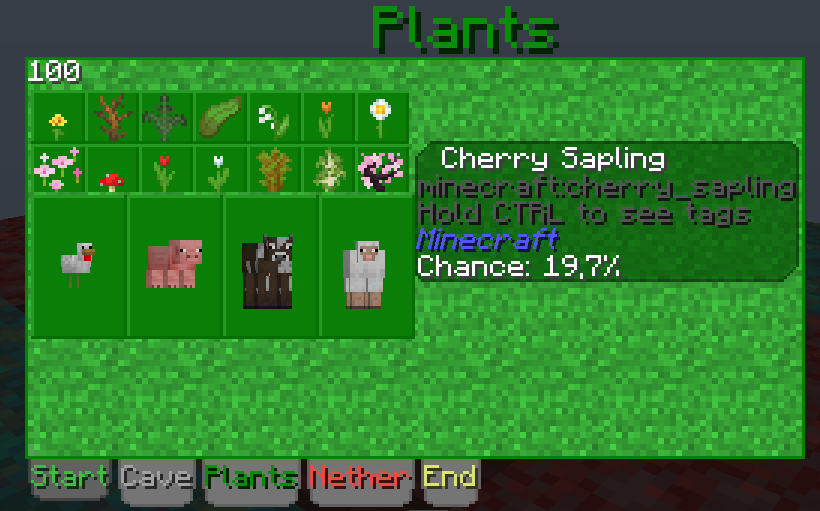
- 📊 Progressive Layers - Unlock new blocks and entities as you advance
- 🎯 JEI Integration - Full layer and information integration
- 🎯 KubeJS Integration - Full layer control
🏗️ The Generator System

A new world with the BlatBlock world type:
- You spawn at coordinates (0, 2, 0)
- The BlatBlock Generator appears at (0, 0, 0)
- The world is completely void except for your starting platform
How It Works
- The generator places blocks from your selected layer above itself
- Each layer contains different blocks and entities with varying spawn chances
- Progress through layers by collecting enough blocks to unlock the next tier

Available Content
- See which blocks and mobs are available at your current layer
- Preview Next Layers: Check what becomes available as you progress
- Layer Switching: Unlock and switch between different layers
- Progression System: Each layer requires a certain number of mined blocks to access
🚀 AutoGenerator Block

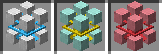
Three tiers of generators:
- Basic – iron-based, slow, simple recipe
- Improved – diamond accents, faster operation
- Perfect – netherite construction, maximum performance
- Creative
Generator Upgrades
Four upgrade types that improve generator behavior:
- Speed Upgrade – increases tick rate
- Fortune Upgrade – increases output quantity
- Tag Upgrade – controls tag filtering
- Entity Upgrade – enables mob drops
- Stack Upgrade - increases maximum stack


💍 Magical Rings

Ring Effect
- 🔮 Entity Ring Prevents mobs from spawning from the generator
- 💧 Liquid Ring Blocks liquid generation from the generator
- 📦 Drop Ring Items drop directly into your inventory
- 🏷️ Tag Ring Removes source tags from generated items Rings can be combined for maximum efficiency!
⚒️ Multitool System

Functionality
- ⛏️ Pickaxe: Mine stone, ores, and hard materials
- 🪓 Axe: Chop wood, strip logs, scrape copper, remove wax
- 🔨 Shovel: Dig dirt, sand, gravel, create paths, extinguish campfires
- 🌾 Hoe: Till farmland, create dirt paths
- ⚔️ Sword: Combat capabilities
Available Tiers
- Wooden Multitool - Basic starter tool
- Stone Multitool - Standard efficiency
- Iron Multitool - Enhanced durability
- Golden Multitool - Fast but fragile
- Diamond Multitool - High-tier performance
- Netherite Multitool - Ultimate efficiency and durability
🔧 Creating Custom Layers
BlatBlock uses JSON configuration files for complete customization:
Example Layer Configuration
{
    "title": "blatblock.layer.end",
    "title_color": "#dce775",
    "texture": "blatblock:textures/gui/end.png",
    "background": "blatblock:textures/gui/end_bg.png",
    "block_cost": 2000,
    "sort": 3,
    "block_calc": "4*level*level+40*(level+1)",
    "blocks": [
        {
            "block": "minecraft:end_stone",
            "chance": "0.9"
        },
        {
            "block": "minecraft:obsidian",
            "chance": "0.1"
        }
    ],
    "entities": [
        {
            "entity": "minecraft:endermite",
            "chance": "0.2+((level-4)/10)*0.02",
            "level": 4
        },
        {
            "entity": "minecraft:enderman",
            "chance": "0.1+((level-6)/10)*0.02",
            "level": 6
        }
    ]
}
Configuration Options 
- Advanced Features
- Dynamic Chance Calculations: Use mathematical expressions for progressive difficulty
- Level Requirements: Set minimum levels for specific content
- Custom Textures: Create themed layers with unique visual styles
- Mod Integration: Support for modded blocks and entities
🎮 Gameplay Tips
Early Game Strategy
Start Mining: Use the generator to collect basic materials Craft Tools: Create multitools for efficient resource gathering Build Platform: Expand your starting area for safety Progress Layers: Collect enough blocks to unlock new tiers
Mid Game Optimization
- Acquire Rings: Enhance generator efficiency
- Layer Management: Switch between layers for specific resources
- Automation Setup: Plan for semi-automated systems
- Resource Planning: Focus on materials needed for progression
Late Game Mastery
- Ring Combinations: Maximize generator output
- Advanced Layers: Access end-game content and materials
- Mega Projects: Build extensive structures in the void
- Custom Content: Create and share your own layer configurations
🔗 Compatibility
Recommended Mods
- JEI (Just Enough Items) - Recipe viewing and integration
- KubeJS (For modpack maker) - Custom Block Layers
- Jade - Block and entity information
- Storage mods - For managing large quantities of items
Mod Compatibility
BlatBlock is designed to work with most popular mods and modpacks. Custom layers support modded blocks and entities automatically.
KubeJS
Example
// kubejs/server_scripts/
BlatBlock.bbl(event => {
    event.remove("blatblock:end")

    event.add('technoblock:end')
        .title('blatblock.blatblock.end')
        .titleColor('#dce775')
        .texture('blatblock:textures/gui/end.png')
        .background('blatblock:textures/gui/end_bg.png')
        .blockCost(2000)
        .sort(3)
        .blockcalc('4*level*level+40*(level+1)')
        .block('minecraft:end_stone', '0.9', 0)
        .block('minecraft:obsidian', '0.1', 0)
        .block('draconicevolution:end_draconium_ore', '0.05+((level-10)/10)*0.01', 10)
        .entity('minecraft:endermite', '0.2+((level-4)/10)*0.02', 4)
        .entity('minecraft:enderman', '0.1+((level-6)/10)*0.02', 6)
        .entity('minecraft:shulker', '0.05+((level-8)/10)*0.01', 8)
        .register()

    event.addTo("blatblock:start", "minecraft:bedrock", "1")

    event.setBaseId("technoblock:start")
})

// kubejs/startup_scripts/
StartupEvents.registry('item', event => {
  event.create('test:test_multitool', 'blatblock:multitool').tier('diamond').attackDamage(10.0)
  event.create('test:test_speed_upgrade', 'blatblock:generator_upgrade').type('speed').quality(10)
})
🤝 Contributing
We welcome contributions to BlatBlock! Whether you're:
- Creating custom layers
- Reporting bugs
- Suggesting features
- Contributing code
BlatBlock transforms traditional skyblock gameplay into a dynamic, progressive experience. Start your void world adventure today!
Available Versions
How to Install BlatBlock on Your Server
Order Server
Order a Minecraft Java server with at least 3 GB RAM (4 GB recommended).
Set forge Loader
In the panel under "Egg", select the forge loader and matching Minecraft version (1.20.1).
Install Mod
Open the mod browser in the dashboard and search for "BlatBlock". Click "Install" – done! Alternatively, upload the .jar via SFTP to the /mods folder.
Compatibility
Mod Loaders
Minecraft Versions
1.20.1
Server-side
✓ RequiredRecommended RAM
4 GB(min. 3 GB)Frequently Asked Questions
BlatBlock server crashes on startup – what to do?
Most common cause: wrong forge version or insufficient RAM. Check the server log (latest.log) for "OutOfMemoryError" or "Mixin" errors. With Mado Hosting: ensure at least 3 GB RAM is allocated and the loader matches the mod version (1.20.1). You can switch loaders with one click in the panel.
Is BlatBlock compatible with forge?
BlatBlock officially supports forge for Minecraft 1.20.1. The Mado dashboard automatically detects incompatible loader combinations.
Server lagging with BlatBlock – how to optimize performance?
Recommended RAM: 4 GB (per 8 players). Use /spark profiler to check if BlatBlock consumes the most tick time. Common fixes: reduce server view-distance to 8-10, install "performant" or "starlight" as supplementary mods on Forge. With Mado Hosting, your server runs on NVMe SSDs with dedicated CPU cores for minimal latency.
Similar Mods





Rent Modded Server
Install BlatBlock with just one click on your server.