Bleeding Edge
A server-side mod (meaning vannila/bedrock can play!) all about blood gained from a new enchantment.
Screenshots

About this Mod
Bleeding Edge
This mod is better with Server-Side-Scythes!
This mod adds a brand new enchantment; Bleeding Edge; which allows you to harvest blood; a new consumable that is eaten fast for a small amount of nutrition and saturation; for various uses.
This mod is 100% serverside with a custom resource pack, meaning players with vannila clients or Geyser can still play properly!
New Items
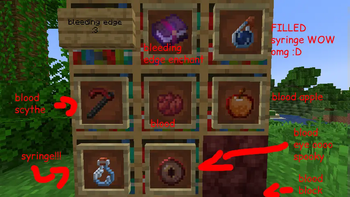
- Blood
- Blood Block
- Blood Eye
- Reveals all nearby entities with glowing when used
- Blood Apple
- An inversed Golden Apple, giving you harmful effects.
- Potion Syringe
- A syringe you can fill up with all of your effects, than use for later or hit an enemy with.
Blood Scythe (Requires Scythes)
A new Scythe that slowly drains life from your opponents after being hit.
You may also get some errors when not using Server-Side Scythes. You can safely ignore this, as it's just trying to add the scythe to recipes although it doesn't exist.
Resource Pack
- Install Polymer (you may already have it installed as a dependency)
- Follow this guide for up-to-date details on how to host your pack for your specific scenario.
Bedrock / Geyser
Bedrock players may see blood as steak.
Bedrock support not tested.
Recipes
Recipes are available in-game after obtaining Blood from the Bleeding Edge enchantment. (or gaining a stick for the blood scythe)

Available Versions
How to Install Bleeding Edge on Your Server
Order Server
Order a Minecraft Java server with at least 3 GB RAM (4 GB recommended).
Set fabric Loader
In the panel under "Egg", select the fabric loader and matching Minecraft version (1.21.1).
Install Mod
Open the mod browser in the dashboard and search for "Bleeding Edge". Click "Install" – done! Alternatively, upload the .jar via SFTP to the /mods folder.
Compatibility
Mod Loaders
Minecraft Versions
1.21.1
Server-side
✓ RequiredRecommended RAM
4 GB(min. 3 GB)Frequently Asked Questions
Bleeding Edge server crashes on startup – what to do?
Most common cause: wrong fabric version or insufficient RAM. Check the server log (latest.log) for "OutOfMemoryError" or "Mixin" errors. With Mado Hosting: ensure at least 3 GB RAM is allocated and the loader matches the mod version (1.21.1). You can switch loaders with one click in the panel.
Is Bleeding Edge compatible with fabric?
Bleeding Edge officially supports fabric for Minecraft 1.21.1. The Mado dashboard automatically detects incompatible loader combinations.
Server lagging with Bleeding Edge – how to optimize performance?
Recommended RAM: 4 GB (per 8 players). Use /spark profiler to check if Bleeding Edge consumes the most tick time. Common fixes: reduce server view-distance to 8-10, install "performant" or "starlight" as supplementary mods on Forge. With Mado Hosting, your server runs on NVMe SSDs with dedicated CPU cores for minimal latency.
Similar Mods



![[TaCZ] Timeless and Classics Zero](https://cdn.modrinth.com/data/SzzJttH8/fd27766d2bb8390d284696b1dbd358f87e081439_96.webp)


Rent Modded Server
Install Bleeding Edge with just one click on your server.