
Blink and Build
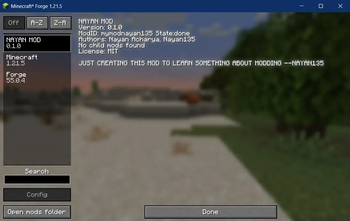
Blink & Break is a Minecraft Forge mod that adds various custom items and blocks with special abilities to enhance gameplay.
Screenshots
About this Mod
Blink & Break - Minecraft Forge Mod (Beta)
Description
Blink & Break (mymodnayan135) is a Minecraft Forge mod currently in BETA that adds various custom items and blocks with special abilities to enhance gameplay. This mod introduces magical tools and items that provide unique functionality such as teleportation, time manipulation, and auto-smelting.
Version Compatibility
- Minecraft: 1.21.1
- Forge: 47.1.0+
- Game Version: Java Edition
Features
Custom Items
Auto-Smelt Pickaxe: A special pickaxe that can smelt ores directly into ingots when mining.
- Toggle ability on/off by right-clicking
- Higher mining speed when ability is disabled
- Slightly reduced mining speed when ability is active
- Works on iron, gold, and copper ores
Teleportation Wand: Allows players to teleport to where they're looking.
- Range of up to 100 blocks
- 1-second cooldown between uses
- Safety checks to prevent teleporting into blocks
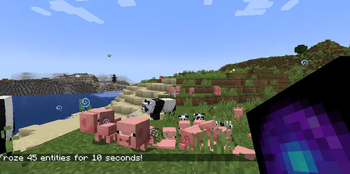
Time Freeze Orb: Freezes entities in a 10-block radius around the player.
- Applies extreme slowness and mining fatigue to affected entities
- Disables mob AI temporarily
- Effect lasts for 10 seconds
- 3-second cooldown between uses
- Consumed on use (unless in creative mode)
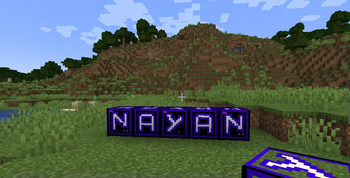
**Nayan **: Basic custom items added to the ingredients tab.
Installation
- Make sure you have Minecraft Forge installed for the appropriate Minecraft version.
- Download the latest release of Blink & Break.
- Place the downloaded .jar file in your Minecraft's "mods" folder.
- Launch Minecraft with the Forge profile.
Usage
Auto-Smelt Pickaxe
- Mine ores normally to collect them as usual
- Right-click on an ore block to activate the auto-smelt ability
- When active, mining iron, gold, or copper ore will directly yield ingots
- Right-click on any non-ore block to deactivate the ability
Teleportation Wand
- Hold the wand and look at where you want to teleport
- Right-click to teleport to that location
- Make sure the destination has enough space (2 blocks of air)
Time Freeze Orb
- Hold the orb and right-click to activate
- All non-player entities within 10 blocks will be frozen for 10 seconds
- The orb will be consumed after use (unless in creative mode)
Credits
Created by Nayan135 as a Minecraft modding project.
Available Versions
How to Install Blink and Build on Your Server
Order Server
Order a Minecraft Java server with at least 3 GB RAM (4 GB recommended).
Set forge Loader
In the panel under "Egg", select the forge loader and matching Minecraft version (1.21.5).
Install Mod
Open the mod browser in the dashboard and search for "Blink and Build". Click "Install" – done! Alternatively, upload the .jar via SFTP to the /mods folder.
Compatibility
Mod Loaders
Minecraft Versions
1.21.5, 1.21.4, 1.21.3 (+3 more)
Server-side
✓ RequiredRecommended RAM
4 GB(min. 3 GB)Frequently Asked Questions
Blink and Build server crashes on startup – what to do?
Most common cause: wrong forge version or insufficient RAM. Check the server log (latest.log) for "OutOfMemoryError" or "Mixin" errors. With Mado Hosting: ensure at least 3 GB RAM is allocated and the loader matches the mod version (1.21.5). You can switch loaders with one click in the panel.
Is Blink and Build compatible with forge?
Blink and Build officially supports forge for Minecraft 1.21.5, 1.21.4, 1.21.3. The Mado dashboard automatically detects incompatible loader combinations.
Server lagging with Blink and Build – how to optimize performance?
Recommended RAM: 4 GB (per 8 players). Use /spark profiler to check if Blink and Build consumes the most tick time. Common fixes: reduce server view-distance to 8-10, install "performant" or "starlight" as supplementary mods on Forge. With Mado Hosting, your server runs on NVMe SSDs with dedicated CPU cores for minimal latency.
Rent Modded Server
Install Blink and Build with just one click on your server.