
Block Memory
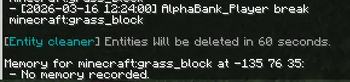
Block Memory records the history of blocks (who placed/broke them and when). Use the Memory Scanner: right-click on a block and view the last eight events in chat. Works in single-player and on the server.
Screenshots

About this Mod
Block Memory это небольшой Fabric-мод для Minecraft 1.21.4, который записывает “память” блоков: кто и когда поставил или сломал конкретный блок.
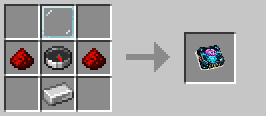
Чтобы посмотреть историю, сделай и возьми в руку предмет “Сканер памяти” и нажми ПКМ по нужному блоку. Мод выведет в чат последние события для этой позиции (до 8 записей): действие PLACE/BREAK, ник игрока и время.
Как это работает:
Запись событий идет на стороне сервера, поэтому мод полезен и в одиночке, и на серверах.
История сохраняется в данных мира и не пропадает после перезапуска.
Функция предназначена для удобства, администрирования и “детективных” ситуаций: быстро понять, что происходило в конкретном месте. КРАФТ СКАНЕРА ПАМЯТИ: (https://cdn.modrinth.com/data/cached_images/2533e780e9b622546826eb4eda954f6feb493ef9.png)
Available Versions
How to Install Block Memory on Your Server
Order Server
Order a Minecraft Java server with at least 3 GB RAM (4 GB recommended).
Set fabric Loader
In the panel under "Egg", select the fabric loader and matching Minecraft version (1.21.11).
Install Mod
Open the mod browser in the dashboard and search for "Block Memory". Click "Install" – done! Alternatively, upload the .jar via SFTP to the /mods folder.
Compatibility
Mod Loaders
Minecraft Versions
1.21.11, 1.21.10, 1.21.9 (+5 more)
Server-side
✓ RequiredRecommended RAM
4 GB(min. 3 GB)Frequently Asked Questions
Block Memory server crashes on startup – what to do?
Most common cause: wrong fabric version or insufficient RAM. Check the server log (latest.log) for "OutOfMemoryError" or "Mixin" errors. With Mado Hosting: ensure at least 3 GB RAM is allocated and the loader matches the mod version (1.21.11). You can switch loaders with one click in the panel.
Is Block Memory compatible with fabric?
Block Memory officially supports fabric for Minecraft 1.21.11, 1.21.10, 1.21.9. The Mado dashboard automatically detects incompatible loader combinations.
Server lagging with Block Memory – how to optimize performance?
Recommended RAM: 4 GB (per 8 players). Use /spark profiler to check if Block Memory consumes the most tick time. Common fixes: reduce server view-distance to 8-10, install "performant" or "starlight" as supplementary mods on Forge. With Mado Hosting, your server runs on NVMe SSDs with dedicated CPU cores for minimal latency.
Similar Mods





Rent Modded Server
Install Block Memory with just one click on your server.