
Blocktracker
Track your items! Scans your entire inventory, including Shulker Box and Ender Chest contents.
Screenshots
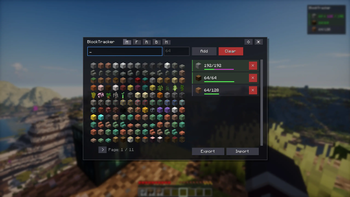
About this Mod

A powerful utility mod for efficient resource management and project tracking in Minecraft.
BlockTracker Advantages
Core Features
- Block-Based To-Do Lists: Define resource goals with target amounts using the newly redesigned in-game GUI.
- Folder & Profile System: No more chaos! Organize your projects using folders (Main, Farming, Redstone, Building, Misc). You can create and save multiple lists (profiles) within each folder.
- Import & Export: Easily share your configurations! This is perfect for creators making tutorials on specific farms or builds. You can simply export the material list and share it with your viewers to import.
- Persistent Tracking: The task list and progress are automatically saved and persist across game sessions.
Killer Feature: Smart Inventory Tracking
- Comprehensive Scan: BlockTracker tracks progress by scanning the entire player inventory and reading the contents of Shulker Boxes held within that inventory.
- Ender Chest Support: It also reads items inside your Ender Chest (and even Shulker Boxes stored inside it), so you don't have to take everything out to see your progress!
- Smart Progress Bars: In the GUI, you can now instantly see where your items are located: A green bar represents the inventory, while a purple bar shows the share inside the Ender Chest.
- Automatic Update: Tasks are automatically marked as complete as soon as the required items are collected.

Interface & Control
- HUD Editor: Total freedom! You can now freely move, scale, and align (left/right) the overlay to perfectly fit your screen.
- New Themes: Customize the look of your manager! Choose between Clipboard, Dark, and Transparent themes to suit your preference.

- Toggleable HUD Overlay: A minimalist overlay displays actively tracked items and current progress.
- The overlay can be toggled on or off with a keybind (default: H).
- Management GUI: Access the task manager via keybind (default: B) to add, remove, or reset goals.
- Visual Confirmation: Completed tasks show clear feedback (Green Checkmark/Text).

Technical Details
| Detail | Status |
|---|---|
| Mod Loader | Fabric |
| Game Versions | 1.21.8, 1.21.10, 1.21.11 |
| Type | Client-Side Only |
| Dependency | None |
Usage
- Open Manager: Press B (default).
- Toggle Overlay: Press H (default).
Available Versions
How to Install Blocktracker on Your Server
Order Server
Order a Minecraft Java server with at least 3 GB RAM (4 GB recommended).
Set fabric Loader
In the panel under "Egg", select the fabric loader and matching Minecraft version (1.21.11).
Install Mod
Open the mod browser in the dashboard and search for "Blocktracker". Click "Install" – done! Alternatively, upload the .jar via SFTP to the /mods folder.
Compatibility
Mod Loaders
Minecraft Versions
1.21.11, 1.21.10, 1.21.8
Server-side
✗ UnsupportedRecommended RAM
4 GB(min. 3 GB)Frequently Asked Questions
Blocktracker server crashes on startup – what to do?
Most common cause: wrong fabric version or insufficient RAM. Check the server log (latest.log) for "OutOfMemoryError" or "Mixin" errors. With Mado Hosting: ensure at least 3 GB RAM is allocated and the loader matches the mod version (1.21.11). You can switch loaders with one click in the panel.
Is Blocktracker compatible with fabric?
Blocktracker officially supports fabric for Minecraft 1.21.11, 1.21.10, 1.21.8. The Mado dashboard automatically detects incompatible loader combinations.
Server lagging with Blocktracker – how to optimize performance?
Recommended RAM: 4 GB (per 8 players). Use /spark profiler to check if Blocktracker consumes the most tick time. Common fixes: reduce server view-distance to 8-10, install "performant" or "starlight" as supplementary mods on Forge. With Mado Hosting, your server runs on NVMe SSDs with dedicated CPU cores for minimal latency.
Similar Mods






Rent Modded Server
Install Blocktracker with just one click on your server.