
blockbench import library
This library simplifies model import, generates item models & textures, and leverages polymer for resource pack creation. Supports animations, Molang expressions, and various Blockbench features.
Screenshots
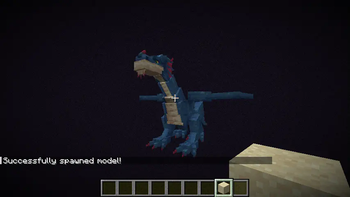
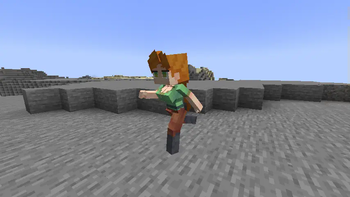

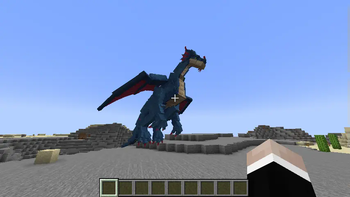
About this Mod
This mod will no longer be updated on modrinth!
See https://www.curseforge.com/minecraft/mc-mods/blockbench-import-library for the latest version!
blockbench import library
This library streamlines the process of integrating Blockbench models (generic and from the AnimatedJava Blockbench Plugin) into your Fabric mods.
It automates item model and texture creation and leverages resource packs in combination with item display entities for client-side integration, eliminating the need for players to install additional mods.
The library offers comprehensive support for animations, including Molang expressions for keyframes, along with a variety of Blockbench features and additionally support for one of its plugins, AnimatedJava.
Features:
- Animation Support: Import models with pre-rendered animations and utilize Molang expressions (currently only q.anim_time and q.life_time) for dynamic animation control.
- CustomModelData & Item Displays: Employs CustomModelData and Item Displays to represent the model with minimal server impact through "virtual" item display entities. - Item Display transformations are asynchronously updated for smooth performance.
- Large Bone Support: Breaks free from vanilla's limitations, allowing for bones exceeding the standard 3x3x3 size restriction.
- Blockbench Feature Support: Offers compatibility with various Blockbench features, including effect keyframes (commands & sound effects), animation loop modes, interpolations, and more.
- AnimatedJava Extensions: Provides additional functionality for AnimatedJava, including variant support, bone blacklisting, conditional effects, and locator support
- Vanilla Mob Feature Integration: Out-of-the-box support for many vanilla mob features like accurate hitboxes (visible in F3+B), ridability, name tags, invisibility, glowing, fire animations, particle effects, leashes, death animations, smooth collisions, dynamic hitboxes/scale, and entity-specific ticking for optimized performance.
Checkout the Github README and the documentation for more infos!
Setup
repositories {
    maven { url "https://maven.tomalbrc.de" }
}

dependencies {
    modImplementation include("de.tomalbrc:blockbench-import-library:[TAG]")
}
Usage
Documentation is available here
Commands
/bil model create id<.ajmodel>|filepath <model>Spawns a model ingame based on mob identifier or a file path (from server root folder) to the model json file. These models are not saved and are mostly intended for testing. If you want load an .ajmodel file, make sure to append
.ajmodelto either the id or file path./bil model <targets> animation|variant|scale <args>Modifies the model of any entity selected in
that has a custom model. Allows you to temporarily change the scale of the model, update the variant and play / pause / stop animations. This is also mostly intended for testing and playing with the models.
Roadmap
1.x
- Bone modifier for more dynamic animations
- Handle pre/post values for keyframes
- mcmeta generation for animated textures
- Bezier support for keyframes
2.x
- Dynamic Animations for dynamic animation speed, right now all animations are pre-rendered during import
- Per-player animations; Show animations to only a single player or a group of players. Right now all animations are played globally, visible for all players
- Multiple rider (for entities), currently only 1 is supported
- Multiple hitboxes (requires the same changes as multiple rider support)
- Particle effects (?)
Test Sever
Join the test server with a 1.20.5-1.21+ client on
mc.tomalbrc.de:25565
to test this mod and my other mods + upcoming, unreleased mods and features!
Available Versions
How to Install blockbench import library on Your Server
Order Server
Order a Minecraft Java server with at least 3 GB RAM (4 GB recommended).
Set fabric Loader
In the panel under "Egg", select the fabric loader and matching Minecraft version (26.1.2).
Install Mod
Open the mod browser in the dashboard and search for "blockbench import library". Click "Install" – done! Alternatively, upload the .jar via SFTP to the /mods folder.
Compatibility
Mod Loaders
Minecraft Versions
26.1.2, 26.1.1, 26.1 (+18 more)
Server-side
✓ RequiredRecommended RAM
4 GB(min. 3 GB)Frequently Asked Questions
blockbench import library server crashes on startup – what to do?
Most common cause: wrong fabric version or insufficient RAM. Check the server log (latest.log) for "OutOfMemoryError" or "Mixin" errors. With Mado Hosting: ensure at least 3 GB RAM is allocated and the loader matches the mod version (26.1.2). You can switch loaders with one click in the panel.
Is blockbench import library compatible with fabric?
blockbench import library officially supports fabric for Minecraft 26.1.2, 26.1.1, 26.1. The Mado dashboard automatically detects incompatible loader combinations.
Server lagging with blockbench import library – how to optimize performance?
Recommended RAM: 4 GB (per 8 players). Use /spark profiler to check if blockbench import library consumes the most tick time. Common fixes: reduce server view-distance to 8-10, install "performant" or "starlight" as supplementary mods on Forge. With Mado Hosting, your server runs on NVMe SSDs with dedicated CPU cores for minimal latency.
Similar Mods



Rent Modded Server
Install blockbench import library with just one click on your server.