
BlockBuster engine
Blockbaster Engine is a Minecraft datapack for creating cinematics and cutscenes. The engine allows you to record player movements, create actors with custom skins, control scenes, and play complex animated sequences directly in the game.
Screenshots

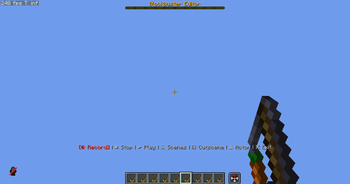
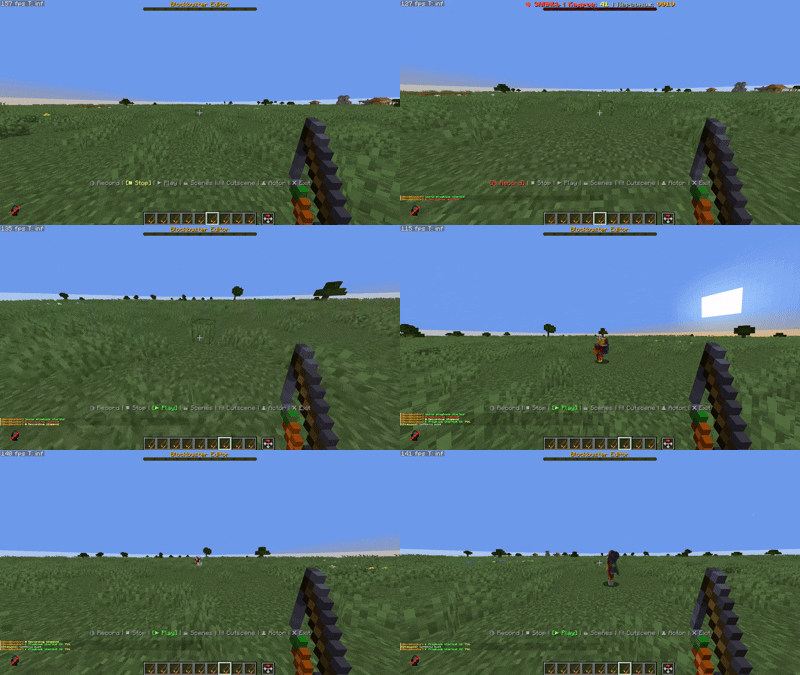

About this Mod
#BlockbasterEngine
Cinematic Engine for Minecraft
Blockbaster Engine is a powerful datapack for creating professional cinematics, cutscenes, and animated sequences directly in Minecraft. The engine provides a complete set of tools for recording, editing, and playing back complex scenes with multiple actors.
🎬 Key Features
Actor System
Create and manage virtual characters for your scenes:
- Actor creation with unique names and IDs
- Custom skins — apply any skins to actors
- Visibility control of names and display parameters
- Actor database with the ability to save and load
- Interactive menu for editing actor properties
Motion Recording
Capture player actions in real time:
- Frame-by-frame recording of all player movements, turns, and actions
- Save to storage for later use
- Playback via mannequins — precise repetition of recorded actions
- Support for multiple recordings for a single scene
- Indexing system for organizing large numbers of recordings
Scene Editor
A professional tool for creating Cinematography:
- Create and manage scenes with unique IDs
- Add multiple recordings to a single scene
- Link actors to recordings for synchronized playback
- Load and edit existing scenes
- Interactive menu with a user-friendly control interface
Playback System (Player)
Smooth and synchronized playback:
- Frame-by-frame execution of recorded actions
- Synchronize multiple actors in a single scene
- Control the player's camera during cutscene playback
- Automatic player state restoration upon completion
- Callback system for integration with other systems
Mannequin System
Advanced NPC playback system:
- Dynamic creation of mannequins with specified skins
- Frame-by-frame animation of movements and rotations
- Support Indexed records for optimization
- Automatic cleanup after playback completes
- Macro system for efficient data loading
🚀 Quick Start
Installation
- Download the datapack
- Place the
blockbaster-enginefolder in thedatapacksdirectory of your world - Reload the world or run
/reload
Launching the Editor
To work with Blockbaster Engine, use the visual editor instead of commands:
/function _blockbuster:open
After launching, the editor interface will open with a menu in the actionbar (above the hotbar).
🎮 Working with the Editor
Interface Controls
Menu Navigation:
- Mouse Wheel (Slot Change) — Switch between menu items
- RMB (Right Mouse Button) — Select the current menu item
Main Menu Structure:
- 🔴 Record — Start recording movements
- ⏹ Stop — Stop the current recording
- ▶ Play — Play the last recording
- 🎬 Scenes — Open the scene management menu
- 🎞 Cutscene — Cutscene Editor
- 👤 Character — Actor Management Menu
- ❌ Exit — Close the editor
Creating Your First Scene
Step 1: Open Editor
/function _blockbuster:open
Step 2: Create a Character
- Scroll to 👤 Character
- Right-click to open the menu
- Select the desired action (create, list, edit)
Step 3: Record Actions
- Scroll to 🔴 Record
- Right-click to start recording
- Perform the desired actions (move, turn, jump)
- Scroll to ⏹ Stop and right-click
Step 4: Create a Scene
- Scroll to 🎬 Scenes
- Right-click to open the scenes menu
- Create a new scene and add recordings
Step 5: Play
- Select ▶ Play to preview the results
🎯 Character Menu
After selecting 👤 Character in the main menu:
- Character List — view all created actors
- Stop All — stop playback of all mannequins
- Back — return to the main menu
Working with Characters
- Create actors with unique names
- Assign custom skins
- Manage name visibility
- Link recordings to specific characters
🎬 Scene Menu
After selecting 🎬 Scenes in the main menu:
- Create Scene — new cinematic scene
- Scene List — all saved scenes
- Edit — change scene parameters
- Add Recording — link a recording to a scene
- Play — start a scene
Working with Scenes
- One scene can Contain multiple recordings
- Each recording is linked to a specific actor
- Automatic synchronization of all actors during playback
- Saving scenes to files for reuse
🔧 Technical features
Data Storage System
- Use of storage for temporary data
- Loot tables** for persistent storage of scenes and actors
- Predicates** for conditional logic and checks
Optimization
- Indexed system** for working with large numbers of records
- Macro functions** for dynamic data loading
- Efficient memory management** by cleaning up unused data
Integration
- Callback system** for interacting with other datapacks
- Cutscene Engine support** for advanced features
- Modular architecture** for easy functionality expansion
📋 Requirements
- Minecraft version**: 1.21.9+
- Game mode**: Any (Creative recommended for ease of use)
- Permissions**: Operator for executing commands
🎯 Usage Examples
Creating a Dialogue Scene
- Create two actors with different skins
- Record movements for each character
- Create a scene and add both recordings
- Adjust timing using the scene editor
- Play the final scene
Cinematic Cutscene
- Record camera (player) movement
- Add actor recordings for background characters
- Use the playback system to control the camera
- Integrate with Cutscene Engine for additional effects
🤝 Integration with Other Systems
Blockbaster Engine supports integration via:
- Callback Functions — calling custom functions when events occur
- Storage API — accessing scene and actor data
- Predicate System — conditional logic for complex scenarios
Create cinematic masterpieces in Minecraft with Blockbaster Engine! 🎬✨
Available Versions
How to Install BlockBuster engine on Your Server
Order Server
Order a Minecraft Java server with at least 3 GB RAM (4 GB recommended).
Set datapack Loader
In the panel under "Egg", select the datapack loader and matching Minecraft version (26.1.2).
Install Mod
Open the mod browser in the dashboard and search for "BlockBuster engine". Click "Install" – done! Alternatively, upload the .jar via SFTP to the /mods folder.
Compatibility
Mod Loaders
Minecraft Versions
26.1.2, 26.1.1, 26.1 (+3 more)
Server-side
✓ RequiredRecommended RAM
4 GB(min. 3 GB)Frequently Asked Questions
BlockBuster engine server crashes on startup – what to do?
Most common cause: wrong datapack version or insufficient RAM. Check the server log (latest.log) for "OutOfMemoryError" or "Mixin" errors. With Mado Hosting: ensure at least 3 GB RAM is allocated and the loader matches the mod version (26.1.2). You can switch loaders with one click in the panel.
Is BlockBuster engine compatible with datapack and fabric and forge and neoforge and quilt?
BlockBuster engine officially supports datapack, fabric, forge, neoforge, quilt for Minecraft 26.1.2, 26.1.1, 26.1. Note: Forge and Fabric mods are NOT cross-compatible – pick one loader and stick with it. The Mado dashboard automatically detects incompatible loader combinations.
Server lagging with BlockBuster engine – how to optimize performance?
Recommended RAM: 4 GB (per 8 players). Use /spark profiler to check if BlockBuster engine consumes the most tick time. Common fixes: reduce server view-distance to 8-10, install "performant" or "starlight" as supplementary mods on Forge. With Mado Hosting, your server runs on NVMe SSDs with dedicated CPU cores for minimal latency.
Similar Mods



Rent Modded Server
Install BlockBuster engine with just one click on your server.