
Blocketing
Syncs chat and commands between Discord and Minecraft
Screenshots

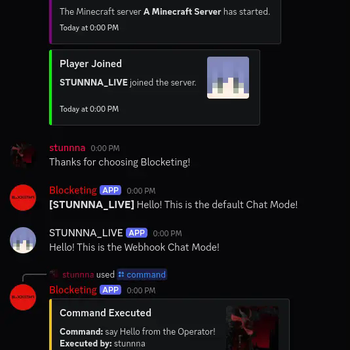

About this Mod
Blocketing
Blocketing is a Fabric mod for seamless communication between a Discord channel and a Minecraft server, enabling bidirectional message synchronization and command execution.




✨ Features
- ✅ Syncs Minecraft and Discord messages in both directions 💬
- ✅ Join/Leave notifications with player avatars 🖼️
- ✅ Server start/stop announcements 🚀
- ✅ Toggle sending advancement and death messages to Discord 🏆
- ✅ Run Minecraft commands from Discord (permission-based) 🛠️
- ✅ Player chat webhook mode (with avatar & name) 👨
- ✅ In-game configuration via commands 🎮
- ✅ Update notifications for new mod versions 🔔
- ✅ Paginated player list and server status via Discord slash commands 📊
- ✅ Multi-server support to run multiple Minecraft server instances using the same Discord bot token (per-server channel filtering) ♾️
🚀 Installation
🔨 1. Install the Mod
- Download the latest .jar from the Releases Page.
- Place the
.jarfile in your server’smods/folder. - Start the Minecraft server with Fabric.
- Configure the bot using the in-game commands (see below).
🤖 2. Set up the Discord Bot
- Create a new Discord bot application in the Discord Developer Portal.
- Add the bot to your Discord server.
- Copy the
bot tokenfor later configuration.
🛡️ Permissions
- Minecraft:
/blocketingcommands require permission level 4 (OP). - Discord: For
/consolevia Discord, the user must have the configured OP role (if set).
⚙️ Configuration Commands
All configuration is done in-game using /blocketing commands (OP only):
Setup Discord Integration
/blocketing setup token <token>
Set the Discord bot token./blocketing setup guild <guild_id>
Set the Discord server (guild) ID./blocketing setup channel <channel_id>
Set the Discord channel ID for message sync./blocketing setup op_role <role_id>
Set the Discord role ID required to run/consolefrom Discord./blocketing setup webhook_url <url>
Set the Discord webhook URL for player chat webhook mode./blocketing setup
List available setup commands.
Feature Toggles
/blocketing toggle advancements
Enable/disable sending advancement messages to Discord./blocketing toggle deaths
Enable/disable sending death messages to Discord./blocketing toggle player_chat_mode
Enable/disable player chat webhook mode (uses webhook for chat, with player avatar and name)./blocketing toggle update-info
Enable/disable update notifications for new mod versions./blocketing toggle discord_chat_log
Enable/disable logging of Discord chat messages to the server console./blocketing toggle
List available toggles.
Other Commands
/blocketing reload
Reload the configuration and restart the Discord bot.
👥 Discord Slash Commands
/status
Show server status (TPS, MSPT, CPU, RAM, uptime, version)./players
Show online players (paginated, with navigation buttons)./console <command>
Run a Minecraft command from Discord (requires OP role if set).
💬 Player-Chat Webhook Mode
When enabled, Minecraft chat messages are sent to Discord using a webhook, displaying the player's name and avatar.
To enable, set a webhook URL and use /blocketing toggle player_chat_mode.
🔔 Notifications
- Join/Leave: Player join/leave events are announced in Discord with player avatars.
- Advancements/Deaths: Advancement and death messages can be toggled.
- Server Start/Stop: Server start/stop events are announced in Discord.
- Update Info: OPs and Discord can be notified when a new mod version is available.
❓ Need Help?
Feel free to ask questions or open an issue.
Available Versions
How to Install Blocketing on Your Server
Order Server
Order a Minecraft Java server with at least 3 GB RAM (4 GB recommended).
Set fabric Loader
In the panel under "Egg", select the fabric loader and matching Minecraft version (1.21.10).
Install Mod
Open the mod browser in the dashboard and search for "Blocketing". Click "Install" – done! Alternatively, upload the .jar via SFTP to the /mods folder.
Compatibility
Mod Loaders
Minecraft Versions
1.21.10, 1.21.9, 1.21.8 (+3 more)
Server-side
✓ RequiredRecommended RAM
4 GB(min. 3 GB)Frequently Asked Questions
Blocketing server crashes on startup – what to do?
Most common cause: wrong fabric version or insufficient RAM. Check the server log (latest.log) for "OutOfMemoryError" or "Mixin" errors. With Mado Hosting: ensure at least 3 GB RAM is allocated and the loader matches the mod version (1.21.10). You can switch loaders with one click in the panel.
Is Blocketing compatible with fabric?
Blocketing officially supports fabric for Minecraft 1.21.10, 1.21.9, 1.21.8. The Mado dashboard automatically detects incompatible loader combinations.
Server lagging with Blocketing – how to optimize performance?
Recommended RAM: 4 GB (per 8 players). Use /spark profiler to check if Blocketing consumes the most tick time. Common fixes: reduce server view-distance to 8-10, install "performant" or "starlight" as supplementary mods on Forge. With Mado Hosting, your server runs on NVMe SSDs with dedicated CPU cores for minimal latency.
Similar Mods






Rent Modded Server
Install Blocketing with just one click on your server.