
Blockspan
Blockspan is a client-side Fabric mod that helps builders measure, label, and color-code build areas directly in the world. It adds vanilla-friendly outlines, dimensions, volume, and saved measurement areas.
Screenshots
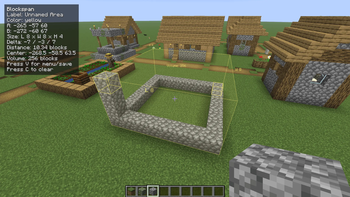
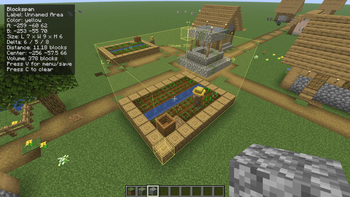
About this Mod
Blockspan
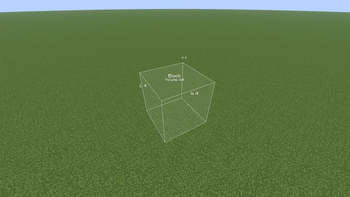
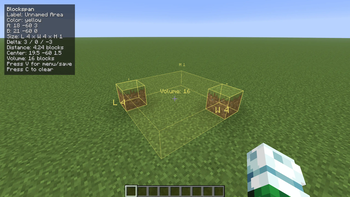
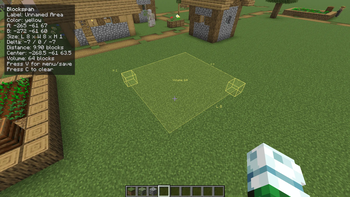
Blockspan is a client-side Fabric/Forge mod for builders who want quick measurements while planning builds. Select two block positions and Blockspan shows a subtle in-world box with labels, dimensions, volume, distance, center point, and coordinates.
It is safe for survival worlds/multiplayer because it does not add blocks, items, entities, recipes, world generation, or server-required features. Saved areas are stored only in your local client config.
How to use
Look at a block and press R to set Point A. Look at another block and press R again to set Point B. The selected area will appear in the world with its length, width, height, and volume.
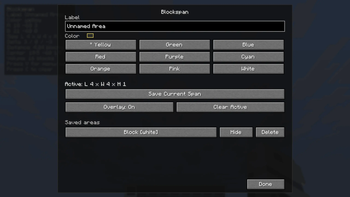
Press V to open the Blockspan menu, where you can rename the current area, choose a color, save it, hide/show saved areas, or delete saved areas.
Controls
R- Set the next pointShift + R- Force set Point ACtrl + R- Force set Point BC- Clear the active pointsB- Toggle the Blockspan overlayV- Open the Blockspan menu
Commands
All commands are client-side:
/blockspan label <name>- Set the current area label/blockspan color <color>- Set the current area color/blockspan colors- List available colors/blockspan save [name]- Save the current selected area/blockspan list- List saved areas in the current dimension/blockspan enable <name or id>- Show a saved area/blockspan disable <name or id>- Hide a saved area/blockspan toggle <name or id>- Toggle a saved area on or off/blockspan delete <name or id>- Delete a saved area/blockspan clear-saved- Delete all saved areas
Measurements
Blockspan uses inclusive Minecraft-style measurements. If Point A and Point B are the two ends of a wall, both endpoint blocks are counted.
The overlay can show:
- Point A and Point B coordinates
- Length, width, and height
- X/Y/Z delta
- Straight-line distance
- Center point
- Total cuboid volume
Requirements FABRIC:
- Fabric Loader
- Fabric API
- Minecraft 26.1.2
Requirements FORGE:
- Forge
- Minecraft 26.1.2
Available Versions
How to Install Blockspan on Your Server
Order Server
Order a Minecraft Java server with at least 3 GB RAM (4 GB recommended).
Set fabric Loader
In the panel under "Egg", select the fabric loader and matching Minecraft version (26.1.2).
Install Mod
Open the mod browser in the dashboard and search for "Blockspan". Click "Install" – done! Alternatively, upload the .jar via SFTP to the /mods folder.
Compatibility
Mod Loaders
Minecraft Versions
26.1.2
Server-side
✗ UnsupportedRecommended RAM
4 GB(min. 3 GB)Frequently Asked Questions
Blockspan server crashes on startup – what to do?
Most common cause: wrong fabric version or insufficient RAM. Check the server log (latest.log) for "OutOfMemoryError" or "Mixin" errors. With Mado Hosting: ensure at least 3 GB RAM is allocated and the loader matches the mod version (26.1.2). You can switch loaders with one click in the panel.
Is Blockspan compatible with fabric and forge?
Blockspan officially supports fabric, forge for Minecraft 26.1.2. Note: Forge and Fabric mods are NOT cross-compatible – pick one loader and stick with it. The Mado dashboard automatically detects incompatible loader combinations.
Server lagging with Blockspan – how to optimize performance?
Recommended RAM: 4 GB (per 8 players). Use /spark profiler to check if Blockspan consumes the most tick time. Common fixes: reduce server view-distance to 8-10, install "performant" or "starlight" as supplementary mods on Forge. With Mado Hosting, your server runs on NVMe SSDs with dedicated CPU cores for minimal latency.
Similar Mods






Rent Modded Server
Install Blockspan with just one click on your server.