
blocky13
Minecraft 26.1.2 Fabric mod. 150 blocks (slabs, stairs, fences, doors, chains, bars). Data-driven, Python-generated.
Screenshots
About this Mod
Blocky13
A Minecraft Fabric mod that adds decorative and functional block variants for Minecraft 26.1+.
Features
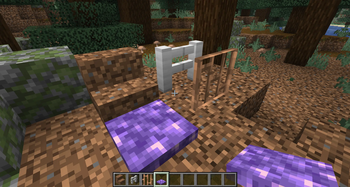
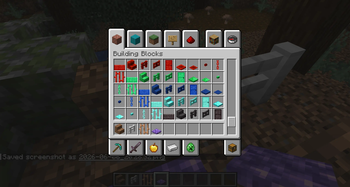
Blocky13 expands the building possibilities in Minecraft by creating a comprehensive set of variants for base materials. For each of 15 different base blocks (dirt, iron block, coal block, copper block, gold block, redstone block, emerald block, lapis block, diamond block, netherite block, raw iron block, raw copper block, raw gold block, quartz block, and amethyst block), the mod generates:
- Slabs — Half-height blocks for detail work
- Stairs — Diagonal blocks for elevation changes
- Fences — Perimeter blocks with no collision
- Fence Gates — Openable fence segments
- Doors — Full-size entryways
- Trapdoors — Horizontal access blocks
- Pressure Plates — Redstone input sensors
- Buttons — Redstone input triggers
- Chains — Hanging connectors
- Bars — Decorative barriers
Redstone-Powered Variants
All blocks made from redstone block material have special powered variants that emit a constant redstone signal (strength 15), making them useful for redstone contraptions and automation. These blocks appear in both the Building Blocks and Redstone Blocks creative tabs.
Requirements
- Minecraft: 26.1 or later
- Fabric Loader: 0.19.3 or later
- Java: 21 or later
- Fabric API: Latest version
Building
Use Gradle to build the mod:
./gradlew build
The compiled JAR will be in build/libs/.
Installation
Place the compiled JAR file in your Minecraft mods folder:
- Windows:
%APPDATA%/.minecraft/mods/ - Linux/Mac:
~/.minecraft/mods/
Development
The mod is structured as a standard Fabric mod project with:
- Source code:
src/main/java/com/blocky13/ - Client code:
src/client/java/com/blocky13/client/ - Assets:
src/main/resources/assets/blocky13/ - Data:
src/main/resources/data/blocky13/
Key Files
ModBlocks.java— Block registration and factory methodsBlocky13.java— Mod entrypointblocky13.mixins.json— Mixin configuration
Adding New Blocks
To add a new base material variant set:
- Add the material to the
BASESarray inModBlocks.javawith its ID and a vanilla block to copy properties from - The registration system automatically generates all 10 variants
- Specify if the variant should appear in the Redstone Blocks tab via the
registerSlab/registerStairs/etc. calls
License
This project is licensed under CC0-1.0 — you are free to use, modify, and distribute it.
Contributing
Contributions are welcome! Feel free to open issues or pull requests for improvements, new block variants, or bug fixes.
Available Versions
How to Install blocky13 on Your Server
Order Server
Order a Minecraft Java server with at least 3 GB RAM (4 GB recommended).
Set fabric Loader
In the panel under "Egg", select the fabric loader and matching Minecraft version (26.2).
Install Mod
Open the mod browser in the dashboard and search for "blocky13". Click "Install" – done! Alternatively, upload the .jar via SFTP to the /mods folder.
Compatibility
Mod Loaders
Minecraft Versions
26.2, 26.1.2, 26.1.1 (+2 more)
Server-side
✓ RequiredRecommended RAM
4 GB(min. 3 GB)Frequently Asked Questions
blocky13 server crashes on startup – what to do?
Most common cause: wrong fabric version or insufficient RAM. Check the server log (latest.log) for "OutOfMemoryError" or "Mixin" errors. With Mado Hosting: ensure at least 3 GB RAM is allocated and the loader matches the mod version (26.2). You can switch loaders with one click in the panel.
Is blocky13 compatible with fabric?
blocky13 officially supports fabric for Minecraft 26.2, 26.1.2, 26.1.1. The Mado dashboard automatically detects incompatible loader combinations.
Server lagging with blocky13 – how to optimize performance?
Recommended RAM: 4 GB (per 8 players). Use /spark profiler to check if blocky13 consumes the most tick time. Common fixes: reduce server view-distance to 8-10, install "performant" or "starlight" as supplementary mods on Forge. With Mado Hosting, your server runs on NVMe SSDs with dedicated CPU cores for minimal latency.
Rent Modded Server
Install blocky13 with just one click on your server.
Details
- License
- LicenseRef--Creative-Commons-Attribution-NonCommercial-4.0-International-License
- Server-side
- Required