BloodMarks
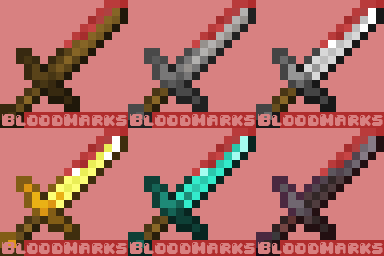
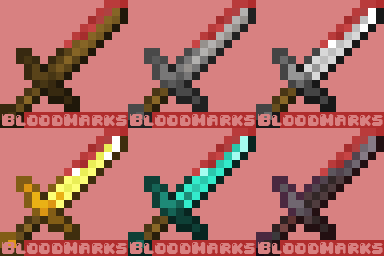
Adds blood effects to your swords and a unique Blood Instinct status, attracting hostile mobs from a distance. Cleanse your weapons in water or face the challenge head-on.
Screenshots
About this Mod
BloodMarks | Bloodstain your Minecraft !
Fabric API 1.12.1 required
Bloodmarks introduces an immersive twist to Minecraft gameplay by adding blood effects to all swords in the game, with seamless compatibility for resource packs. This mod brings a unique challenge with the "Blood Instinct" effect, intensifying the danger as zombies, creepers, spiders, and skeletons gain an extended aggro range to hunt the player.
Features
Adds blood effects to all swords
- Bloodstained swords
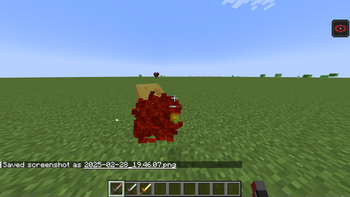
- Blood particles on entities
- "Blood Instinct" status, making zombies, creepers, spiders, and skeletons track the player from a wider range.
Cleanses bloody swords by:
Swimming in deep water.
Dropping the items into a water source.
Roadmap
A roadmap is in place to ensure the mod's growth and evolution. I have numerous ideas to enhance its current features , introduce new ones, and make it more comprehensive and immersive for roleplay enthusiasts.
Feedbacks
You're welcome to reach out and share your feedback or ideas about the mods I'm creating. I kindly ask for your input to be thoughtful and constructive, so it can help me improve and develop the best content possible!
Available Versions
How to Install BloodMarks on Your Server
Order Server
Order a Minecraft Java server with at least 3 GB RAM (4 GB recommended).
Set fabric Loader
In the panel under "Egg", select the fabric loader and matching Minecraft version (1.21.1).
Install Mod
Open the mod browser in the dashboard and search for "BloodMarks". Click "Install" – done! Alternatively, upload the .jar via SFTP to the /mods folder.
Compatibility
Mod Loaders
Minecraft Versions
1.21.1
Server-side
✓ RequiredRecommended RAM
4 GB(min. 3 GB)Frequently Asked Questions
BloodMarks server crashes on startup – what to do?
Most common cause: wrong fabric version or insufficient RAM. Check the server log (latest.log) for "OutOfMemoryError" or "Mixin" errors. With Mado Hosting: ensure at least 3 GB RAM is allocated and the loader matches the mod version (1.21.1). You can switch loaders with one click in the panel.
Is BloodMarks compatible with fabric?
BloodMarks officially supports fabric for Minecraft 1.21.1. The Mado dashboard automatically detects incompatible loader combinations.
Server lagging with BloodMarks – how to optimize performance?
Recommended RAM: 4 GB (per 8 players). Use /spark profiler to check if BloodMarks consumes the most tick time. Common fixes: reduce server view-distance to 8-10, install "performant" or "starlight" as supplementary mods on Forge. With Mado Hosting, your server runs on NVMe SSDs with dedicated CPU cores for minimal latency.
Similar Mods




![[TaCZ] Timeless and Classics Zero](https://cdn.modrinth.com/data/SzzJttH8/fd27766d2bb8390d284696b1dbd358f87e081439_96.webp)

Rent Modded Server
Install BloodMarks with just one click on your server.