
BloodMoons
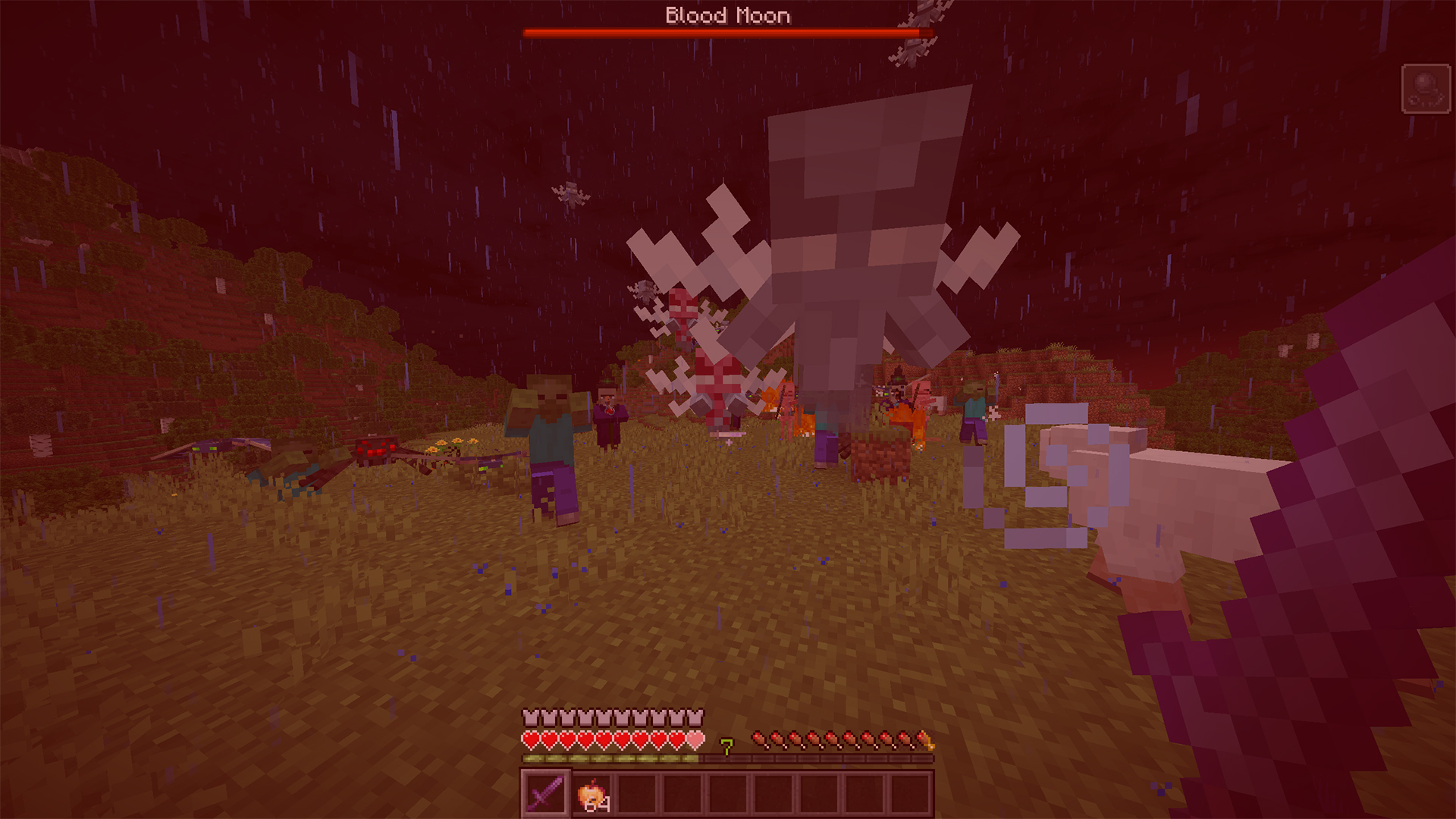
Blood Moon transforms nights into deadly challenges: red skies, hordes of buffed mobs, and rare loot drops. Survive the night if you dare!
Screenshots

About this Mod
English
Blood Moon is a thrilling survival mod that transforms Minecraft nights into terrifying challenges. During the Blood Moon, the sky turns deep red, hordes of hostile mobs spawn, and danger lurks at every corner. Players must survive increasingly difficult nights, enhanced with powerful enemies and rare loot drops.
📆 Features:
- 🌙 Blood Moon Event — triggers during the night. The sky turns fully red, and day cannot progress until the event ends.
- ⚔️ Hostile Horde Spawns — every 15–30 seconds, three hordes of enemies spawn simultaneously around players. Hordes include Zombies, Skeletons, Strays, Witches, Phantoms, Spiders, and Vexes.
- 💪 Buffed Enemies — all hostile mobs during the Blood Moon have increased health and attack damage, making survival a true test of skill.
- 💰 Loot Drops — enemies have a small chance to drop iron/gold ingots and raw iron/gold, 1–3 per mob.
- 📢 Player Notifications — messages appear above the hotbar.
🛠️ Commands — administrators can control the Blood Moon with commands:
/bloodmoon start — manually start the Blood Moon.
/bloodmoon stop — stop the Blood Moon.
/bloodmoon status — check if the Blood Moon is active and remaining time.
/bloodmoon reload — reload Blood Moon settings for the world.
🌐 Multiplayer Friendly — fully compatible with servers; all events, spawns, and boss bars synchronize for every player in the world.
Русский
Blood Moon — это захватывающий мод на выживание, который превращает обычные ночи Minecraft в ужасающие испытания. Во время Кровавой Луны небо становится насыщенно красным, вокруг игроков появляются орды враждебных мобов, а опасность подстерегает на каждом шагу. Игрокам предстоит пережить всё более сложные ночи с усиленными противниками и редкими дропами.
📆 Особенности:
- 🌙 Событие Кровавой Луны — запускается ночью. День не наступает до конца события.
- ⚔️ Появление орд врагов — каждые 15–30 секунд вокруг игроков появляются сразу три орды врагов. Орды включают Зомби, Скелетов, Зимогоров, Ведьм, Фантомов, Пачков, и Зловредов.
- 💪 Усиленные противники — все враждебные мобы во время Кровавой Луны получают увеличенное здоровье и урон, делая выживание настоящим испытанием.
- 💰 Добыча — мобы имеют небольшой шанс выбросить железные/золотые слитки и руды (1–3 штуки).
- 📢 Уведомления для игроков — сообщения появляются над хотбаром.
🛠️ Команды — администраторы могут управлять Кровавой Луной с помощью команд:
/bloodmoon start — запустить Кровавую Луну вручную.
/bloodmoon stop — остановить Кровавую Луну.
/bloodmoon status — узнать, активна ли Кровавая Луна и сколько времени осталось.
/bloodmoon reload — перезагрузить настройки Кровавой Луны для мира.
🌐 Поддержка многоплеера — полностью совместим с серверами; все события, спавны и полосы босса синхронизируются для каждого игрока в мире.
Discord: dastych_
Available Versions
How to Install BloodMoons on Your Server
Order Server
Order a Minecraft Java server with at least 3 GB RAM (4 GB recommended).
Set fabric Loader
In the panel under "Egg", select the fabric loader and matching Minecraft version (1.21.7).
Install Mod
Open the mod browser in the dashboard and search for "BloodMoons". Click "Install" – done! Alternatively, upload the .jar via SFTP to the /mods folder.
Compatibility
Mod Loaders
Minecraft Versions
1.21.7
Server-side
✓ RequiredRecommended RAM
4 GB(min. 3 GB)Frequently Asked Questions
BloodMoons server crashes on startup – what to do?
Most common cause: wrong fabric version or insufficient RAM. Check the server log (latest.log) for "OutOfMemoryError" or "Mixin" errors. With Mado Hosting: ensure at least 3 GB RAM is allocated and the loader matches the mod version (1.21.7). You can switch loaders with one click in the panel.
Is BloodMoons compatible with fabric?
BloodMoons officially supports fabric for Minecraft 1.21.7. The Mado dashboard automatically detects incompatible loader combinations.
Server lagging with BloodMoons – how to optimize performance?
Recommended RAM: 4 GB (per 8 players). Use /spark profiler to check if BloodMoons consumes the most tick time. Common fixes: reduce server view-distance to 8-10, install "performant" or "starlight" as supplementary mods on Forge. With Mado Hosting, your server runs on NVMe SSDs with dedicated CPU cores for minimal latency.
Similar Mods




Rent Modded Server
Install BloodMoons with just one click on your server.