
BlueMap Sign Markers
A Fabric plugin for BlueMap that creates markers from signs
Screenshots
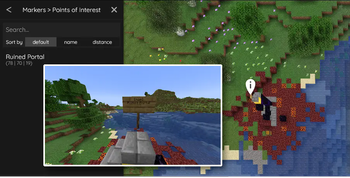
About this Mod
BlueMap Sign Markers
Overview
Fabric plugin for BlueMap that displays markers based on in-game signs
Installation
Place in your mods folder along with BlueMap.
Server-side only.
Usage
Place a sign or hanging sign with the following text on either the front or back:
[poi]
<short description>
A marker will be displayed on the map at the location of the sign with the text <short description>. The marker will
be removed from the map when the sign is broken.
Note that the prefixes can be configured in the configuration file.
Configuration
The mod will create a BMSM-Core.json file in the config/bluemapsignmarkers folder. This file contains the following
options:
markerGroups- a list of marker groups (described in detail below); default is a list with a single marker group
configured for the[poi]prefix.
Marker Groups
A marker group is a collection of markers that can be toggled on and off in the BlueMap UI. Each marker group
configuration contains the following options:
prefix- prefix that the sign must contain to be included in the marker group; required;matchType- the type of match to use when checking the first non-empty sign text line; optional; default isSTARTS_WITH(case-sensitive exact match);STARTS_WITH- line must start with the prefix;REGEX- line must match the regular expression (uses Java regex engine);
name- the name of the marker group; required;type- the type of marker to display; optional; default isPOIicon- the icon path or URL to display for the marker; optional; default isnull(BlueMap default POI icon)offsetX- the x offset of the marker; optional; default is0(corresponds withanchor.xin BlueMap base configuration)offsetY- the y offset of the marker; optional; default is0(corresponds withanchor.yin BlueMap base configuration)
Example
{
  "markerGroups": [
    {
      "prefix": "[poi]",
      "name": "Points of Interest"
    },
    {
      "prefix": "[store]",
      "name": "Stores",
      "icon": "assets/store.png"
    },
    {
      "prefix": "\\[[vV][iI][lL][lL][aA][gG][eE]\\]",
      "matchType": "REGEX",
      "name": "Villages"
    }
  ]
}
This example configuration creates 3 marker groups: one for [poi] signs, one for [store] signs, and one for signs
where the prefix is a regex match for villages (e.g. [Village] or [VILLAGE]).
The [poi] and Villages marker groups use the default POI icon, while the [store] marker group uses a custom icon
located at assets/store.png.
Signs with the [poi] prefix will be displayed in the "Points of Interest" marker group. Signs with the [store]
prefix will be displayed in the "Stores" marker group. Signs that match the villages regex will be displayed in the
'Villages' marker group.
Available Versions
How to Install BlueMap Sign Markers on Your Server
Order Server
Order a Minecraft Java server with at least 3 GB RAM (4 GB recommended).
Set fabric Loader
In the panel under "Egg", select the fabric loader and matching Minecraft version (26.1.2).
Install Mod
Open the mod browser in the dashboard and search for "BlueMap Sign Markers". Click "Install" – done! Alternatively, upload the .jar via SFTP to the /mods folder.
Compatibility
Mod Loaders
Minecraft Versions
26.1.2, 26.1.1, 1.21.11 (+11 more)
Server-side
✓ RequiredRecommended RAM
4 GB(min. 3 GB)Frequently Asked Questions
BlueMap Sign Markers server crashes on startup – what to do?
Most common cause: wrong fabric version or insufficient RAM. Check the server log (latest.log) for "OutOfMemoryError" or "Mixin" errors. With Mado Hosting: ensure at least 3 GB RAM is allocated and the loader matches the mod version (26.1.2). You can switch loaders with one click in the panel.
Is BlueMap Sign Markers compatible with fabric?
BlueMap Sign Markers officially supports fabric for Minecraft 26.1.2, 26.1.1, 1.21.11. The Mado dashboard automatically detects incompatible loader combinations.
Server lagging with BlueMap Sign Markers – how to optimize performance?
Recommended RAM: 4 GB (per 8 players). Use /spark profiler to check if BlueMap Sign Markers consumes the most tick time. Common fixes: reduce server view-distance to 8-10, install "performant" or "starlight" as supplementary mods on Forge. With Mado Hosting, your server runs on NVMe SSDs with dedicated CPU cores for minimal latency.
Similar Mods






Rent Modded Server
Install BlueMap Sign Markers with just one click on your server.