![BETTER MINECRAFT [ BMC MOD ]](https://cdn.modrinth.com/data/8AM9MxTo/ec25a22873eaf2c7b0e7d2938c2b472078dd4f8b_96.webp)
BETTER MINECRAFT [ BMC MOD ]
Enderite, Emeraude & More: A vanilla mod that adds new goals to Minecraft. You’ll never get bored with this mod, which enhances your experience
Screenshots
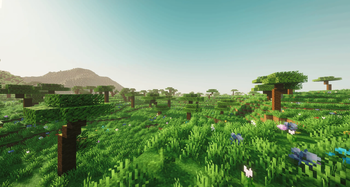
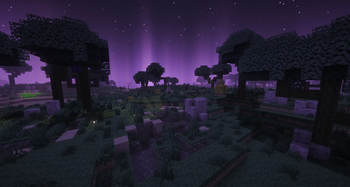

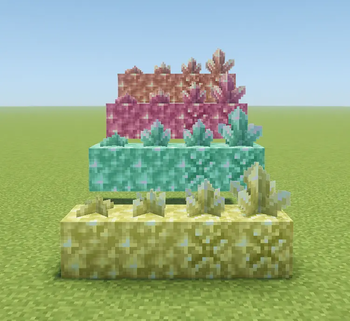
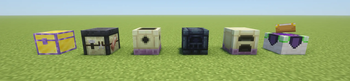
About this Mod

- ⭐Thank you to everyone who supports us!
- 🔔If you want to see more, go to SOLEA PIXEL
- ⚒️Check out the wiki here [Under construction]

BETTER MINECRAFT: As the name suggests, “Better” is a mod that offers a wide range of essential additions to Minecraft, improving the game without requiring you to install 30 different mods.
Note that this mod is “vanilla-like”; the goal isn’t to add features such as special machines or overpowered abilities. The mod must adapt to Minecraft and stay within its universe. (Better Minecraft was created to be, in my opinion, one of several Minecraft updates that I think would be cool to add.)
If you’d like to participate in the project by sharing your ideas or concepts, head over to our official Discord.
💎 Additional Information
This mod is compatible with several other mods, such as
- Just Enough Items [JEI]
- Jade
This helps improve the experience for new players.
It’s also easy for you to include it in your modpacks, as this mod blends in well with others and offers a range of features that can enhance your modded survival experience.

Minecraft has often become repetitive; eventually, you end up seeing everything there is to see. That’s why BETTER MINECRAFT stands out as the new 1.22 update that will never be released in Minecraft. You can discover our various additions and more by installing our mod.
🪄 Example of addition in the mods
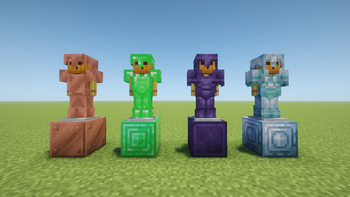
- Enderite Armor & Tools
- Emerald Armor & Tools
- New Infusion Table
- New Biome End / Overworld
- Compatibilities : JEI / JADE
- News Enchant & More
And there is much more to discover in the mods as the updates come, so what are you waiting for?
Would you like to create with BMCMOD?
⚠️Stable : Version 26.1 !
Stable identifiers (com.soleapixel.bmcmod.api.BmcModIds)
Use these ResourceLocation constants in addons to avoid hard-coded strings. They match registry paths for the current version.
| Constant | Path |
|---|---|
BmcModIds.MAYOR_BELL_BLOCK |
bmcmod:mayor_bell (block) |
BmcModIds.MAYOR_BELL_ITEM |
bmcmod:mayor_bell (item) |
BmcModIds.VILLAGE_MAYOR_SPAWN_EGG |
bmcmod:village_mayor_spawn_egg |
BmcModIds.CONSTRUCTION_GUIDE |
bmcmod:construction_guide |
BmcModIds.PROFESSION_MAYOR |
bmcmod:mayor (VillagerProfession) |
BmcModIds.PROFESSION_CURED_WITCH |
bmcmod:cured_witch |
Note: Gameplay still resolves blocks/items through ModBlocks / ModItems in the main mod; BmcModIds is for cross-mod references, recipes, and conditions in your own code or datapacks.
Tag conventions (datapack & cross-mod)
Tags live under data/bmcmod/tags/…. Use #bmcmod:… in JSON where Minecraft expects a tag.
Mayor / village integration (extend in your addon)
| Tag ID | Type | Purpose |
|---|---|---|
#bmcmod:mayor_bells |
block |
All blocks that act as a “Mayor Bell” for filtering, quests, or compatibility in your mod. The base mod still registers its own block in code; add your block id here for ecosystem consistency. |
#bmcmod:mayor_bells |
item |
Same for the item form (block items). |
Example (your addon’s datapack):
{
  "replace": false,
  "values": ["yourmod:golden_mayor_bell"]
}
If you add a custom bell block that must ring and use BellBlockEntity:
- Your block should behave like a bell (e.g. extend
BellBlockor mirror behavior). - Register it on
BlockEntityType.BELLvia NeoForgeBlockEntityTypeAddBlocksEvent(same pattern as this mod forMAYOR_BELL). - Add your block/item to
#bmcmod:mayor_bellsso other mods and datapacks can target all mayor bells at once.
Other useful namespaces in this mod
#c:…(common / convention) — e.g.c:tags/item/tools/scytheis used for compatibility. Add your items to the c / forge / neoforge tags your ecosystem expects.- Item tags under
data/bmcmod/tags/item/(e.g.scythes,foundry_shards,boreal_ingots, enchantability lists) are datapack-driven; addon items can be merged in with"replace": false.
Registries (code entry points)
| Registry | Class (indicative) |
|---|---|
| Blocks / Items | com.soleapixel.bmcmod.registry.ModBlocks, ModItems |
| Villager professions | com.soleapixel.bmcmod.villager.ModProfessions |
| Block entity types | com.soleapixel.bmcmod.registry.ModBlockEntityTypes |
| Entities, sounds, particles, … | ModEntities, ModSounds, ModParticles, etc. |
| Global loot / GLM | com.soleapixel.bmcmod.registry.ModGlobalLoot |
Village saved data (per dimension): BmcVillageSavedData — key = village anchor (long from BlockPos).
Events (NeoForge) — where to hook
These use @EventBusSubscriber(modid = "bmcmod", …) on the game bus unless noted. Add-on mods should subscribe with EventPriority appropriately and not assume load order unless you declare an explicit dependency in mods.toml.
| Area | Example classes / hooks |
|---|---|
| Villager trades | VillagerTradesEvent, TradeWithVillagerEvent — see village.mayor.VillageEconomyEvents |
| Mayor death | LivingDeathEvent — VillageMayorDeathEvents |
| Server tick (elections / lifecycle) | ServerTickEvent.Post — MayorElectionScheduler, VillageLifecycleEvents |
| POI extension | Mod bus: ExtendPoiTypesEvent — vanilla bell POI extended for mayor bell (BmcMod setup) |
| Block entity types | Mod bus: BlockEntityTypeAddBlocksEvent — SunwoodRegistryEvents (same pattern for bells/signs) |
Compatibility tip: prefer listening to NeoForge events or datapacks (tags, loot tables) over mixin targets inside com.soleapixel.bmcmod.mixin, which may change between BMC releases.
Mixins
- Configuration:
resources/bmcmod.mixins.json. - Treat mixin targets as fragile API: they can break on Minecraft or NeoForge updates.
- For addons: avoid shadowing BMC mixins; use NeoForge events, tags, or ASM-free registry hooks when possible.
Datapacks & resource paths
- Recipes:
data/bmcmod/recipe/ - Loot tables:
data/bmcmod/loot_table/ - Loot modifiers:
data/bmcmod/loot_modifiers/ - Structures / worldgen:
data/bmcmod/worldgen/and patched vanilla pools underdata/minecraft/where shipped - Tags:
data/bmcmod/tags/<type>/<path>.json
mods.toml dependency snippet (addon mod)
[[dependencies.yourmod]]
modId = "bmcmod"
type = "required" # or "optional" if soft-compat only
versionRange = "[26.0.3,)" # align with the BMC major you tested against
ordering = "NONE"
side = "BOTH"
Adjust version range to match gradle.properties → mod_version for the BMC build you test against.
API & docs changelog
| Date | Change |
|---|---|
| 2026-05-09 | Initial publication of release/dev.md: #bmcmod:mayor_bells (block + item), com.soleapixel.bmcmod.api.BmcModIds, maintainer checklist for Modrinth bio. |
(Append new rows whenever integration surfaces change.)
License / redistribution
Follow the license declared in the BMC jar / repository (SOLEA PIXEL as shown in user mods.toml). When redistributing this dev guide, keep the changelog section honest with your fork.
Available Versions
How to Install BETTER MINECRAFT [ BMC MOD ] on Your Server
Order Server
Order a Minecraft Java server with at least 3 GB RAM (4 GB recommended).
Set forge Loader
In the panel under "Egg", select the forge loader and matching Minecraft version (1.21.1).
Install Mod
Open the mod browser in the dashboard and search for "BETTER MINECRAFT [ BMC MOD ]". Click "Install" – done! Alternatively, upload the .jar via SFTP to the /mods folder.
Compatibility
Mod Loaders
Minecraft Versions
1.21.1, 1.20.1
Server-side
~ OptionalRecommended RAM
4 GB(min. 3 GB)Frequently Asked Questions
BETTER MINECRAFT [ BMC MOD ] server crashes on startup – what to do?
Most common cause: wrong forge version or insufficient RAM. Check the server log (latest.log) for "OutOfMemoryError" or "Mixin" errors. With Mado Hosting: ensure at least 3 GB RAM is allocated and the loader matches the mod version (1.21.1). You can switch loaders with one click in the panel.
Is BETTER MINECRAFT [ BMC MOD ] compatible with forge and neoforge?
BETTER MINECRAFT [ BMC MOD ] officially supports forge, neoforge for Minecraft 1.21.1, 1.20.1. The Mado dashboard automatically detects incompatible loader combinations.
Server lagging with BETTER MINECRAFT [ BMC MOD ] – how to optimize performance?
Recommended RAM: 4 GB (per 8 players). Use /spark profiler to check if BETTER MINECRAFT [ BMC MOD ] consumes the most tick time. Common fixes: reduce server view-distance to 8-10, install "performant" or "starlight" as supplementary mods on Forge. With Mado Hosting, your server runs on NVMe SSDs with dedicated CPU cores for minimal latency.
Similar Mods




Rent Modded Server
Install BETTER MINECRAFT [ BMC MOD ] with just one click on your server.