
Bonzi Buddy
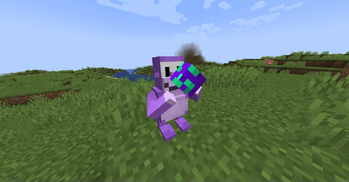
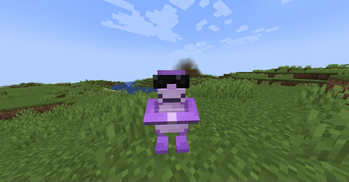
Your best friend on the Internet is now in Minecraft! Made for ModFest Carnival!
Screenshots
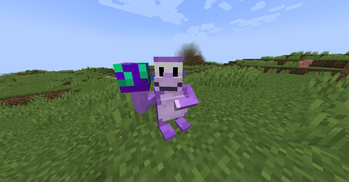
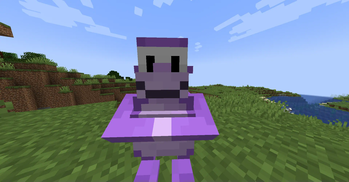
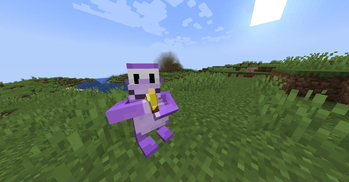
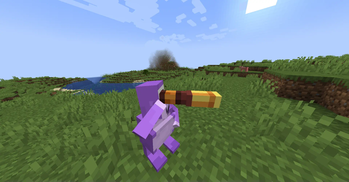
About this Mod
BonziBUDDY - ModFest Carnival
Your best friend on the Internet is now in Minecraft!
Bonzi Buddy can...
- Preform a trick!
- Play a game!
- Send an "email"!
- P... preform another trick!
- Give you hats if you play his game!
- And much more!...
Take a minute... and make a friend for life!
Triple Bonzi Chaos
Uh oh! Bonzi Buddy Clones are attacking and Bonzi Buddy needs YOUR help!
There are three Bonzi Bosses, which all need to be taken down before it's too late! Additional clones are able to drop Banana Blasters which can be used against the Bonzi Bosses.
Be careful though, the Bonzi Bosses will try to smash your face, and will obliterate anything in its path!
Take a minute... and help a friend out! Or have some friends help you out! You can play Triple Bonzi Chaos with multiple players!
REWARDS!!!
Did you take a minute and help Bonzi Buddy out? Great! Now you are eligible to some complementary hats, sponsored by Bonzi Buddy himself!
NOTE: Bonzi Buddy is NOT responsible for any possible side effects of helping Bonzi Buddy out. While there are systems in place to prevent item loss, any and all items are not insured. Let's save Bonzi Buddy, together!
Didn't defeat all the Bonzi Bosses? No worries(actually there's a lot to worry about)! You can still be rewarded for getting a boss' health really low. If you did defeat all 3 Bonzi Bosses, you get a special Bonzi Buddy Hat Of Legends!
Take a minute... and show off to your friends!
Take a minute...
and make a friend for life!
Made for ModFest Carnival!
Dependencies
Requires Fabric API and GeckoLib.
Available Versions
How to Install Bonzi Buddy on Your Server
Order Server
Order a Minecraft Java server with at least 3 GB RAM (4 GB recommended).
Set fabric Loader
In the panel under "Egg", select the fabric loader and matching Minecraft version (1.21).
Install Mod
Open the mod browser in the dashboard and search for "Bonzi Buddy". Click "Install" – done! Alternatively, upload the .jar via SFTP to the /mods folder.
Compatibility
Mod Loaders
Minecraft Versions
1.21
Server-side
✓ RequiredRecommended RAM
4 GB(min. 3 GB)Frequently Asked Questions
Bonzi Buddy server crashes on startup – what to do?
Most common cause: wrong fabric version or insufficient RAM. Check the server log (latest.log) for "OutOfMemoryError" or "Mixin" errors. With Mado Hosting: ensure at least 3 GB RAM is allocated and the loader matches the mod version (1.21). You can switch loaders with one click in the panel.
Is Bonzi Buddy compatible with fabric?
Bonzi Buddy officially supports fabric for Minecraft 1.21. The Mado dashboard automatically detects incompatible loader combinations.
Server lagging with Bonzi Buddy – how to optimize performance?
Recommended RAM: 4 GB (per 8 players). Use /spark profiler to check if Bonzi Buddy consumes the most tick time. Common fixes: reduce server view-distance to 8-10, install "performant" or "starlight" as supplementary mods on Forge. With Mado Hosting, your server runs on NVMe SSDs with dedicated CPU cores for minimal latency.
Similar Mods





Rent Modded Server
Install Bonzi Buddy with just one click on your server.