
BordersOnXaeroMap
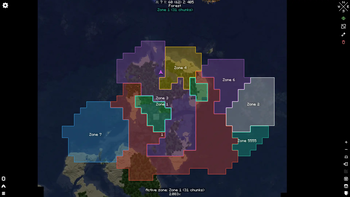
A simple addon for the Xaero's World Map, which adds drawing visual chunk-based zones on the map for everyone.
Screenshots
About this Mod





A simple open source addon for the Xaero's World Map, which adds drawing visual chunk-based zones on the map for everyone.
IMPORTANT
The mod is currently in alpha, and at the moment it only works locally. It is expected to have a LOT of fundamental changes internally.
Don't expect a savefile to be inter-version compatible as this is a working prototype - there'll be breaking changes soon.
Don't expect support for other Minecraft versions and mod loaders until it is somewhat finished for1.21.1 NeoForge.

✨ Features
- Obviously, integration with the Xaero's World Map
- Toggle all zones (local only) (not being saved on the map closure currently)
- Click on a zone to make it active. Click on any empty spot to clear active zone
- Draw mode (draw a new zone if no active zone is selected or add/erase to/from currently active one). Hold
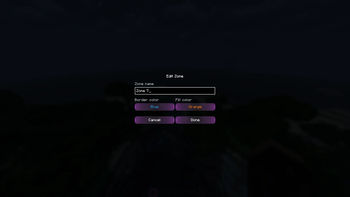
LMBto add,Shift + LMBto erase - Edit zone (rename, change border and fill appearance with a palette of 14 predefined colors). The menu could be accessed by the toolbar button and by double-clicking on a zone
- Delete zone
- [Planned] Multiplayer support (local only currently)
- [Planned] Private and public zones (the exact concept is WIP)
🔗 Dependencies
- Xaero's World Map (only on a client)
📫 Contacts
If you have any questions or suggestions, you could open an issue on GitHub or contact me in Discord (@immorrtalz) or Telegram (@immorrtalz)
⚖️ License
Except where otherwise stated, the content of this repository is provided under the GNU GPLv3 license.
Not associated with or approved by Mojang or Microsoft.
P. S. The mod screenshots might have been done with my resourcepack on, so buttons and other UI elements might have non-vanilla look
Available Versions
How to Install BordersOnXaeroMap on Your Server
Order Server
Order a Minecraft Java server with at least 3 GB RAM (4 GB recommended).
Set neoforge Loader
In the panel under "Egg", select the neoforge loader and matching Minecraft version (1.21.1).
Install Mod
Open the mod browser in the dashboard and search for "BordersOnXaeroMap". Click "Install" – done! Alternatively, upload the .jar via SFTP to the /mods folder.
Compatibility
Mod Loaders
Minecraft Versions
1.21.1
Server-side
✗ UnsupportedRecommended RAM
4 GB(min. 3 GB)Frequently Asked Questions
BordersOnXaeroMap server crashes on startup – what to do?
Most common cause: wrong neoforge version or insufficient RAM. Check the server log (latest.log) for "OutOfMemoryError" or "Mixin" errors. With Mado Hosting: ensure at least 3 GB RAM is allocated and the loader matches the mod version (1.21.1). You can switch loaders with one click in the panel.
Is BordersOnXaeroMap compatible with neoforge?
BordersOnXaeroMap officially supports neoforge for Minecraft 1.21.1. The Mado dashboard automatically detects incompatible loader combinations.
Server lagging with BordersOnXaeroMap – how to optimize performance?
Recommended RAM: 4 GB (per 8 players). Use /spark profiler to check if BordersOnXaeroMap consumes the most tick time. Common fixes: reduce server view-distance to 8-10, install "performant" or "starlight" as supplementary mods on Forge. With Mado Hosting, your server runs on NVMe SSDs with dedicated CPU cores for minimal latency.
Similar Mods




Rent Modded Server
Install BordersOnXaeroMap with just one click on your server.